

Picking a productivity planner app gets weirdly hard once every option promises focus, calm, and a better life. Most people pick the prettiest timer, then wonder why they still end the day with five tabs open and no clear win.
What matters is simpler. Does the app help you choose the work, stay with it, and see where the time actually went? That's the split. The good ones reduce drift. The weak ones add admin (and guilt).
We cut the noise and kept the eight options worth your attention.
Show 5 more productsShow fewer products
1. Flocus

- Clear one-task daily planning
- Focus blocks support follow-through
- Progress ring adds visible closure
- Estimate vs actual improves planning
- Optional flow-state tracking depth
- Limited for team coordination
- Narrower than full task suites
- Muse integration is niche
If you want a productivity planner app that tells you what to do today, not just where to dump tasks, this is the shape of tool we'd reach for. Flocus is built for the gap between "I have things to do" and "I actually finished the thing that mattered."
The difference is simple: we start with one most-important task. Then we run timed focus blocks against that plan. That sounds almost too plain, but plain is useful. Most people don't need a bigger system. They need a smaller loop they can repeat tomorrow.
A few parts matter more than they first appear:
- Most-important-task planning gives the day a center of gravity.
- Timed focus blocks turn intention into something you can actually sit down and do.
- A daily progress ring gives you visible closure, which is rarer than it should be in digital planning.
- Streaks, reflections, and weekly insights help the method carry over instead of resetting every morning.
- Estimated vs. actual time tracking keeps your planning honest. This is the quiet workhorse feature.
That last point matters. A lot of apps let you feel organized while you remain wildly optimistic about time. By the second afternoon, that starts to show. When each session logs what you thought it would take and what it actually took, you stop planning fantasy days.
Compared with broad task managers, Flocus is narrower and more opinionated. Compared with timer-first apps, it's more of a planner with Pomodoro timer logic built in. Compared with AI schedulers, it keeps you in charge of choosing the priority instead of handing the day over to automation and hoping for the best.
There's also an optional depth layer: connect a Muse EEG headband and Flocus can track your flow state in real time while you work. For most people, that's not the reason to start. It's for the small group who are neurotech-curious and want measured feedback on whether they're settling into focus, not just counting completed sessions.
A timer helps you begin. A plan helps you finish.
Flocus is strongest for personal daily execution. It is not trying to be team operations software, and that's fine. If your real problem is "I keep using focus apps and still can't say what got done," this is one of the few tools in the list that is aimed directly at that problem.
2. TickTick
- Tasks, calendar, and timer together
- Easy upgrade from basic to-dos
- Flexible planner-style organization
- Built-in Pomodoro reduces context switching
- Familiar workflow without AI automation
- Flexibility can become system sprawl
- Less guided than method-first apps
- Can feel busy for minimalists
TickTick sits near the middle of this category for a reason. It combines tasks, planning views, calendar structure, and a built-in focus timer in one place. For a lot of people, that's enough to stop the tool-hopping.
Its appeal is not mystery. It's convenience.
If you're moving up from a basic to-do list and want a pomodoro app with task planning without rebuilding your whole workflow, TickTick is an easy bridge. You can keep your tasks, see them in planner-style views, and run focus sessions without switching context every 20 minutes.
Where it differs from Flocus is method. TickTick gives you flexibility. Flocus gives you a tighter daily loop. That's a real tradeoff, not a flaw. Some users want room to arrange things their own way. Others do better when the app quietly says, "pick the one thing first."
Here's where TickTick tends to fit well:
- You want tasks, calendar views, and focus sessions in one familiar app.
- You don't want AI deciding your day.
- You still want more structure than a plain checklist provides.
The risk is the usual one with general-purpose tools. Flexibility can drift into sprawl. If you've ever spent ten minutes organizing your system to avoid doing the work inside it, you'll know the feeling. TickTick is still one of the stronger all-around options here, but it helps users who like having options more than users who want a calmer, narrower ritual.
3. Sunsama

- Makes tasks meet the calendar
- Encourages realistic daily planning
- Great for time-blocking workflows
- Helps curb overcommitting
- Feels natural for calendar users
- Less built around Pomodoro sessions
- May feel indirect for focus blocks
- Not ideal for timer-first users
Sunsama is for people whose day only becomes real once it's on the calendar. If lists tend to lie to you, this approach makes sense.
Its center of gravity is daily planning, not task accumulation. That sounds subtle, but it changes the whole experience. Instead of collecting obligations forever, you shape a day you can plausibly live through. That's often the missing piece for people who keep overcommitting and then calling it a motivation problem.
The tool is built around scheduling tasks into your calendar and planning around actual time, not ideal intentions. In practice, that means the day gets bounded. You can see the point where adding one more item stops being planning and starts being fiction.
Compared with TickTick or Flocus, Sunsama is less timer-led. It is not the clearest answer if your search is specifically for a daily planning Pomodoro app. But if your issue is that tasks never meet the calendar, it may solve a more upstream problem.
A few readers will feel the difference immediately:
- If you already live by your calendar, Sunsama will feel natural.
- If you want a built-in focus rhythm around sessions, it may feel one step removed.
- If your real failure mode is overbooking the day, it speaks directly to that.
There's a practical operator lesson here: some people don't need more discipline. They need fewer imaginary hours. Sunsama is good at exposing that.
4. Motion

- Automates scheduling in busy weeks
- Reduces manual calendar planning
- Useful for chaotic workloads
- Helps fit tasks into time
- Less hands-on daily ritual
- Not very Pomodoro-centered
- Automation will not fix procrastination
Motion is the option for people who want the app to do more of the arranging. If your schedule is crowded, messy, and constantly moving, that can be useful.
Its main draw is AI-powered planning and scheduling assistance. Rather than asking you to manually shape every block, it actively helps place work into the day. For busy knowledge workers, that can feel like relief. For others, it can feel like one more system making decisions on their behalf.
That distinction matters.
Motion sits further from a classic planner with Pomodoro timer setup than Flocus or TickTick. It is less about a simple focus ritual and more about intelligent time allocation. If deciding what matters isn't the bottleneck, and fitting it into a chaotic schedule is, Motion becomes more relevant.
What to keep in mind:
- It suits users who appreciate automation.
- It's better thought of as a scheduling tool inside this category than a pure focus planner app.
- It won't automatically solve procrastination just because the calendar looks neat.
A lot of planning apps break down at contact with a busy week. Motion tries to absorb that complexity. The tradeoff is that it can feel less calm and less hands-on than a manual method. Some people want exactly that. Others want to own the ritual of choosing and starting.
5. Akiflow
- Calendar-first planning feels natural
- Consolidates tasks into one hub
- Strong for time-blocked workdays
- Scheduling stays tightly integrated
- Pomodoro support feels less central
- Less execution-focused than some rivals
- May be overkill for simple planning
Akiflow makes the strongest case for the calendar as your operating system. If you already think in blocks of time, it will make immediate sense.
Its workflow is calendar-first, with task consolidation and scheduling brought into one place. That makes it a solid choice for people who need a command center more than a classic timer app. You're not just storing tasks. You're organizing commitments into time.
It lands closer to Sunsama than to Forest. It is more planner-structured than an open-ended workspace like Notion, but less explicitly centered on focus sessions than TickTick. And unlike Flocus, it doesn't push a single-priority daily method quite as hard.
That's the useful contrast. Akiflow helps when the main challenge is coordination. Flocus helps when the main challenge is execution.
You'd likely lean this way if:
- your day is shaped by blocks, meetings, and shifting commitments
- you want task consolidation tied tightly to scheduling
- you don't need Pomodoro to be the center of the product
For readers searching very specifically for a pomodoro app with task planning, Akiflow may feel a little indirect. But for calendar-led workers, indirect is sometimes correct. If your workday already lives in time blocks, forcing yourself into a timer-first tool can feel oddly backwards.
6. Todoist
- Dependable everyday task organization
- Familiar, low-friction planning workflow
- Easy benchmark against specialized apps
- Simple system most users recognize
- Weak built-in Pomodoro emphasis
- Less calendar-driven than rivals
- Can feel too neutral daily
Todoist belongs here less as the most specialized answer and more as a benchmark. A lot of people already know it, trust it, and want to compare more focused tools against something familiar.
Its strength is dependable task management with broad planning appeal. That's useful. Familiarity has value. Not every system needs to be clever.
Still, in this specific category, Todoist is less explicitly shaped around Pomodoro than TickTick or Forest, and less calendar-centered than Sunsama, Motion, or Akiflow. It tends to represent the conventional end of the spectrum. Good task organization, clear planning workflows, fewer built-in signals pushing you into a focused daily execution loop.
That makes it helpful as a reference point:
If you mainly need a solid place to manage tasks, Todoist still holds up. If you need help turning a task into a finished block of work today, more specialized tools pull ahead.
This is one of those cases where a well-known app can be slightly too neutral. Some readers need neutrality. Others need a point of view. If you've been keeping your planning simple and recognizable, Todoist remains a reasonable anchor. If you've been ending the day with tidy lists and unfinished priorities, it's probably not the final answer.
7. Forest
- Strong Pomodoro-style focus support
- Helps reduce session distractions
- Simple timer-led workflow
- Great if planning exists elsewhere
- Weak daily planning features
- Doesn't help choose priorities
- Too narrow for full workflows
Forest is the clean contrast case in this roundup. It is much more about staying focused during a session than planning the day around that session.
For some people, that's enough. If you already know exactly what to work on and your real problem is staying off distractions for the next 25 minutes, a timer-led tool can do the job. Forest is strongly associated with Pomodoro-style work sessions and concentration support, and that is where it earns its place here.
But it is not a full productivity planner app in the same sense as Flocus, TickTick, Sunsama, or Akiflow. The timer is the product. That is both its appeal and its limit.
A quick reality check helps:
- Great when planning already happens somewhere else.
- Weaker when you need help choosing priorities.
- Not the right tool if you keep finishing sessions but still can't explain the day.
There is nothing wrong with a narrower tool. The mistake is expecting a focus timer to provide a planning system by accident. It won't. Forest is best for readers whose planning layer is already handled and who simply need support staying with the work once they begin.
8. Notion

- Highly customizable planning workflows
- Keeps notes and tasks together
- Works inside broader personal systems
- Supports timer integrations and templates
- Not purpose-built for daily focus
- Setup can become time-consuming
- Ongoing maintenance adds friction
Notion is the adjacent option. Many readers already live inside it, which makes the question less "is it the best dedicated tool?" and more "do we really need to leave?"
As an all-in-one workspace, Notion is flexible enough to support planning workflows and timer integrations alongside notes, documents, and larger personal systems. That flexibility is the whole proposition. You can build the setup you want. You can also spend a surprising amount of time building the setup you want.
That's the tradeoff in plain terms.
Compared with most apps on this list, Notion is more open-ended and less purpose-built for daily focus execution. It can absolutely hold a planning system. It is less likely to hand you a ready-made daily planning Pomodoro app experience without extra setup.
It tends to suit readers who:
- like customizing their tools
- want planning to live beside notes and documents
- don't mind maintenance and setup friction
If you bounce off complexity, Notion can become a very elegant way to postpone choosing what matters today. If you enjoy building systems, it may still win. The right answer depends on whether you want a workspace or a working day.
How to Choose the Right Productivity Planner App
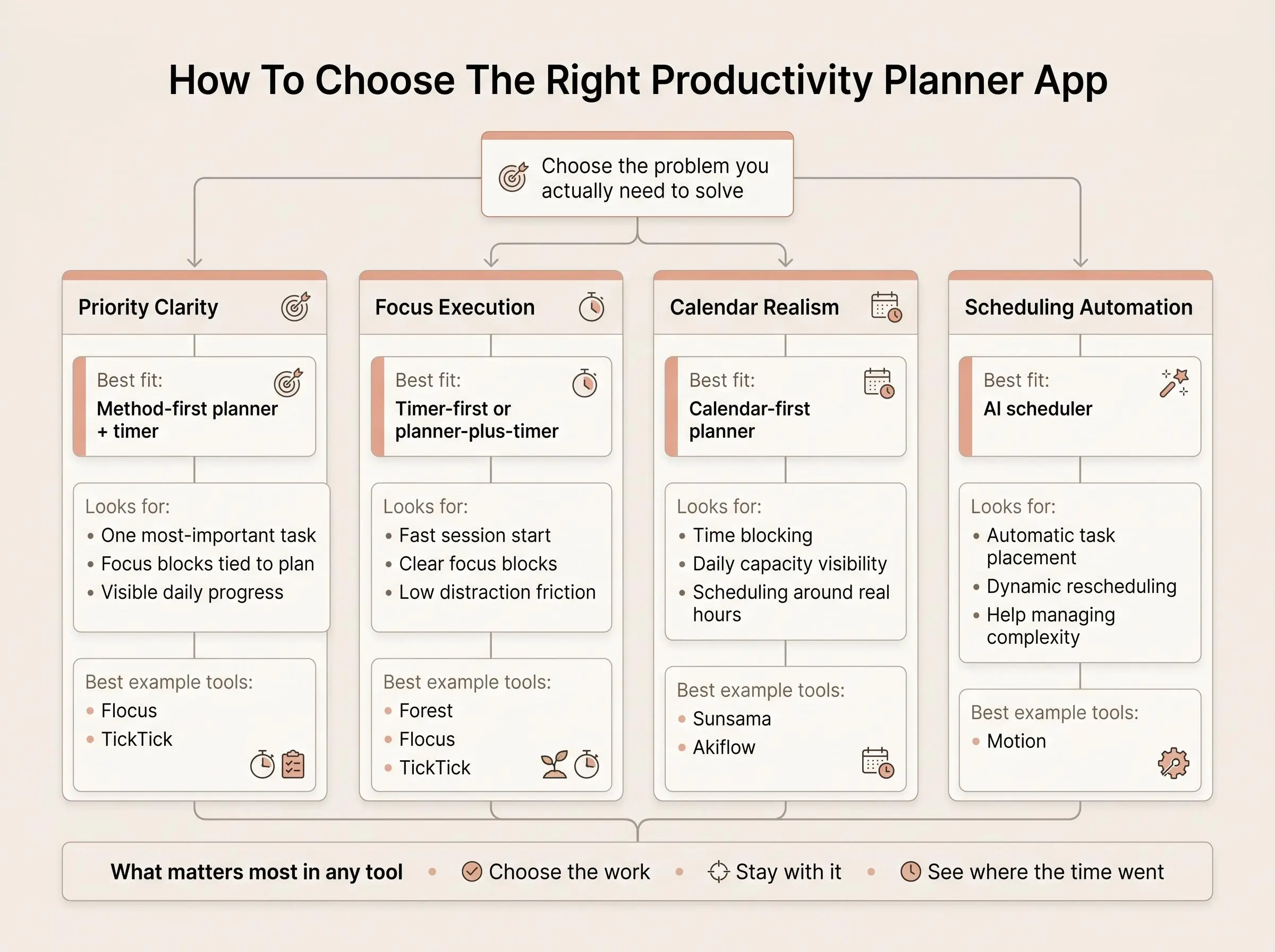
Most people choose too early. They pick a tool before they name the actual problem.
Start there instead. Usually it is one of four things:
- You can't decide what matters each day.
- You know what matters but can't stay focused long enough to finish.
- Your tasks never meet the calendar.
- Your system is too complex to keep using.
Once the problem is clear, the app type usually follows.
- Planner-plus-timer tools fit when you need both direction and execution.
- Calendar-first planners fit when realism is the missing piece.
- AI schedulers fit when you want help arranging a crowded day.
- Timer-first apps fit when planning is already handled.
- Workspace tools fit when planning needs to live inside a broader system.
A few criteria are worth taking seriously:
- How clearly does the app force or support daily priority selection?
- Does Pomodoro support feel central or bolted on?
- How much calendar depth do you actually need?
- Do you need simplicity or room to customize?
- Is there a review layer, or do days just disappear behind completed checkmarks?
- Can you compare estimated time with actual time?
- Do you want measured focus data, or are session counts enough?
If you need one clear priority and visible progress, lean method-first. If your day is mostly meetings and blocks, go calendar-first. If you love building systems, a workspace may still be right. And if the only real problem is getting yourself to sit down and start, a timer-led tool can be perfectly adequate.
What Matters Most in a Planner With Pomodoro Timer

A timer alone often fails for a boring reason: it helps you start, but it doesn't tell you what deserves the next 25 minutes. Then the session ends, and you still don't have a clean sense of completion.
That is why the planning layer matters.
When evaluating a planner with Pomodoro timer support, look for these elements:
- Priority selection before the first session
- Task planning tied directly to focus blocks
- Visible progress during the day
- Estimated versus actual time
- A light reflection or insight loop
A good focus planner app helps you choose and execute. A good daily planning Pomodoro app is strongest when it helps map one day clearly, not just store tasks forever. And a pomodoro app with task planning should reduce ambiguity, not add another layer of admin. If you need three extra clicks to begin working, the system is already arguing with you.
The EEG question is simpler than it sounds. For most people, flow-state tracking is a niche depth feature, not the starting point. Its value isn't novelty. It's feedback on whether you're actually settling into focused work. That matters most to neurotech-curious deep workers, not casual timer users.
Common Mistakes When Choosing a Focus Planner App
Most mistakes here come from solving the wrong problem with the most attractive tool.
A few show up repeatedly:
- picking a beautiful timer without asking how you'll choose the day's priority
- choosing a broad productivity suite when you really need a calmer, narrower loop
- confusing calendar scheduling with actual focus support
- assuming AI scheduling will fix procrastination by itself
- ignoring the review layer that turns one decent day into a repeatable method
- overvaluing feature count and undervaluing friction
- looking for the perfect system instead of the smallest one you'll still use next Tuesday
That last one is the quiet killer. People don't usually fail because the app lacked capability. They fail because the system asked for too much upkeep.
A useful tool should remove hesitation, not formalize it.
How We Evaluated These Tools
We evaluated these productivity planner apps by comparing their publicly described features, workflows, and intended use cases. We focused on how well each tool addresses the main gaps readers may have: choosing priorities, staying focused, fitting tasks into a realistic schedule, or keeping a system simple enough to maintain.
Our comparison considered:
- Daily priority support: Whether the app helps users identify and act on important work.
- Focus-session integration: How central Pomodoro or timed focus blocks are to the planning workflow.
- Calendar and scheduling depth: Whether the tool supports time-blocking, calendar coordination, or automated scheduling.
- Progress and review features: Whether it provides visible progress, reflections, insights, or other feedback beyond task completion.
- Planning realism: Whether users can account for available time or compare estimated and actual effort where those capabilities are offered.
- Flexibility and upkeep: How much setup, customization, or ongoing maintenance the approach requires.
The descriptions and distinctions in this roundup reflect that comparison of publicly available product information and linked materials. We did not treat every app as a full productivity planner: timer-first tools, calendar-first planners, AI schedulers, and flexible workspaces are included where they provide a relevant alternative for a specific planning or focus need.
Conclusion
The right productivity planner app depends less on hype and more on the exact gap in your day.
Choose Flocus if you want a simple daily method that connects planning, focus blocks, and visible progress, with optional depth through measured flow-state tracking. Choose TickTick if you want a flexible planner-and-timer combination in one familiar app. Choose Sunsama or Akiflow if your best work starts by placing tasks onto a real calendar. Choose Motion if you want AI to take a larger role in shaping the day. Choose Forest if focus is the issue and planning already happens elsewhere. Choose Notion if you want planning inside a broader workspace.
If you're deciding today, keep it practical:
- Identify the missing piece: priority clarity, focus execution, calendar realism, or automation.
- Shortlist two tools that match that exact problem.
- Test each one for a week with a real workload, not a tidy hypothetical version of your life.
That usually tells you more than another hour of research.
Article Record
ReferencesPrimary sources used for this article
- Get To Know Our Productivity-Booster - Akiflow
- Spend your time wellwith Forest.
- Flocus | Your Aesthetic Productivity Dashboard
- RescueTime Timesheets Overview - RescueTime
- Daily Planning
- Stay Organized, Stay Creative.
- Clarity, finally.
- Motion AI Task Manager | Auto-Scheduling Tasks & Intelligent Prioritization | Motion
Update HistoryMeaningful revisions to this article
- Added an at-a-glance comparison to help readers quickly evaluate the featured productivity planner apps.
- Updated pricing details for Flocus, Sunsama, Akiflow, Todoist, and Forest so readers can compare costs more easily.
- Added a methodology section explaining how the productivity planner apps were evaluated.
- Reviewed pricing information across all eight featured apps to keep the comparison current.