

Picking an online focus app gets weirdly hard once you realize most of them are the same timer in different clothes.
What matters is not the tree animation or the pomodoro badge. It's whether the app helps you start the right task, stay with it, and see where the day actually went.
We cut the fluff and kept seven options worth your attention.
Show 4 more productsShow fewer products
1. Daily Planner

- Planning-first daily focus workflow
- Connects tasks to weekly goals
- Estimate versus actual time insights
- Browser-based on laptop or phone
- Optional Muse flow tracking support
- Not a strict site blocker
- Less motivating for gamification fans
- Muse features are entirely optional
Some people don't need another way to start. They need help deciding what deserves a start in the first place. That's where a planning-first online focus app earns its keep.
Daily Planner is the calmest answer on this list for fuzzy priorities. We built it as a browser based focus app that handles the whole loop, not just the middle 25 minutes. You choose one most-important task, keep the daily list deliberately short, estimate the work in pomodoros, then run focus blocks against that plan.
A few details matter more than they sound:
- your tasks can connect to weekly goals, so today's work isn't floating
- each focus block compares estimated versus actual time, which is how planning gets more honest
- the day doesn't just stop when the timer ends, you close a Focus Ring and review what actually happened
- weekly and monthly recaps come from real days, not optimistic intentions
- it works in a browser on laptop or phone, so it still qualifies as a focus app no download option for most people
That planning layer is the difference. A plain timer can help you sit down. It can't tell you whether you're spending your good hours on the wrong thing.
Compared with the rest of this list, Daily Planner is less gamified than Forest or Focus Friend, less blocker-heavy than Apple Screen Time, and more complete as a web based planner app than tools that mostly live as browser extensions. It's built for people who keep ending the day with a strange mix of busyness and doubt.
Most focus problems are planning problems wearing a timer costume.
There's also an optional depth layer for Muse headband owners. If you connect one, Flocus can track your flow state in real time while you work. Useful for the neurotech-curious, but not required, and not the point. The core value is still planning plus review. The headband is extra information, not a personality.
If your main issue is hard enforcement against apps and sites, this won't replace a strict blocker. If your real issue is unclear priorities and inconsistent follow-through, this is usually the better fix.

2. Focus To-Do
- Familiar Pomodoro workflow
- Easy way to start working
- Structured sessions build momentum
- Browser extension supports web work
- Limited help with task choice
- Less planning depth than rivals
- Utilitarian feel, not motivating
Focus To-Do fits people who already know what they need to do and mostly need a clean way to begin. It's timer-first, familiar, and tied closely to the Pomodoro method.
That makes it one of the more recognizable options in this category. You start a session, work the block, take the break, and repeat. For plenty of readers, that's enough structure to stop drifting and get into motion. The browser extension also helps if you want some of that workflow accessible where your work already happens.
What stands out is how little explanation it needs. If you've used any Pomodoro app before, you'll understand the shape of it quickly. That's a strength. Not every tool needs a philosophy.
Still, its limits show up fast for people who struggle before the timer starts. If your recurring problem is "I can work, but I don't know on what," a timer-led system can become very efficient avoidance. We've seen that pattern often. People rack up neat little sessions on second-tier tasks and wonder why the important work still feels untouched.
In relation to the rest:
- it's more utilitarian than gamified tools
- it's more dedicated to structured work sessions than Apple Screen Time
- it's less planning-rich than an online focus app built around daily priorities
If task initiation is the real issue, Focus To-Do is a solid pick. If choosing the right task is the issue, it won't solve that for you. A timer can create momentum. It can't create judgment.
3. Forest

- Gamified sessions boost consistency
- Easy to understand quickly
- Makes focus feel more tangible
- Browser extension suits tab-heavy work
- Light on planning features
- Limited review and reflection
- Less useful for unclear priorities
Forest works well for people who focus better when the process feels visible and mildly rewarding. Some readers resist that framing, then end up liking it anyway.
It's one of the best-known focus apps for a reason. The session structure is easy to grasp, the gamified reinforcement gives your attention something concrete to protect, and its browser extension makes it relevant for people who spend half their life inside tabs. It has also been named in research, which gives it a bit more weight than the average aesthetic study tool.
The appeal is simple. You commit to a focus session, and that commitment feels tangible. For students especially, that can be enough to make distraction feel slightly more expensive. Not impossible. Just less casual.
Forest is more playful than Focus To-Do and much more motivation-driven than planning-driven tools. That's the tradeoff. If boredom, temptation, or inconsistency is the main enemy, it can be a better fit than something stricter. If you need a full web based planner app with weekly goals, estimate tracking, and review habits, it will feel thin after the first few days.
A practical way to think about it:
When Forest makes sense
- you already know the work
- you need help staying with it
- you respond well to visible momentum
When it usually falls short
- your day lacks a clear priority
- you want end-of-day reflection, not just sessions completed
- you need planning to happen before focus
Forest is good at making focus feel less abstract. That's not a small thing. But motivation isn't the same as direction, and people often confuse the two.
4. Focus Friend

- Gamified support feels approachable
- Helps resist distracting apps
- Lightweight, low-pressure experience
- Good for everyday focus nudges
- Limited planning and review tools
- Weak for choosing priority tasks
- Not browser-first for study workflows
Focus Friend sits close to the gamified end of the spectrum, but in a more consumer-friendly, app-based way. It's less about building a work system and more about making it easier to stay off the distracting stuff you already know is a problem.
That approach has a real audience. Plenty of people bounce off rigid productivity tools because they feel like homework before the actual homework. Focus Friend lowers that barrier. The gamified support keeps things approachable, and the emphasis on resisting preselected distracting apps gives it an immediate use case.
It shares some spirit with Forest, but the feel is different. Forest turns focus into a visible commitment. Focus Friend feels more like a friendly guardrail. Slightly lighter. Slightly less ceremonial.
That also means it has clearer limits. It won't do much for readers who want a study focus app in browser with an actual planning layer. There's no real substitute here for weekly goal connection, estimate tracking, or reflective review. If you need those, you'll feel the missing pieces quickly, usually by the second afternoon.
A useful read on Focus Friend is this:
- good for staying out of places you already regret opening
- less useful for deciding what meaningful work to do once you're out of them
It's a popular gamified tool for broad everyday use, and that's exactly how it should be judged. Not as an all-purpose productivity system. As a light behavioral nudge with decent bedside manners.
5. Focus Bear

- Supports executive-function challenges
- Research-backed positioning adds credibility
- Helps reduce repeated self-interruption
- Useful for fragile routines
- More scaffolding than simple timers
- Not a browser-first experience
- Less planning and review depth
- Less playful than gamified apps
Focus Bear is more interesting than the average distraction tool because it speaks to executive functioning, not just temptation. That's an important distinction, and most roundups blur it.
If your attention problems are tied to routines, self-regulation, and the friction of getting yourself into the right mode, Focus Bear deserves a closer look. It's described as research-backed and linked to a randomized controlled trial around distraction and executive function. That doesn't make it magic, but it does separate it from products that are mostly vibes with a timer attached.
The angle here is more serious than gamified tools. Less playful, more scaffolding. For some readers, especially those who feel their focus issues aren't just about willpower, that's a relief.
Here's where it fits best:
- you struggle with repeated self-interruption
- your routines collapse easily
- you want a tool that takes executive-function challenges seriously
The tradeoff is format and feel. It doesn't present as a browser-first option in the same way as a browser productivity app or extension-led tool. So if your priority is a pure focus app no download experience, this may not be the cleanest fit.
It's also not built around the same planning-and-review loop as Daily Planner. Focus Bear is more about reducing disruption and supporting regulation than helping you decide your one most important task. Different problem, different answer.
6. FocusUp

- Browser-native support where distraction happens
- Helpful for tab wandering and feeds
- Relevant for students and knowledge workers
- ADHD-oriented positioning adds credibility
- Narrower than full planning tools
- Limited help outside the browser
- Little review or goal-setting support
FocusUp makes the most sense for people whose focus leaks happen right inside the browser. Not vaguely "online." Specifically tabs, feeds, wandering, and the quiet loss of 40 minutes.
That browser-extension angle matters. For students and workers who do most of their studying or knowledge work in Chrome, support inside the environment is often more useful than a separate app sitting politely elsewhere. FocusUp is also mentioned in research around ADHD individuals, which makes its positioning more grounded than the typical browser tool that just promises better habits.
This is a narrower tool than a full planner workflow, and that's fine. Narrow tools can be excellent when the problem is specific.
Where FocusUp tends to work well
It helps when your focus breaks in-browser, not across your whole device. If you open one reference tab and somehow end up checking five unrelated things, a browser-native tool is more relevant than a system-level blocker on its own.
Where it won't carry the whole load
If you want planning, review, weekly direction, or even much help outside the browser, you'll need something else around it. Extension tools can reduce wandering. They rarely tell you what the day is for.
Compared with Apple Screen Time, it's more browser-native. Compared with Daily Planner, it's much narrower. Compared with app-first products, it's more aligned with the study focus app in browser use case.
For the right reader, that's enough. The best tool is often the one that shows up where you fail, not where you wish you worked.
7. Apple Screen Time

- Built into iPhone and Mac
- System-level app and site limits
- No extra account required
- Strong for distraction enforcement
- Little help with task planning
- Not tailored for study workflows
- Review features are fairly limited
Apple Screen Time is the practical choice for people who mainly want limits, already live in the Apple ecosystem, and don't want to sign up for another service just to stop opening the same three things.
Its appeal is obvious. It's built in across iPhone and Mac, it handles app blocking and website limits at the system level, and it's already there. No setup pilgrimage. No new account. No shiny productivity identity to maintain for four days.
That system-level reach is its advantage over every dedicated browser productivity app here. If your issue is raw access, not planning or ritual, Screen Time can be enough. It's also referenced in research as a distraction-control tool, which tracks with how people actually use it.
Still, it solves a narrower problem than many readers think. Blocking access isn't the same as deciding what meaningful work replaces it. People often discover this the hard way. They lock down social apps and then sit there slightly annoyed, still directionless.
A simple distinction helps:
- choose Screen Time when you need enforcement
- don't choose it expecting a web based planner app or browser based focus app experience
It's not tailored for studying, task selection, or reflective review. But if you want built-in limits and you're deep in Apple already, it remains a very sensible baseline.
How to Choose the Right Online Focus App
The real decision isn't which app has the nicest timer. It's which kind of support matches the exact place your focus breaks.
Most people shop features before they diagnose the failure point. That's backwards. Start with the moment things go wrong, then pick the tool shape that fits.
Four decision paths
- Planner-first: for people who need clarity before action. If your days fall apart because everything feels equally urgent, start here.
- Timer-first: for people who know the task and just need a clean start ritual.
- Game-first: for people who respond to rewards, visible momentum, or a lighter sense of commitment.
- Blocker-first: for people who need hard limits between themselves and distracting apps or sites.
A few filters make the choice easier:
- does it live in the browser where your work already happens?
- does it feel like a focus app no download option, or will installs and extensions add friction?
- does it help with planning, not just timing?
- is it better suited to studying, knowledge work, or both?
- does it offer review and feedback, or only completed sessions?
One more note on neurofeedback, since it tends to attract either too much excitement or too much eye-rolling. Most readers do not need it. But if you already own a Muse headband, or you're genuinely curious about measured focus rather than self-reported focus, it can add a useful feedback layer. Among these picks, Daily Planner is the only one with that optional path.
Useful, optional, not sacred.
Timer, Blocker, or Planner: What Actually Solves Your Problem
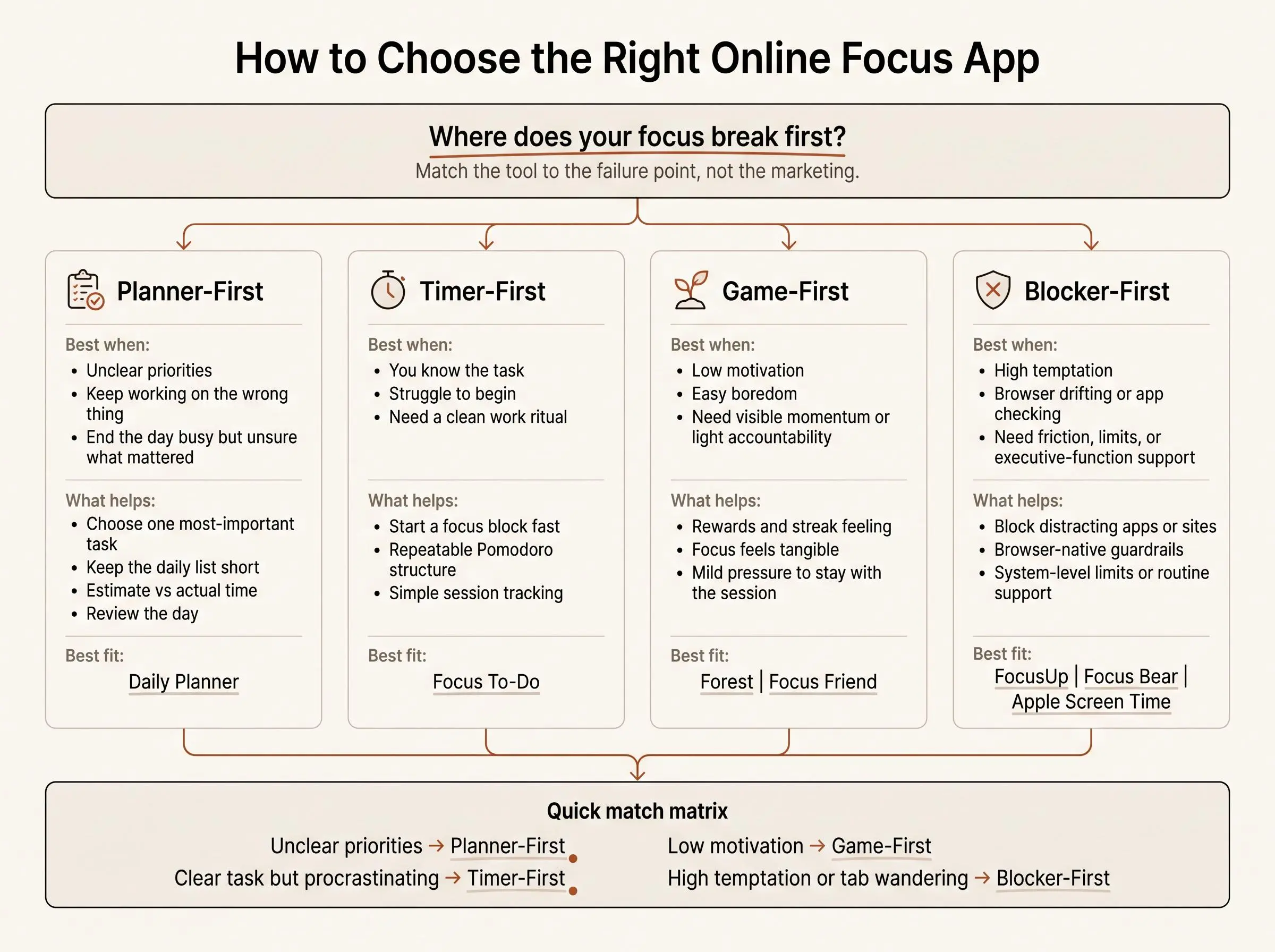
These tools don't fail because they're bad. They fail because people ask the wrong type of tool to solve the wrong type of problem.
Timers help you begin. Blockers reduce temptation. Gamified apps make discipline feel lighter. Planner-first tools help you choose the right work and finish the day knowing where it went. Those are different jobs.
This is why so many people feel oddly disappointed after using standard focus apps. You can complete plenty of sessions and still avoid the most important task. You can reduce distractions and still feel directionless. You can build a streak and still have no realistic plan for tomorrow.
Here are the common failure modes we see most:
- "I keep switching tasks." You probably need a planner-first tool or a stricter work definition before the session starts.
- "I can start, but not on the right thing." Again, planning problem. The timer isn't the missing ingredient.
- "I study in my browser and drift into tabs." Look at extension or browser-native tools like FocusUp, or pair a planner with browser controls.
- "I need friction between me and distracting apps." Blocker-first options or Screen Time are the honest answer.
If the problem is direction, more minutes won't save you.
A quick recommendation matrix:
- unclear priorities: planner-first
- procrastination but clear tasks: timer-first
- low motivation: game-first
- high temptation: blocker-first
- browser distraction: extension or browser-native tools
That's the whole game, really. Match the tool to the failure point, not to the marketing category.
Common Mistakes People Make When Picking a Focus App
Most mistakes happen before the first session. People choose the tool that looks appealing, not the one that matches their work pattern.
The usual errors are predictable:
- choosing based on aesthetics instead of actual friction
- downloading a timer when the real need is a web based planner app
- overvaluing strict blocking when the deeper issue is executive dysfunction or vague task definition
- assuming a study focus app in browser will fix device-wide distraction
- picking something so rigid they stop opening it after three days
- ignoring review loops like estimated versus actual time, even though that's often where better planning comes from
- treating neurofeedback like a magic fix instead of an optional feedback layer for a small subset of users
One mistake deserves extra attention. People underestimate review. They want the clean feeling of a focus session, but skip the part where the system teaches them anything. If your tool never shows where your estimates were wrong, your planning stays fictional.
Pretty dashboards are cheap. Honest feedback is rarer.
Conclusion
The best online focus app isn't the most popular one. It's the one that matches the kind of help you actually need: planning, timing, gamification, browser control, or system-level blocking.
Choose Daily Planner if the missing piece is a calm browser based focus app that turns a timer into a real daily plan. Choose Focus To-Do if Pomodoro structure is enough. Choose Forest or Focus Friend if motivation and distraction resistance matter most. Choose Focus Bear or FocusUp if your issue is more about executive function or browser attention. Choose Apple Screen Time if built-in Apple controls are enough.
A practical next step is simple. Find the single moment where focus usually breaks down. Then test one matching tool for a full week.
Judge it by whether you finish more meaningful work, not by how many timers you start.
Article Record
ReferencesPrimary sources used for this article
- Flocus | A beautiful way to get more done
- Focus To-Do - Pomodoro Technique & Tasks
- Forest — The #1 Focus App for Time Well Spent
- Features – What Focus Bear Can Do for You
- Focus Friend By Hank Green
- DayFocus | Smart Planner for Students & Teams — Tasks, Focus, AI
- Locu - Focus Timer, To-Do List & Notes for Daily Execution
- Optimal feedback improves behavioral focus during self-regulated computer-based work | Scientific Reports
- Self-regulation of time: The importance of time estimation accuracy
- Focus apps claim to improve your productivity. Do they actually work?
- Get started with Screen Time on iPhone - Apple Support (CA)
- Get started with Screen Time on your Mac - Apple Support
Update HistoryMeaningful revisions to this article
- Added a comparison of online focus apps to help readers evaluate their options more easily.