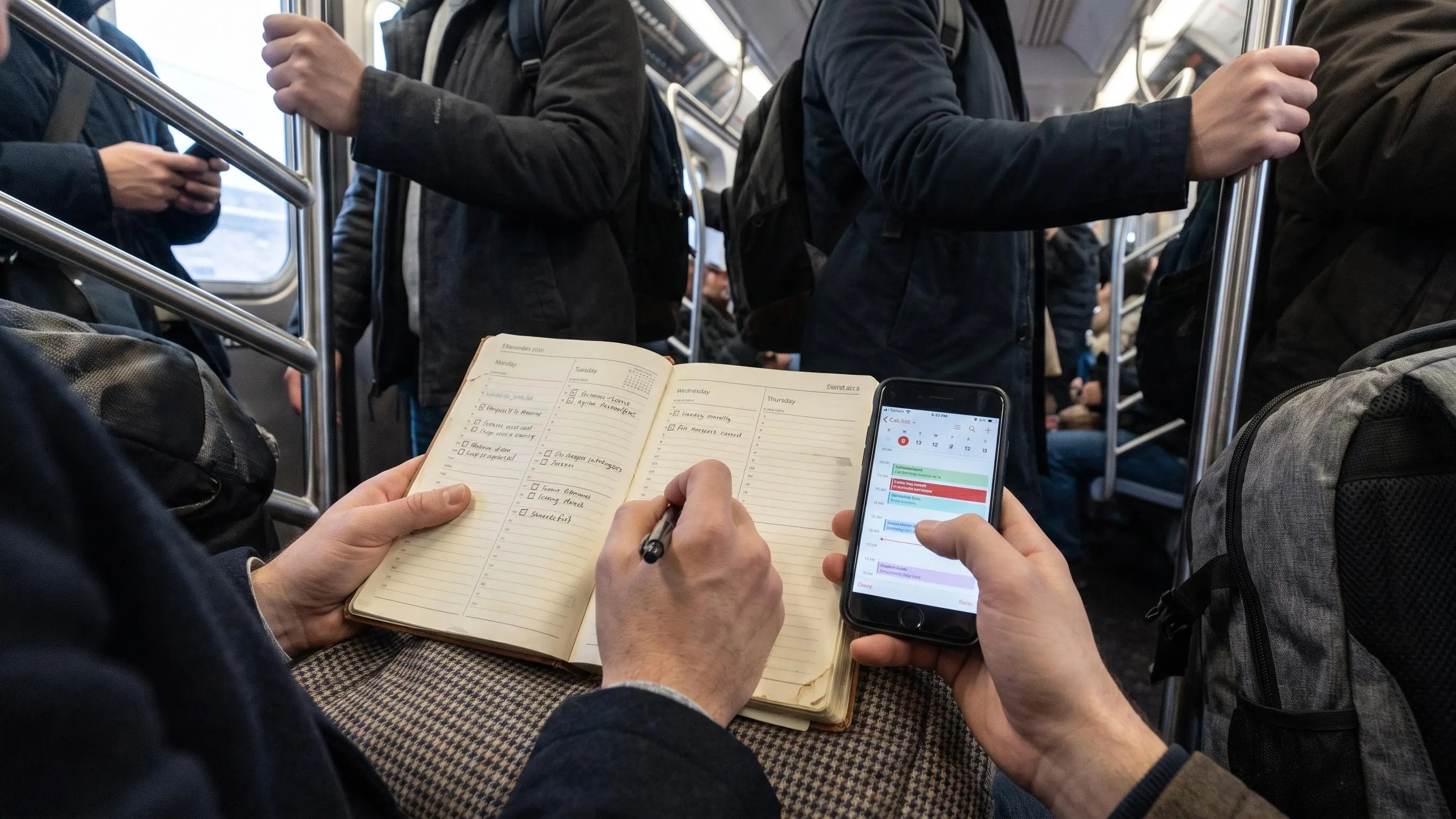

A productivity planner setup goes wrong fast when it tries to manage your whole life. Then the timer runs, the task list swells, and you still don't know what counted.
What matters is simpler: one real priority, a short list, and a clean end to the day. Start with these:
- Choose the task that would make today feel used well.
- Give it a time block, not just a due date.
- Keep the system light enough to open tomorrow. You leave with a plan that holds.
Why Most Productivity Planner Setups Feel Overwhelming So Fast
Most people don't fail at planning because they're lazy. They fail because the system becomes another task with its own maintenance schedule, rules, and guilt.
A common pattern goes like this: you copy someone else's setup, spend an evening building it, use it for three or four days, then hit a busy week and stop opening it. Not because the idea was bad. Because the setup was heavier than the problem it was supposed to solve.
Plain timers usually don't fix this. A timer can count 25 minutes just fine. It can't tell you what deserves those 25 minutes, what should wait, or when the day is done enough to stop. That's the missing layer.
The failure points are usually boring, which is why they matter:
- the setup is more complex than your actual work
- it doesn't solve the places where things really break down
- it needs too much upkeep when life gets noisy
That's why a good productivity planner setup should feel lighter after a week, not more impressive.
We're not trying to control every hour. We're trying to reduce decision fatigue enough that focused work can happen on purpose. A useful system helps you capture, choose, focus, finish, and review. If it asks for more than that, it should probably defend itself.
Your planner should remove work, not create a second shift.
Paper Planner vs Digital Planner: Which Setup Creates More Calm for You?
The real question behind paper planner vs digital planner isn't format. It's stress. You're trying to find the least exhausting way to stay on track.
Digital works especially well when your problem is fragmentation. If tasks live in one place, your calendar in another, and reminders in your head, digital gives you a way to pull the mess into one system. It's useful when you want:
- tasks, calendar, notes, and routines in one place
- syncing across devices
- search, reminders, and a few sensible integrations
- a way to update plans without rewriting the same list by hand
But digital has its own traps. Notifications make every plan feel negotiable. Too many views and tags turn a simple system into a museum of abandoned organization ideas. And because apps let you customize everything, people often do.
Paper-style methods still appeal for good reasons. Guided prompts are easier than blank pages. A visible daily focus feels grounding. There's also something clean about a page that only asks one thing from you.
That bridge matters. A digital planner can keep the best part of a structured paper method, one clear focus and a repeatable routine, without the rewriting, lost pages, or scattered tools. That's the part worth preserving.
A simple decision framework helps:
- Choose digital if your main pain is fragmentation.
- Choose simpler physical planning if screens are the problem.
- Choose hybrid only if you can explain exactly what each tool is for.
If both systems hold "everything," you don't have a hybrid. You have duplication with better branding.
What a Good Productivity Planner Setup Actually Needs
Before templates, apps, or color codes, there is a minimum viable setup. It needs to be complete enough to hold your commitments and simple enough to survive Thursday afternoon.
A calm productivity planner setup usually needs these parts:
- one capture inbox for tasks, ideas, and loose obligations
- a Today view with one most-important task
- a short list for the rest of the day
- a timetable or calendar layer for time blocks
- a quick notes area
- a Someday or Later list so interesting things stop sitting on today's desk
- a daily completion cue
- a weekly review ritual
That's it. Not tiny, but not sprawling either.
Here's what sounds useful and usually isn't foundational:
- detailed project dashboards
- heavy tagging systems
- habit trackers for every behavior
- advanced automation
- five different priority levels, which is just indecision dressed formally
The goal is not to create a place where every thought can become a system. The goal is to give every input a home while asking today to carry only what matters today.
A useful test
If you miss two days, can you re-enter the system in under ten minutes?
If not, it's probably too elaborate.
Start With a Friction Audit, Not a Template
The smartest first step in any productivity planner setup is not choosing software. It's finding where your work actually jams.
Templates are seductive because they let you skip thinking. That's also the problem. A setup should solve your bottlenecks, not mirror someone else's ideal morning routine.
Start with a short friction audit. Ask:
- What important tasks do you regularly avoid?
- Where do things fall through the cracks?
- What part of your day feels most chaotic?
- What task do you dread every week?
- Where do you lose time on low-value activity?
Then add a second layer. Define what a productive day actually means for you. Not in theory. In practice.
For some people it's one meaningful deliverable. For students it may be staying consistent with coursework before panic takes over. For knowledge workers it may be protecting a deep work block before meetings spread everywhere. Sometimes it's simply ending the day knowing what got done.
Energy matters too. Notice when you're sharp, when you dip, and whether you work better in short bursts or longer sessions. By the second afternoon of using any planner, this becomes obvious if you're paying attention.
That audit should change the setup:
- if you forget commitments, make capture and reminders the priority
- if you keep starting the wrong task, build a stronger Today focus
- if you underestimate work, track estimated versus actual time
- if meetings eat the day, use calendar blocking and meeting review
An honest friction audit is mildly annoying because it removes excuses. That's useful.
Build a Daily Planning Workspace in an App That Stays Light
Daily planning in an app works best when the workspace is shallow. You should be able to open it and know where to look without clicking through a maze.
A simple home layout is enough:
- Today
- Tasks
- Calendar or timetable
- Notes
- Projects or goals, only if you actually need them
Build it in that order. The inbox comes first. Always.
Core setup steps
- Create one central inbox for all incoming tasks and ideas.
- Add project folders or labels only after the inbox exists.
- Use a small number of priority markers, not a full taxonomy.
- Create a Someday or Maybe list.
- Add a quick capture shortcut so ideas stop living in your head.
That last one matters more than people expect. If capturing something takes too many taps, you'll delay it, then trust your memory, then forget. Very classic.
Calendar organization should also stay plain. Sync your digital calendars. Block time for deep work. Add recurring classes, meetings, or routines. Then look at standing commitments that create noise without value and trim them where you can.
The digital environment matters as much as the planner:
- turn off non-urgent push notifications
- set Do Not Disturb windows
- process inboxes at specific times instead of all day
A browser-based tool like Flocus can help here because the plan and the focus session live in the same place. That sounds small until you've spent a week bouncing between task app, timer app, calendar, and notes. Context switching can make a simple system feel mysteriously tiring.
How to Use a Digital Productivity Planner Without Rebuilding Your Whole Life
The question behind how to use a digital productivity planner is usually practical: how do you make it repeatable enough to last beyond the setup phase?
The answer is a small routine, not a lifestyle conversion.
Here's a simple digital planning routine:
- Open the planner before messages.
- Review calendar realities first.
- Choose one most-important task.
- List the supporting tasks that keep the day workable.
- Estimate how much focused time the main task needs.
- Place it into one or more protected work blocks.
That's planning. Overplanning is different. Planning decides what deserves attention. Overplanning fills every hour so tightly that reality immediately breaks it.
Leave room.
Example: a meeting-heavy Tuesday
Imagine your calendar has a 9:30 meeting, a 1:00 appointment, and several small tasks waiting in the inbox. The routine might look like this:
- Open the planner before email or chat.
- Record the two calendar commitments as fixed points.
- Choose “draft the project outline” as the one most-important task.
- Add “reply to three messages” and “send the meeting notes” as supporting tasks.
- Estimate 60 minutes for the outline and place it in the open 10:30–11:30 block.
- Leave the period before the appointment unscheduled rather than filling it with guesses.
- Capture any new requests during the day without immediately replacing the outline.
- At shutdown, mark what was completed and move unfinished work to a deliberate next step.
The point is not to copy this exact schedule. It is to show the decision rule: fixed commitments shape the day, one meaningful task gets protected space, and everything else stays visible without competing for equal attention.
When new inputs show up during the day, capture them first. Don't rebuild the whole day every time a message arrives. Replan only when the new item genuinely changes today's priority. Most things don't. They just arrive loudly.
For a student, this might mean choosing one reading or writing task as the anchor, while admin tasks stay secondary. For a knowledge worker, one deliverable leads, and meetings or replies fit around it rather than replacing it by default.
The best digital planner workflow feels directional, not crowded. You should feel guided, not supervised.
Create a Digital Planner Workflow That Turns Intent Into Focus
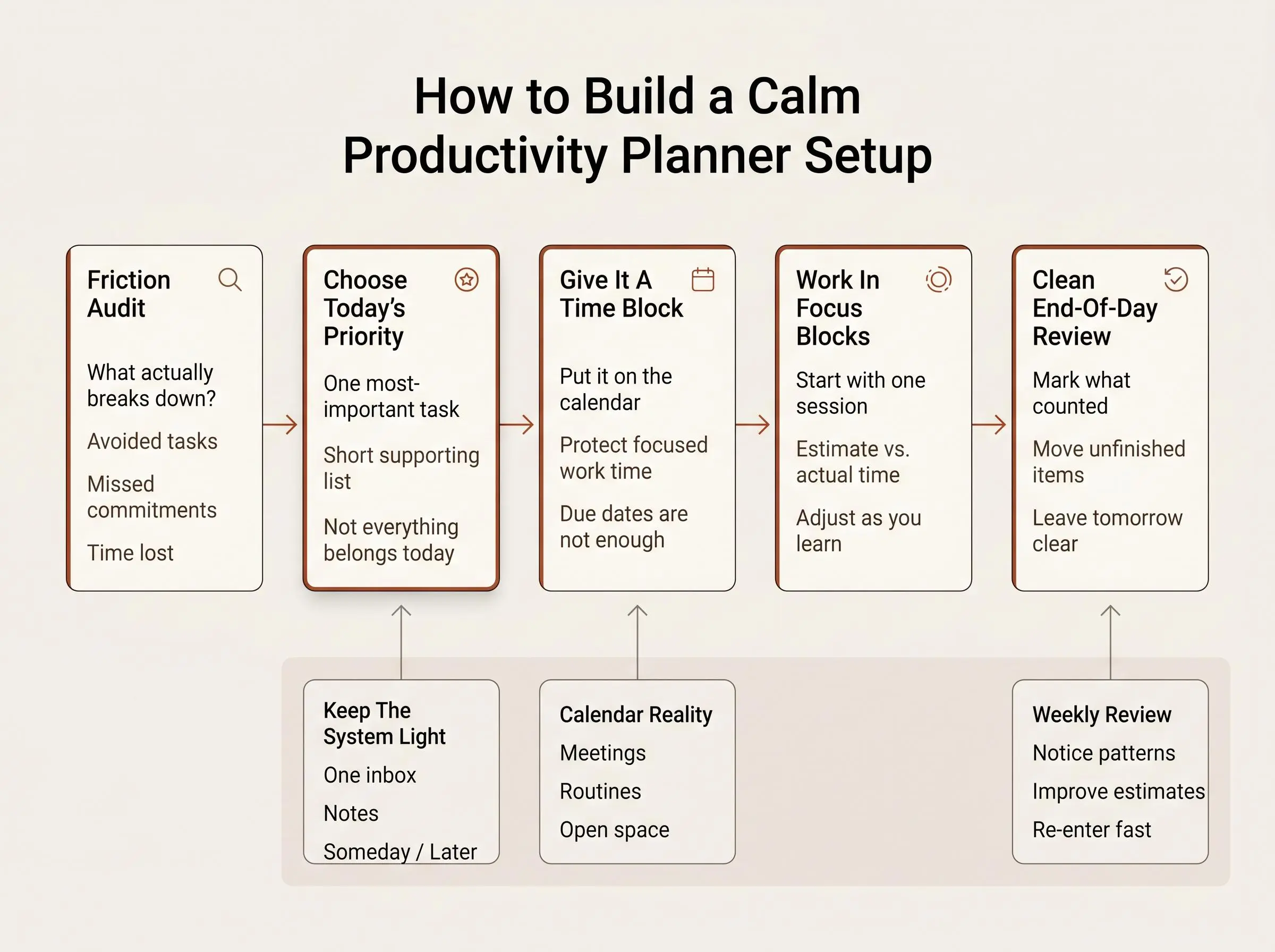
A strong digital planner workflow has a simple shape: input, choose, schedule, focus, record, review.
That order matters. If you skip choose, everything feels equally urgent. If you skip schedule, important work remains theoretical. If you skip review, you repeat the same bad estimates and call it a busy month.
The workflow, in plain terms
- Input: capture tasks, ideas, and obligations in one place
- Choose: identify the most-important task
- Schedule: assign focused time, not just a due date
- Focus: work inside a defined block
- Record: compare estimated time with actual time
- Review: use that evidence to adjust tomorrow
There are also layers of planning. Strategic planning handles longer goals. Tactical planning handles projects and weekly outcomes. Operational planning answers the blunt question: what happens today?
A to-do list alone usually fails because it flattens all work into one pile. A real workflow makes time visible, reduces false urgency, gives unfinished work somewhere to go, and closes the gap between intention and execution.
This is also where our bias is pretty clear. We don't think focus starts with a timer. We think it starts with a plan. Flocus is built around deciding what matters first, then running focus blocks against that plan. Without that planning layer, a timer just measures drift more accurately.
Protect the Most-Important Task With Timed Focus Blocks
Even a clean planner fails if the important task never gets protected time. Lists don't defend your attention. Blocks do.
Timed work is the bridge between planning and doing. Short Pomodoro-style sessions help when resistance is high and starting feels heavier than the task itself. Longer blocks work better for deeper project work when your energy and calendar allow it.
Choose block length based on your friction audit:
- if starting is the problem, go shorter
- if context switching kills momentum, go longer
- if your day is fragmented, use smaller protected windows consistently
The more important habit is honest time planning. Estimate the work before you begin. Log the actual time after the session. Review the gap.
That estimated versus actual comparison matters because it exposes wishful planning. It teaches task sizing. It also rebuilds trust in your system because the numbers start reflecting reality instead of optimism.
Most planning problems are really time-estimation problems wearing nicer clothes.
A low-pressure entry point is enough here. One focused session per day can make the method real. You don't need a full overhaul to prove the system works.
In Flocus, each focus block attaches to the planned task. That helps turn vague intent into visible progress instead of leaving you with a history of disconnected timer sessions and no idea whether the right work moved.
Use Completion Cues, Streaks, and Insights to Rebuild Trust in Yourself
People who feel scattered usually don't just need better organization. They need evidence. Something that says, yes, you did the thing you meant to do.
Completion cues help more than they seem to. A ring, checkmark, or clear done state tells your brain the effort counted. It reduces mental residue and makes it easier to stop for the day without carrying half-finished static into the evening.
Streaks can help too, if you use them correctly. They should act as proof of consistency, not a punishment system. The point isn't perfection. The point is making return easier after a wobble.
A useful review rhythm looks like this:
- a short daily shutdown ritual
- a weekly review session
- a monthly goals check-in if your work needs it
In the weekly review, look for specifics:
- which tasks kept slipping
- where estimates were consistently off
- which blocks actually worked
- what caused distraction or chaos
- whether meetings and routines still deserve space
Insights matter because they keep the setup adaptive. Rigid systems break the moment life stops cooperating, which is often around Wednesday.
In Flocus, daily progress, streaks, and weekly insights are there to show patterns you can use. That's better than ending the week with a vague feeling that you were "busy" and no usable information.
Optional: Measure Flow State if You Want More Than Time Tracking
This is an advanced layer, not a requirement. A good setup does not need biofeedback to work.
Still, some people want to know more than how long they worked. They want to understand what focused effort felt like in real time, and whether certain conditions help them reach it more reliably.
With Muse headband support in Flocus, you can add neurofeedback during work. Plainly put, it gives you a real-time signal related to focus state. Useful, if you treat it as feedback rather than magic.
Practical experiments are where this becomes interesting:
- compare morning and afternoon focus blocks
- test different task types
- try music versus silence
- see whether breaks improve the next session
The limit is important. Biofeedback does not replace choosing a priority, protecting time, or reviewing what got done. It sits on top of the same method. Otherwise it becomes gadget trivia with charts.
For the right person, though, measured focus can be clarifying. Not because it turns work into a game, but because it gives context to what concentration actually requires.
Common Setup Mistakes That Quietly Recreate Overwhelm
Most overwhelm doesn't arrive dramatically. It seeps back in through small design mistakes.
Watch for these:
- copying an elaborate system before identifying your friction points
- building too many views, databases, or categories on day one
- treating every task as urgent
- using the planner as storage instead of a decision tool
- planning from your inbox instead of from priorities
- leaving notifications on and calling the result a focus issue
- skipping recurring routines, so each day starts from scratch
- forgetting a shutdown ritual
- doing weekly reviews that are too long or too judgmental
- measuring activity without measuring progress on the main task
- assuming a missed day means the system failed
That last one catches people more than the technical stuff. A useful system should be easy to re-enter. If a missed day creates a backlog of planner maintenance, the design is wrong.
A calm setup has to survive your imperfect weeks, not just your organized ones.
Conclusion
Calm productivity comes from reducing decisions, choosing one meaningful priority, protecting it with focused time, and ending the day with visible evidence of progress. That's the shift. Less control theater, more clarity.
The sequence is simple:
- audit your friction
- build the lightest useful workspace
- create a simple digital planning routine
- connect planning to timed focus blocks
- review the patterns weekly
If you want to start small, start properly. Set up one Today view. Choose one most-important task. Run one focused work block.
That's a real productivity planner setup. Not a prettier system. A lived one.
Article Record
ReferencesPrimary sources used for this article
Update HistoryMeaningful revisions to this article
- Added a practical example showing how to use a digital productivity planner without having to rebuild your entire routine.