Most people pick a focus app for students because it looks nice, then wonder why they still have six tabs open and no idea what to study. A timer is not a plan. Shocking, apparently.
The good options solve one real problem: choosing a priority, blocking distractions, or making you show up. We cut the clutter and kept the tools that do that job well.
These are the focus apps worth your attention.
Show 5 more productsShow fewer products
1. Daily Planner

- Clear one-task daily priority
- Pomodoro estimates improve planning
- Links tasks to weekly goals
- Browser-based across study devices
- Useful progress ring and reflections
- Less strict than blockers
- Limited phone-gamified motivation
- Muse feature is niche
If your study problem is not "I forgot to start a timer" but "I spent all day busy and still don't know what moved," this is the right place to look. A lot of focus apps hand you a clock and wish you luck. We think that's where the trouble starts.
Daily Planner is built for students who need a daily study planning app first and a focus tool second. The method is deliberately small. Pick one most-important task, keep the daily list short, estimate the work in pomodoros, then close the day with a visible Focus Ring. That's calmer than most productivity systems, and more useful than another endless task dump.
A few details matter more than they seem:
- you choose one top priority, not ten "urgent" things
- tasks can link back to weekly goals
- you estimate focus blocks before you begin
- the day ends with streaks, reflections, and progress insights
That planning layer changes behavior. Students usually don't fail because they lack a timer. They fail because they sit down with six tabs open and no clear next step.
The estimated-versus-actual tracking is especially useful once the first week wears off. You start noticing that the reading you keep calling "one pomodoro" is really three, and that changes how you plan the next day. Honest planning is underrated. It also tends to improve grades more than decorative dashboards.
Because it's browser-based, it works on a library desktop, your own laptop, or a quick phone check-in between classes. That matters more than people admit. Students rarely study in one neat location with one neat device.
For neurotech-curious students, there's optional Muse support for measured flow-state tracking during work. It's a niche feature, and that's fine. The planner works fully without a headband. But if you already own one and want something beyond self-reported "I think I focused okay," it's a real differentiator.
Compared with timer-first tools here, Daily Planner is more planning-focused than Forest, Flipd, and Session. It's lighter than strict blockers like Cold Turkey Blocker and Freedom. And it's more structured than a basic student focus timer with tasks because it doesn't stop at the session. It helps you decide the session in the first place.
A timer protects time. A plan tells time where to go.
2. Forest

- Gamified phone-free study sessions
- Simple, fast to start
- Visual rewards reinforce focus
- Great for habitual phone checking
- Weak for study planning
- Less strict than hard blockers
- Limited task management depth
Forest fits students who already know what they need to study and mostly need to stop touching their phone every four minutes. That's a narrower job than people think, but when it's your job, it works.
The appeal is obvious for good reason. It turns a phone-free study session into something visible and mildly rewarding. That small bit of friction and reward can be enough to keep your hand off the screen. Not profound. Still effective.
Forest is more playful than strict blockers, and easier to grasp than planner-led tools. You don't have to buy into a whole method. You just start a session and leave your phone alone. For some students, that simplicity is the only reason they'll use it beyond day three.
Where it fits best:
- revision sessions where the subject is already chosen
- students who lose focus to habitual checking, not vague planning
- younger students or a focus app for college students who want a clear reward loop without a heavy system
It is less planning-oriented than Daily Planner, less strict than Cold Turkey Blocker or Freedom, and less task-centered than Focus To-Do. It also leans less on accountability than Flipd or Lilo Study Timer.
That tradeoff matters. Forest is good at session discipline. It is not a study planner app for students. If your real problem is staring at your to-do list and not knowing where to begin, a tree won't make the decision for you.
3. Cold Turkey Blocker
- Very strict distraction blocking
- Great for exam-week focus
- Strong on desktop study sessions
- Harder to bypass mid-session
- Little help with planning
- Can feel overly intense
- Less flexible than lighter blockers
Some students do not need encouragement. They need the door locked.
Cold Turkey Blocker is the strictest option here for a reason. It's built around hard distraction blocking, not motivation, aesthetics, or community. If you know you'll disable a softer blocker the moment the essay gets uncomfortable, this is the adult answer.
It stands apart because it assumes temptation will win if you leave negotiation open. That's often correct during exam weeks.
It's particularly suited to:
- exam periods when browsing turns into avoidance fast
- essay-writing days where one "quick check" becomes an hour
- desktop-heavy study where websites and apps are the main leak
Compared with Freedom, it feels stricter and less flexible. Compared with Daily Planner, it's much less gentle and offers almost no help with choosing priorities. Compared with Focus To-Do, it cares far less about tasks. And it has none of the social momentum of Flipd or Lilo.
That makes it powerful, but narrow. If distraction is the main failure point, it's one of the strongest tools in the roundup. If you're looking for a simple planner for studying or a reflective daily workflow, this is not that tool. It may also feel excessive for casual study blocks. Sometimes a hard boundary is exactly right. Sometimes it's just stress in software form.
4. Freedom

- Blocks distractions across devices
- Great for phone-and-laptop studying
- Flexible for browser-heavy coursework
- Useful for remote class workflows
- Doesn't help choose priorities
- Less effective without a plan
- Less motivating than gamified apps
Freedom makes the most sense when your attention leaks across devices, not just inside one of them. That distinction is easy to miss until you block your laptop and then spend the next 20 minutes on your phone.
Its core value is cross-device distraction blocking. For students who study with a laptop open, a phone nearby, and browser-heavy coursework in the mix, that matters. Remote classes, research workflows, and online assignments create a lot of side doors.
Freedom is a practical choice for:
- college students moving between phone and laptop all day
- students in remote or hybrid courses
- anyone who already has a planning system and mainly needs execution protection
Relative to the rest of this list, it's more flexible than Cold Turkey Blocker for multi-device study. It's more protection-focused than Daily Planner, Focus To-Do, or Session. And it skips the gamified tone of Forest and the community angle of Flipd and Lilo.
That also reveals the limit. Freedom can block distractions, but it won't tell you whether to draft the paper, review chapter notes, or finish the problem set. It's an execution tool, not a daily study planning app. If you already know your priorities, it can be exactly enough. If you don't, you'll have a very well-protected drift.
5. Focus To-Do
- Pomodoro timer tied to tasks
- Fits reading and revision blocks
- Breaks assignments into study chunks
- Simple middle ground, not overwhelming
- Limited weekly planning depth
- Weak distraction blocking tools
- Can feel flat long-term
Focus To-Do is the cleanest fit for students who want a student focus timer with tasks in the same place. Not everyone needs more than that.
Its appeal is practical rather than philosophical. It combines Pomodoro timing with task management, which matches how many students actually work. Read 20 pages. Review lecture notes. Draft one section. Break the assignment into chunks and run them through timed sessions.
That makes it stronger than pure timers for coursework that needs structure, but not a full productivity system. There's a nice middle ground here.
Compared with other apps in this roundup:
- it connects tasks to sessions more directly than Forest, Freedom, or Cold Turkey Blocker
- it's more timer-first than Daily Planner, which adds stronger planning and end-of-day review
- it stays away from the social feel of Flipd and Lilo
- it has broader task-linked relevance for students than Session's Apple-specific focus
This is a good option for reading, revision, and assignment blocks when you want enough structure to stay grounded without building a larger system around it. The limit shows up over longer horizons. If you need weekly planning, reflection, or stronger distraction controls, Focus To-Do may start feeling a bit flat by the second afternoon.
Still, for students who find pure timers oddly disconnected from actual coursework, this is a sensible bridge.
6. Flipd
- Good for routine accountability
- Helps rebuild study consistency
- Student-friendly session structure
- Useful behavioral pressure to start
- Light on planning depth
- Weaker distraction blocking
- Less task-focused than rivals
Flipd is for students who don't mainly struggle with knowing what to do. They struggle with showing up and doing it again tomorrow.
That sounds softer than distraction blocking, but it isn't trivial. A rough semester usually doesn't need more app features. It needs a routine you can re-enter without drama.
Flipd leans into accountability in a student-friendly way. It's built around helping study sessions happen consistently, not just tracking that they technically could have happened. That makes it more accountability-centered than Forest, less strict than Cold Turkey Blocker and Freedom, less planning-led than Daily Planner, and less task-focused than Focus To-Do.
A few situations where it makes sense:
- you're rebuilding consistency after falling out of rhythm
- starting is harder than continuing
- a little behavioral pressure helps more than a lockout screen
It is better for momentum and habit than deep academic planning. That's the tradeoff. If you want a simple planner for studying or strong boundaries against distraction, there are better fits above. But if the real issue is that your study routine only exists in theory, Flipd is pointed at the right problem.
7. Lilo Study Timer

- Built specifically for students
- Streaks encourage daily return
- Social accountability boosts follow-through
- Focus timer supports study sessions
- Busier feel than calm tools
- Limited planning depth
- Less useful for strict blocking
Lilo Study Timer is the most explicitly student-built option in this roundup. You can feel that in the design choices. It isn't trying to be a generic productivity tool that happens to tolerate studying.
The app pairs focus timing with streaks and social accountability, which gives it a different emotional profile from quieter tools. For some students, that's exactly the hook. They want the app to feel connected to their study identity and give them a reason to come back tomorrow.
It's closest to Flipd, but the emphasis is slightly different:
- more student-community oriented than Focus To-Do
- more streak- and motivation-driven than Daily Planner
- less blocking-heavy than Freedom or Cold Turkey Blocker
- more visibly reward-based than Flipd
That makes it useful for habit momentum. If solo studying is too easy to postpone, visible streaks and social follow-through can keep the routine alive. During a long semester, that matters.
The tradeoff is pretty clear too. If you want a quiet interface, a stronger planning system, or something that stays in the background, Lilo may feel busier than necessary. Some students do better with a calm tool. Others need a nudge with a pulse. This is the second group.
8. Session
- Native-feeling Apple experience
- Clean Pomodoro session flow
- Built-in distraction control features
- Useful analytics for study sessions
- Best only for Apple users
- Limited planning depth
- Less task integration than rivals
Session is the most ecosystem-specific pick on the list. If you're deep in Apple devices, that can be a strength. If you're not, it can make the choice easy in the other direction.
Its appeal is a streamlined, Apple-focused take on Pomodoro-style focus sessions with some distraction-control positioning built in. That makes it more than a bare timer, but still centered on the session itself rather than broader planning.
Session is most relevant for:
- iPhone and Mac users who want a native-feeling experience
- students who like Pomodoro rhythm without social accountability
- readers who want lighter distraction control than a heavier blocker
Compared with the rest, it's more Apple-specific than everything else here, more streamlined than Cold Turkey Blocker, and less task-integrated than Focus To-Do. It also offers much less planning depth than a true study planner app for students.
Device ecosystem is the deciding factor. That's not glamorous, but it's honest. If you study across mixed devices, Session loses some of its appeal quickly. If you live inside Apple hardware already, it may feel tidy in a way other apps don't.
| Daily Planner | Forest | Cold Turkey Blocker | Freedom | |
|---|---|---|---|---|
| Built-in daily study planning | ✓ | × | × | × |
| Pomodoro timer or focus timer | ✓ | ✓ | × | × |
| Strict distraction blocking | × | × | ✓ | ✓ |
| Blocks across multiple devices | × | × | × | ✓ |
| Gamified visual rewards | ✓ | ✓ | × | × |
| Weekly goals or reflective progress insights | ✓ | ✓ | × | × |
How to Choose the Right Focus App for Students
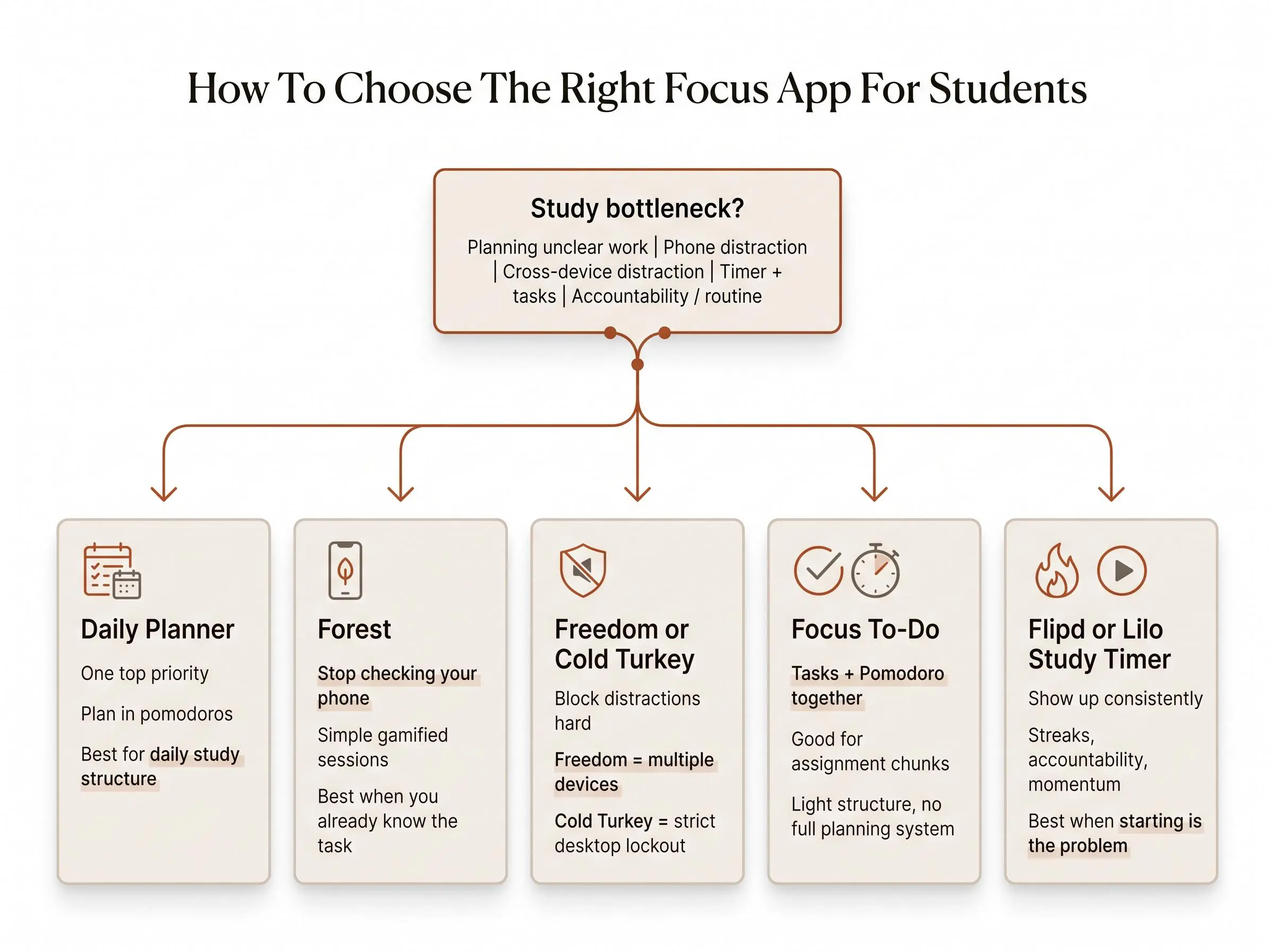
Most students do not need the "best" app overall. They need the app that matches their actual failure point. Those are different questions.
Use these four checks before you download anything:
- Do you lose time because you get distracted, or because you never decide what to study?
- Do you need a timer, a blocker, an accountability system, or a daily study planning app?
- Do you study mostly on phone, laptop, or both?
- Are you trying to survive one exam week or build a routine for the semester?
The shortlist by job is pretty clean:
- planning-first: Daily Planner
- gamified focus: Forest
- strict blocking: Cold Turkey Blocker
- cross-device blocking: Freedom
- timer with tasks: Focus To-Do
- accountability and routine: Flipd
- streaks and student motivation: Lilo Study Timer
- Apple-focused Pomodoro: Session
The tradeoffs are where good decisions happen. A blocker can protect focus, but it won't choose your priorities. A timer can structure a session, but it won't rescue an overloaded to-do list. Accountability can help you start, but it may not help you plan realistically. And a focus app for college students that acts as a simple planner for studying is not trying to be a lockout tool.
What Actually Helps Students Focus: Planning, Blocking, or Accountability?
There are really three study problems hiding under one search query. If you mix them up, you pick the wrong tool and blame yourself.
Distraction problem
If temptation is the main issue, blockers help. Cold Turkey Blocker and Freedom work because they reduce the number of bad decisions available to you. Forest sits on the softer end. It nudges behavior rather than enforcing it.
Planning problem
A lot of students think they have a timing problem when they really have a decision problem. They start a Pomodoro without a clear next step, then drift. In that case, a planning-led tool does more than another timer. This is where a study planner app for students earns its keep.
Consistency problem
Sometimes the issue is not distraction or planning. It's repeatability. You can focus fine once you begin, but beginning keeps slipping. That's where accountability and streaks matter more than feature count. Flipd and Lilo Study Timer belong here.
Mixed cases are common. You might need a planner and a blocker. Or a timer-plus-task app like Focus To-Do may be enough if your structure needs are moderate. We'd avoid building a five-app stack before you know your bottleneck.
If plain Pomodoro tools haven't worked, the missing piece often isn't discipline. It's a better front-end decision process.
Common Mistakes Students Make When Picking a Focus App
Students usually don't pick the wrong app because they lack options. They pick wrong because they diagnose the problem badly.
Common mistakes look like this:
- choosing based on aesthetics instead of the actual study bottleneck
- downloading a strict blocker when the real issue is unclear priorities
- picking a timer-only tool when assignments need task breakdown
- expecting one app to fix both semester planning and minute-by-minute temptation
- ignoring device reality when studying across phone and laptop
- confusing exam-cram needs with long-term habit-building
- switching apps too quickly before the method has time to settle
The fix is less dramatic than people expect. Use Forest for phone temptation. Use Cold Turkey Blocker or Freedom for stronger boundaries. Use Focus To-Do for Pomodoro plus tasks. Use Flipd or Lilo Study Timer for accountability. Use Daily Planner when the missing piece is calm, realistic daily structure.
Don't grade an app by how motivated it makes you feel in the first ten minutes. Grade it by what your Thursday afternoon looks like.
Conclusion
The best focus app for students depends on the job you need done. Planning, blocking, task structure, and accountability solve different problems. No app gets extra credit for trying to be all four.
If you want a calm daily study planning app with one clear priority and visible progress, choose Daily Planner. If your phone is the main issue, choose Forest. If you need strict boundaries, choose Cold Turkey Blocker. If you study across devices, choose Freedom. If you want a student focus timer with tasks, choose Focus To-Do. If accountability helps you show up, choose Flipd or Lilo Study Timer. If you're all-in on Apple and want a focused Pomodoro option, choose Session.
Start with your biggest bottleneck. Test one matching app for a full week of real coursework. Then judge it by the only metric that really matters: whether it helps you finish more meaningful work, not just log more minutes.