
Picking a writing focus app is harder than it looks. You've probably tried a timer or two, maybe a pretty study dashboard, and still ended the day with scattered notes and no real draft.
The good options do one thing right. They make it easier to get into the sentence and stay there. The weak ones pile on mood, widgets, or note clutter when what you need is a clean path back to the page.
So we cut the list down. These are the writing apps worth your attention.
Show 3 more productsShow fewer products
1. iA Writer

- Exceptionally clean drafting experience
- Helps reduce interface distraction
- Fast to open and start
- Ideal for sentence-first writers
- Feels lighter than full workflows
- Too minimal for project planning
- Limited for note-heavy workflows
- Less useful when ideas are unclear
If you want the tool to get out of the way, start here. iA Writer is the kind of writing focus app that makes sense the moment you open it. No sprawling workspace. No productivity theater. Just a clean page and a quiet place to type.
For a certain kind of writer, that's the whole game.
It fits best when you already know what needs writing and the hard part is staying with the sentence. Students drafting essays, bloggers trying to finish the piece before the tab drift begins, knowledge workers turning a half-clear idea into something publishable. If interface clutter reliably steals 15 percent of your attention, you will feel the difference quickly.
A few things are worth saying plainly:
- iA Writer is stronger for pure drafting than note-heavy tools
- it feels lighter than Ulysses if a full writing workflow starts to feel like admin
- it is less staged and atmospheric than OmmWriter, which some people will prefer by the second session
That last point matters. Some writers need mood. Others just need less stuff on screen.
The limitation is also obvious. If you want your writing focus app to double as a daily planner for writers, or to hold your whole project life, this can feel too spare. Minimalism is calming until you realize you also need structure around the draft.
A blank page helps only if the problem is distraction, not ambiguity.
We'd choose iA Writer when the draft is already mentally loaded and the goal is simple: sit down, stay in the paragraph, finish the pass.
2. Ulysses
- Balanced focus and structure
- Strong for multi-piece workloads
- Supports long-form writing projects
- Keeps drafts and organization together
- Calm drafting without bare minimalism
- May feel too feature-rich
- Less ideal for session startup
- Not built for handwriting workflows
Ulysses sits in the middle, and in this category that's a compliment. It gives you a focused drafting experience without forcing you into the bare-room philosophy of the most minimal apps. If you write across multiple pieces at once, that balance matters more than people admit.
This is often the best focus app for writers who don't just draft. They manage articles, sections, chapters, revisions, and a low background hum of unfinished work. Not chaos exactly. Just enough moving parts that a plain editor stops being enough.
Where it earns its keep is in sustained writing, not novelty. The value shows up on the third article, the second chapter, the week when three deadlines overlap. You can stay in one writing environment instead of bouncing between notes, drafts, and rough structure.
Compared with the rest of this list, Ulysses makes the most sense if your problem is not starting one session but managing a body of work without losing focus inside it.
Where it fits best
- long-form writers who think in projects, not isolated documents
- client writers juggling several active pieces
- anyone who wants calm while drafting but still needs some order around the work
It's more robust than iA Writer, but not as mood-driven as OmmWriter. It stays closer to writing than Bear, Notability, or GoodNotes, which lean harder toward note capture and idea development.
That said, not everyone needs this much. If your real issue is resistance at the start of a session, a lighter writing focus app may actually feel calmer. More capability can quietly become more surface area.
A good tool should reduce decisions. If it gives you five new ones, you've lost the plot.
3. OmmWriter
- Highly immersive writing environment
- Supports calm, present drafting
- Great for creative sessions
- Reduces attention-grabbing interface noise
- Weak for planning-heavy workflows
- Immersive style won't suit everyone
- Less ideal for multiple projects
OmmWriter is for writers who care about the feel of the session, not just the output. Some people hear that and roll their eyes. Fair enough. But if your writing quality depends on settling your mind before the words arrive, atmosphere isn't fluff. It's part of the work.
This is the most experience-driven option here. It leans into immersion. The point is not speed. The point is presence.
For creative writing, reflective writing, and any session where emotional state changes the result, OmmWriter can be unusually effective. Not because it does more, but because it asks less of your attention once you're in. That can be the difference between pecking at sentences and actually staying with them.
Here's where it separates from the others:
- more atmospheric than iA Writer or Ulysses
- more clearly a deep work tool for writing than a general workspace
- less practical if your bottleneck is planning, outlining, or keeping track of multiple assignments
Some writers need a neutral desk. Others need a room with the lights set right. OmmWriter is built for the second group.
The tradeoff
If you prefer tools that feel invisible and functional, the immersive approach may feel a bit deliberate. That's not a flaw. It's a fit issue. A lot of writing advice assumes everyone benefits from the same environment. They don't.
And if your problem is that you keep starting timers without knowing what to write, OmmWriter won't solve that. No app can decorate its way around unclear work.
Still, for calm drafting sessions, it has a real place. Ritual isn't silly if it gets you to the page.

4. Bear
- Great for nonlinear idea capture
- Smooth notes-to-draft workflow
- Clean, low-distraction interface
- Strong for outlines and snippets
- Less specialized for final drafting
- Can encourage endless reorganizing
- Weaker for long-form writing flow
Bear makes sense when the draft doesn't appear all at once. A lot of writing starts as fragments, half-formed outlines, clipped notes, and one sentence that feels smarter than the rest. If that's your process, Bear is often more useful than a pure drafting tool.
It has a clean, low-distraction feel, but its real value is how it supports idea growth. You can move between brainstorming and writing without changing environments. That sounds minor until you notice how often friction appears in the handoff between thinking and drafting.
For essay planning, short-form work, research snippets, and nonlinear writing, Bear can be a better writing focus app than the more drafting-centered tools. Not because it's better at the final draft, but because it helps you reach one.
Bear is strongest when your process looks like this
- collect pieces
- shape them into an outline
- draft once the argument is visible
If that sequence feels familiar, Bear will probably feel natural.
It's more notes-oriented than iA Writer, Ulysses, or OmmWriter, and more typing-centered than Notability or GoodNotes. That middle position matters. You get flexibility without moving fully into handwriting or annotation-heavy workflows.
The catch is straightforward. If you want a dedicated drafting engine, Bear may feel a little sideways. It can become more of a thinking space than a writing lane. That's useful until it turns into one more place to rearrange thoughts instead of finishing prose.
Writers sometimes confuse preparation with progress. Bear is excellent for preparation. Just keep an eye on when it's time to leave the notes and write the actual thing.
5. Notability

- Strong for annotation-led writing
- Bridges notes into early drafts
- Great for handwriting-heavy workflows
- Useful for students and researchers
- Weak for long-form typed drafting
- Less focused than dedicated editors
- Overlap with GoodNotes role
Notability is an adjacent pick, not a pure drafting one. That's exactly why it belongs here. Some writers don't begin with prose. They begin with highlighted readings, margin notes, scribbled arrows, lecture notes, and rough concept maps that only make sense after an hour.
If that's you, a standard writer pomodoro app can feel oddly irrelevant. Timing a session is fine. But if the real work is sorting and annotating material before the draft exists, you need a workspace that respects that stage.
Notability is useful when writing is downstream from reading and marking things up. Students, researchers, and note-led writers tend to understand its role quickly. It helps bridge the messy middle between source material and a coherent first draft.
A few practical distinctions help:
- it is less suited to long, uninterrupted prose drafting than iA Writer, Ulysses, or OmmWriter
- it overlaps with GoodNotes in general role, but some people prefer one over the other based on how they capture ideas
- it can be a better fit than Bear if handwriting, annotation, or mixed-format notes are central to your process
A quiet truth about note-led writing
Sometimes the bottleneck is not focus. It's translation.
You have the material. You don't yet have the shape. Notability helps on that side of the line.
That also means it's a weaker fit if your main goal is to disappear into typed long-form drafting for 40 minutes at a time. It's best understood as part of a writing workflow, not the final drafting destination.
6. GoodNotes

- Excellent for handwritten planning
- Strong visual outlining workflow
- Feels natural for notebook thinkers
- Great for story maps and notes
- Weak for typed long drafts
- Can encourage planning over drafting
- Less focused than dedicated editors
GoodNotes is the most page-like option in this list. For writers who still think best on a notebook page, that's not nostalgia. It's efficiency. Handwriting slows the mind just enough to make some ideas easier to catch.
This app works well for outlines, concept pages, story maps, reading notes, and handwritten planning. In other words, it's often better before the draft than during it. If you want a daily planner for writers feel, or you like building the piece spatially before typing it, GoodNotes has a natural pull.
It is especially relevant for students and nonfiction writers whose process is visual. Some people don't discover the argument by typing linearly. They discover it by sketching structure, circling themes, and moving around the page a bit. That's real work, even if it doesn't look like drafting yet.
Compared with the rest:
- it's more handwriting-oriented than Bear
- it is less direct as a deep work tool for writing than iA Writer, Ulysses, or OmmWriter
- it shares territory with Notability, but often feels more like a digital notebook than a mixed capture workspace
The main limitation is easy to miss. GoodNotes can support calm beautifully, but not always momentum. Planning by hand feels productive, and often is. But there comes a point where the article has to become paragraphs.
If you mostly type long-form drafts, use GoodNotes upstream. Let it help you think, then move to a dedicated editor when it's time to produce.
| iA Writer | Ulysses | OmmWriter | Bear | |
|---|---|---|---|---|
| Best for pure drafting | ✓ | × | × | × |
| Handles multi-piece or large writing projects well | × | ✓ | × | × |
| Immersive, atmosphere-driven writing environment | × | × | ✓ | × |
| Strong for notes, outlines, and idea development | × | × | × | ✓ |
| Low-distraction, clean writing interface | ✓ | ✓ | ✓ | ✓ |
| Good fit when planning and structure are part of the workflow | × | ✓ | × | ✓ |
How to Choose the Right Writing Focus App
Choosing well starts with admitting what actually goes wrong. Most people pick tools based on features, then discover the problem lives somewhere more ordinary. Usually at the start.
Begin with the real bottleneck:
- if distraction during typing is the issue, start with iA Writer or OmmWriter
- if you're managing several active writing projects, look at Ulysses first
- if your problem is turning scattered ideas into a draft, Bear, Notability, or GoodNotes make more sense
Then match the tool to your drafting style. Sentence-first writers usually do better in dedicated editors. Note-first writers often need a thinking space before they need a drafting space. Handwriting-first writers should not force themselves into a text-only workflow just because it seems more serious.
Editor or system?
This is where people waste weeks.
Some writers need only a pure writing focus app. Others need a daily planner for writers plus a place to draft. If you keep running focus sessions and still avoid the one page that matters, the missing piece may not be another editor. It may be planning.
Ask three blunt questions:
- Which app makes it easiest to begin?
- Which one helps you stay with one idea for 25 to 50 minutes?
- Which one would you still open on a tired day?
The third question is usually the honest one.
What Actually Helps Writers Do Calm, Deep Work
A plain timer often fails writers for a simple reason. It measures time, not clarity. If you haven't decided what page matters most, a timer can turn into anxious clock-watching with better branding.
Calm deep work comes from pairing time boundaries with one visible writing intention. Not "work on paper." More like "draft intro," "rewrite section two," or "turn notes into 300 words." A focus block needs a target or it becomes decorative.
Three things matter more than people think:
- Entry friction: how quickly you can get from avoidance to first paragraph
- Cognitive quiet: how little the interface competes with your attention
- Session structure: whether the tool keeps you with one drafting goal long enough to make real progress
That last part is why the planning layer matters. A writer pomodoro app is useful once the task is clear. Before that, it's just a polite metronome.
We built Flocus around this gap. Not just a timer, but a plan. You choose one most important task, work in timed focus blocks, and close the day with visible progress. Each block logs estimated versus actual time, which keeps your planning honest. It turns "I wrote for a while" into something you can actually use tomorrow.
Writers don't only need help focusing. They need help deciding what deserves focus.
If you're curious about measured focus, there's also an optional depth layer with Muse EEG support, so flow state can be tracked in real time while you work. Measured, not guessed. Useful for some people. Unnecessary for plenty. We like that balance.
Which Type of App Fits Your Writing Workflow
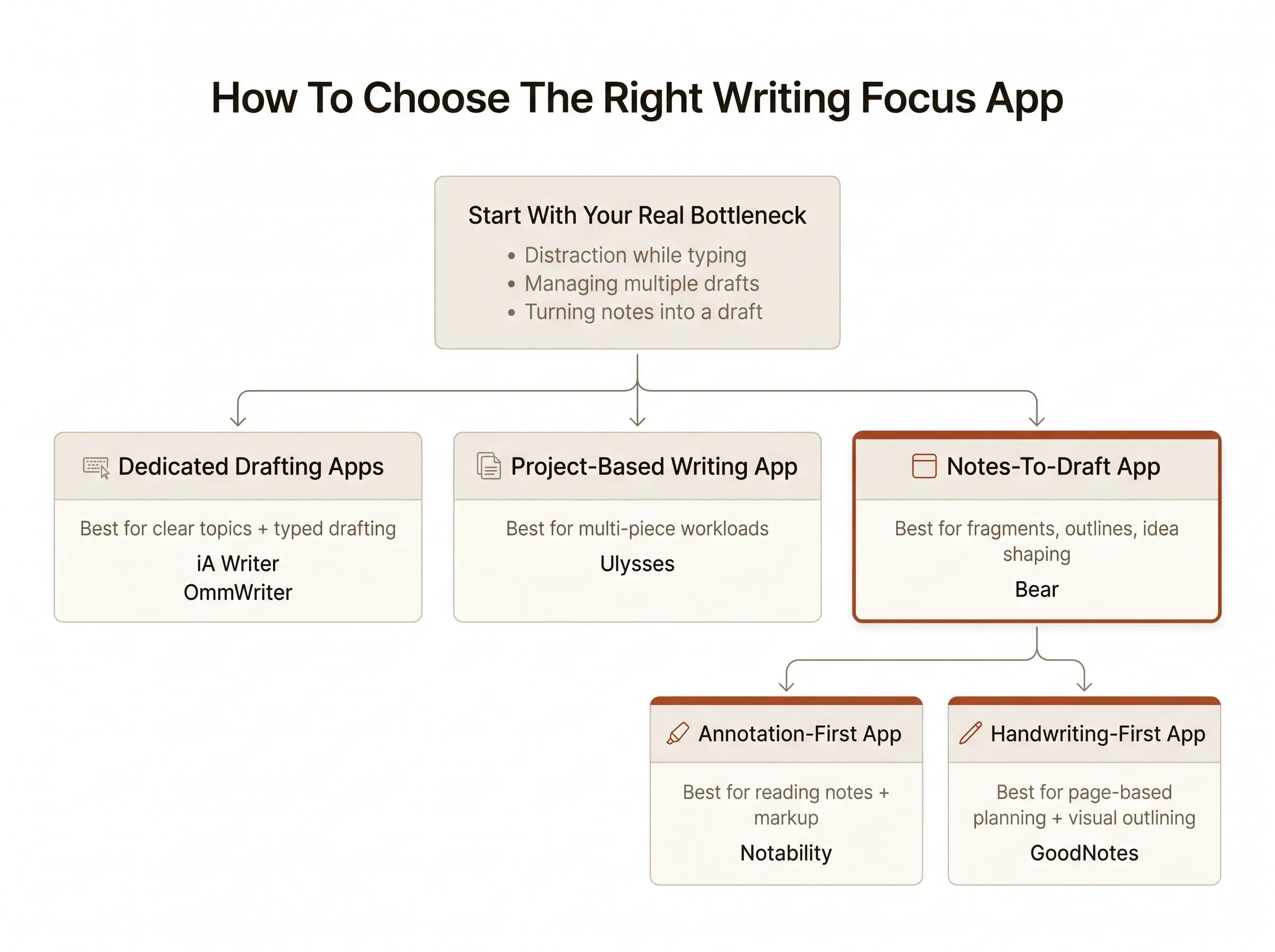
The right category is usually clearer than the right brand. Once you know your workflow, the choice narrows fast.
Choose a dedicated drafting app if you already know your topic, mostly type your drafts, and lose momentum to interface noise or browser drift. That's where iA Writer, Ulysses, and OmmWriter earn their place.
Choose a notes-to-draft app if your writing begins as fragments, research notes, or layered ideas that need shaping before they can become paragraphs. Bear is the cleanest fit in that lane.
Choose a handwriting or annotation-first app if you think on the page, outline by hand, or build work from notebooks and marked-up materials. Notability and GoodNotes both live there, with slightly different personalities.
A few use cases make the split clearer:
- academic essay from reading notes: Notability, GoodNotes, or Bear
- blog post from a clear outline: iA Writer or Ulysses
- personal essay or creative session: OmmWriter or iA Writer
- ongoing multi-piece workload: Ulysses
- idea-heavy, nonlinear capture: Bear
Most writing friction isn't laziness. It's tool mismatch. Once you stop forcing a sentence-first app onto a note-first brain, things get quieter.
How We Evaluated These Tools
We compared these apps as writing focus tools, not as interchangeable productivity systems. The evaluation focused on how well each option supports the stage of writing where a reader is most likely to need help.
We weighed five factors:
- Drafting focus: how directly the app supports staying with typed prose
- Cognitive quiet: how much the interface reduces competing decisions and visual noise
- Workflow fit: whether the app suits sentence-first drafting, project-based writing, idea development, or handwriting and annotation
- Session structure: how well the tool can support a clearly defined writing block and sustained attention
- Tradeoffs: what the app gives up in exchange for minimalism, atmosphere, organization, note capture, or handwriting support
We then compared the tools' roles across the same broad workflow: getting started, developing ideas, drafting, and managing multiple pieces of work. That is why some adjacent note-taking and handwriting apps appear alongside dedicated writing editors. They can be useful before the draft, even when they are not the strongest choice for uninterrupted prose.
The rankings reflect this overall fit for calm, deep writing rather than a single feature count. Because writing processes differ, the recommendations also identify where each app fits best and where another category may be more appropriate.
Conclusion
The best writing focus app depends less on raw features and more on how your writing actually begins. That's the part most roundups skip, and it's the part that usually decides whether a tool gets used after the first week.
If you want distraction-free drafting, iA Writer, Ulysses, and OmmWriter are the clearest picks. If planning, note-taking, or handwriting shapes the work before the draft, Bear, Notability, and GoodNotes are often more useful.
Calm deep work is not about squeezing harder. It's about reducing friction at the right stage.
Choose the app that matches your natural drafting style. Then test it for a week with one clearly defined goal per session. Keep the setup simple. Spend your energy writing, not managing the machinery around it.
Article Record
ReferencesPrimary sources used for this article
- Ulysses app
- Home - OmmWriter : OmmWriter
- FocusWriter
- WriterBlocks: Writing Focus App - App Store
- Ritemark - Markdown Editor with AI Agents | Ritemark
- Ulysses: Writing App - App Store - Apple
- Flowstate is the best app to force yourself to write without any distractions
- I turned my desktop into a distraction-free writing environment with these free tools
Update HistoryMeaningful revisions to this article
- Refreshed pricing information across six writing app listings to make cost comparisons easier.
- Added a “How We Evaluated These Tools” section to explain how the apps were assessed.