

Most plans fail because they start with a wish list, not a real day. Capacity based planning starts with the hours and attention you actually have after meetings, messages, and the 2:40 p.m. mental dip.
What matters is not filling the calendar neatly. It’s protecting one meaningful task, leaving room for the ordinary work, and learning where your estimates keep lying to you.
Start by looking for:
- Fixed commitments that quietly consume your focus time
- Tasks small enough to finish in one focused block
- A stop line that makes “done for today” believable
Why Most Daily Plans Feel Reasonable at 9 A.M. and Impossible by 3 P.M.
Most bad daily plans don't look bad in the morning. They look ambitious, neat, maybe even responsible. Then the day starts acting like a day.
Here's the usual problem: you make a long list, drop meetings on top of it, assume you'll think clearly for eight straight hours, and then treat the gap between plan and reality like a character flaw. It usually isn't. It's a planning flaw.
Traditional to do lists quietly reward optimism. They count tasks, not cost. A three-minute reply and a 90-minute writing session sit side by side like equals. They aren't. The list also ignores interruptions, decision fatigue, and the weird half-hours that disappear into setup, follow-up, and "quick" questions.
For students and knowledge workers, a lot of the day is invisible work:
- checking messages
- switching between classes, projects, or clients
- reviewing other people's work
- fixing small mistakes before they become bigger ones
- figuring out what the task even is before you can start it
That work still burns attention. It just doesn't look impressive on a checklist.
This is where overpacked planning gets expensive. Not just inefficient. Expensive. You end up context switching all day, reacting to whatever is loudest, and carrying the low-grade guilt of five unfinished important things at once. You were busy. You moved. But somehow the one thing that mattered most is still waiting.
We prefer a different standard: honest workday planning.
A good plan should survive contact with Tuesday.
The goal isn't to cram more in. It's to match work to actual capacity so the day stops quietly punishing you for being human.
What Capacity Based Planning Actually Means
Capacity based planning starts from a plain question: what can this day actually carry?
Not "what would be nice to finish." Not "what should fit if nothing goes sideways." Actual usable capacity. Time, yes, but also attention.
The simple definition
In practice, capacity based planning means you start with available time and attention first, then fit work into that limit. The order matters. Most people do the reverse and wonder why their plan collapses by lunch.
Capacity isn't just hours on the clock. If you have a seven-hour workday with two meetings, inbox cleanup, a class changeover, and support messages, you do not have seven hours for meaningful work. You might have three. On rough days, less.
It's useful to separate this from nearby methods:
- A to do list tracks intentions.
- Time blocking reserves calendar space.
- Capacity based planning checks whether the workload is realistic before you commit to it.
That last part is the difference. A beautifully blocked calendar can still be nonsense.
Use real units, not vague ambition
Good capacity planning uses units you can feel. Hours. Focus blocks. Half days. Percent of the day. Something repeatable.
We like focus blocks because they're concrete. If a task needs three blocks, that's different from saying "work on proposal." One is plannable. The other is a hope wearing office clothes.
At the team level, solid planning tools show both the people view and the work view. For personal planning, the same logic holds. Your plan should show two things at once:
- what your day can realistically support
- what the work actually asks for
And one more thing: realistic productivity is not 100 percent utilization. If every slot is full, you're already late. Real life always invoices you later.
The Hidden Hours That Shrink Your Day Before You Start
A lot of failed planning is just bad subtraction. People plan from gross time, not net time.
Start listing what usually gets left out:
- recurring meetings
- standups
- reviews
- partner syncs
- admin
- maintenance work
- training
- support requests
- leave or reduced availability
None of this is fake work. It's just the kind that disappears from self-congratulatory productivity systems.
A weekly example makes the point quickly. Someone can spend 12 hours in meetings, 2 hours in standups, 3 hours in reviews, and 2 hours dealing with interruptions. That's 19 hours gone. Suddenly the week has about 20 hours for actual execution, not 40.
That mismatch is bigger than most people admit out loud.
There's also a broader meeting problem. Knowledge workers can lose an average of 31 hours a week to unproductive meetings. Even if your situation isn't that bad, the message is the same: many work plans fail before focused work even begins.
The same distortion happens inside a single day. A calendar with "free" space often contains:
- recovery after meetings
- loose communication tasks
- decision lag
- setup time before deep work
- mental drag from whatever just happened
You can stare at two empty afternoon hours and still not have two hours of real focus capacity.
If your daily schedule keeps collapsing, the problem may be your math, not your discipline.
That's not an excuse. It's better. Excuses keep you stuck. Better math gives you a usable day.
| Item | Hours per week | Planning impact |
|---|---|---|
| Meetings | 12 | Subtract from gross time before estimating execution work |
| Standups | 2 | Recurring coordination time reduces usable capacity |
| Reviews | 3 | Counts as real work but not execution time |
| Interruptions | 2 | Unplanned time loss shrinks focus capacity |
| Total hidden hours | 19 | Time already gone before focused execution begins |
| Actual execution time left | 20 | Approximate weekly capacity for actual execution instead of 40 hours |
| Average time lost to unproductive meetings | 31 | Broader benchmark showing how meeting load can overwhelm planning assumptions |
How to Calculate Your Real Daily Capacity
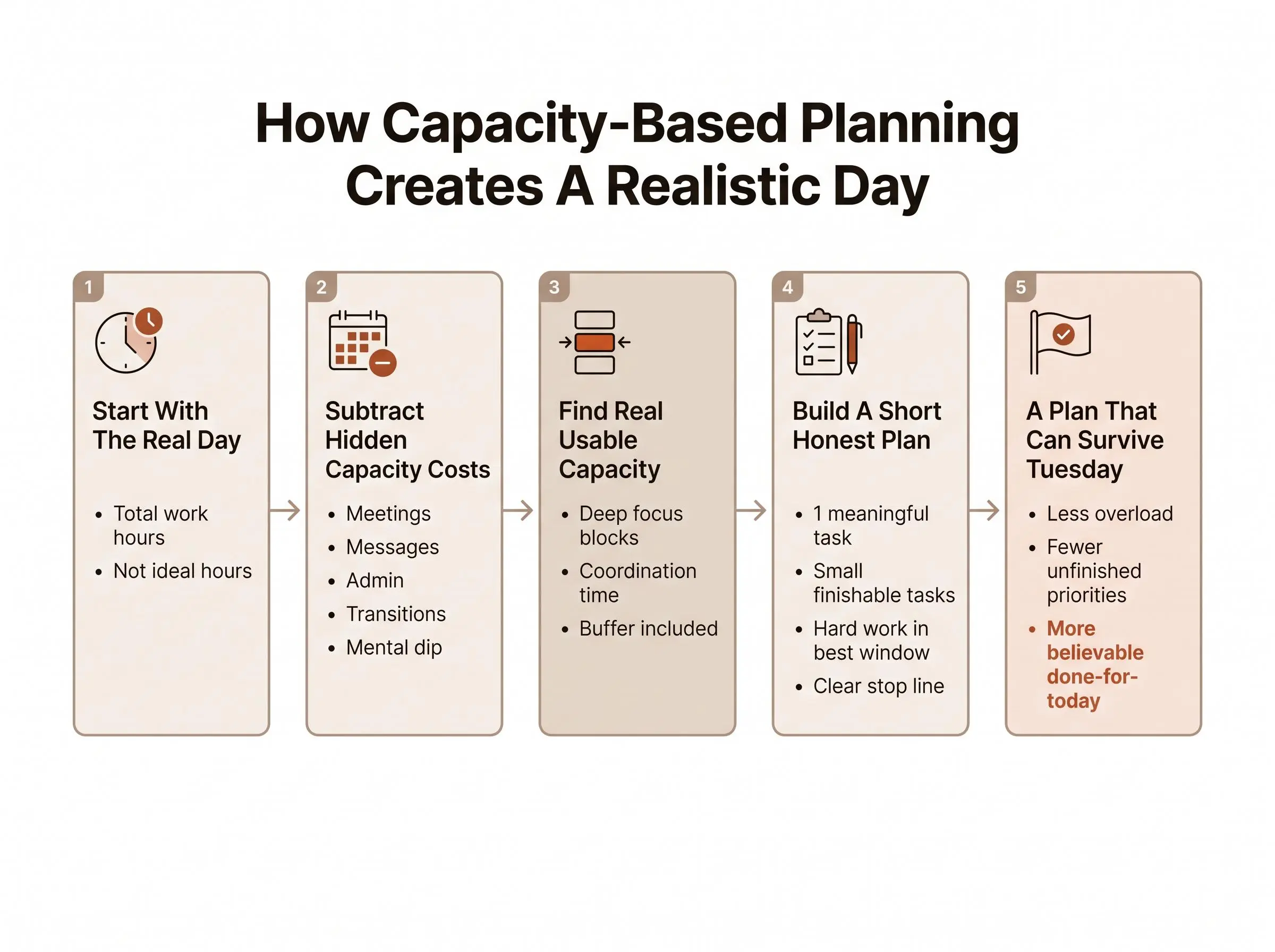
This doesn't need a complicated system. It needs honesty and a repeatable formula.
Use this:
Capacity calculation
- Total time
Start with total working time.
- Fixed commitments
Subtract fixed commitments.
- Recurring overhead
Subtract recurring overhead.
- Buffer
Subtract a buffer for interruptions and transitions.
- Remaining capacity
Plan against what remains.
If you work from 9 to 5, that gives you eight hours on paper. Now subtract a one-hour team meeting, 30 minutes of admin, 45 minutes of email, and a 60-minute buffer for context switching, surprises, and the little scraps of work that always appear. You're down to under five hours. Then ask how much of that is deep focus time. Maybe two or three blocks, if the day is kind.
Separate your capacity types
This helps more than people expect.
- Deep focus capacity for writing, coding, analysis, studying
- Coordination capacity for meetings, communication, review
- Light admin capacity for maintenance tasks and small cleanup
Treating all hours as equal is one of the fastest ways to build a fake plan. A 2 p.m. brain after three calls is not the same as a 9:30 a.m. brain with coffee and silence.
Choose units that match how you naturally think, then stick with them. If focus blocks make sense to you, use those. If half-hours feel more natural, fine. The point is consistency. Without that, you can't compare planned versus actual over time.
And keep the buffer.
People resist this part because it feels lazy. It isn't. If you plan every open slot, you've already overloaded the day. The paper may look tidy. Your nervous system will disagree by midafternoon.
Also track repeating constraints. Class schedules. Standing meetings. Review-heavy Thursdays. Predictable afternoon slumps. This is the base layer of how to make a realistic workday plan. Without it, you're decorating guesswork.
How to Make a Realistic Workday Plan Step by Step
Once you know your real capacity, building the day gets simpler. Not easy, exactly. Simpler.
A practical sequence
Day planning sequence
- Most-important task
Choose one most-important task.
Pick the thing that would make the day feel worthwhile even if the rest shifts around. - Fixed commitments
Add fixed commitments first.
Meetings, classes, appointments, deadlines. Build around the day you have, not the one you wanted yesterday. - Short list
Keep the list short.
Break work into session-sized chunks. "Draft intro" is better than "write report." - Real estimates
Estimate in real units.
Use hours or focus blocks based on previous experience, not optimism. Hope is not a planning tool. - Best attention window
Place hard work in your best attention window.
Usually earlier. Before inbox drift and meeting residue spread everywhere. - Support work
Add support work after the main work fits.
Admin goes in second. Not first. - Space between blocks
Leave space between blocks.
Breaks, notes, switching costs, minor surprises. They will happen whether you plan for them or not. - Stop line
Set a stop line.
Decide where "done for today" is. Optional tasks can stay optional.
This is how to make a realistic workday plan. It's also how to plan your day without overloading yourself. Most people aren't failing because they need more ambition. They need fewer lies in the setup.
A lightweight tool helps here if it keeps the structure tight. Our Daily Planner in Flocus is built around one most-important task, a deliberately short list, and estimates in pomodoro-style focus blocks. That's not for aesthetics. It's so the plan has enough friction to stay honest.
What a Realistic Daily Schedule Looks Like in Practice

A realistic daily schedule doesn't try to prove anything. It just matches attention to demand.
Example 1: meeting-heavy knowledge worker
- 9:00 to 10:30: protected work on the most-important task
- 10:30 to 11:00: email and meeting prep
- 11:00 to 1:00: meetings grouped together
- 1:00 to 1:30: lunch and reset
- 1:30 to 2:00: follow-up from meetings
- 2:00 to 3:00: smaller execution block
- 3:00 to 4:00: admin, replies, loose ends
- 4:00 to 4:15: shutdown review
Notice what's missing: fantasy.
Example 2: student schedule
A student might do one high-focus block on the hardest subject early, take a real break, then switch to reading or review once the sharpest attention has passed. Later in the day comes logistics: email, assignment checks, planning tomorrow, maybe discussion posts.
That's a realistic daily schedule. Hard thing first, lower-intensity work later, admin at the edge. Not six "study goals" stacked back to back like a punishment menu.
Example 3: reactive role with interruptions
If your job includes support requests or constant messages, define one protected block early. Then reserve explicit time for reactive work. Keep one flexible block unassigned for spillover.
That unassigned block often saves the day. People hate leaving time open until they have a day that needs it.
An aspirational schedule stacks important tasks one after another and pretends transitions don't exist. A realistic one accounts for fatigue, obligations, and the fact that your brain does not reboot cleanly between tasks. That's not laziness. It's accuracy.
How to Plan Your Day Without Overloading Yourself
Most overload starts before the calendar. It starts in the social brain.
You want to be helpful. You don't want to fall behind. You don't want to choose what won't get done today, because choosing feels final. So you keep adding. Then the day turns into a quiet argument with reality.
A few guardrails help:
- no more than one true priority
- don't fill every empty hour
- treat admin as real work
- group shallow tasks so they don't leak all day
- don't schedule recovery as if it's optional
Use two questions
A personal version of people view versus work view works well here.
- People view: what can I realistically carry today?
- Work view: which tasks deserve that limited capacity?
Those are not the same question. Most overloaded plans answer only the second one.
Renegotiate early when demand exceeds capacity. That's a grown-up move, not a failure. Silent slipping is worse. It burns trust and leaves you carrying work that was impossible from the start.
Constraint setting is part of planning. Not an annoying extra.
If you want a daily plan you can actually finish, stop treating every request like a moral obligation.
Use Estimate Versus Actual Time to Keep Planning Honest
Capacity based planning gets better only if you close the loop. Otherwise you're just repeating your favorite mistakes in a nicer layout.
There is a practical reason to compare estimates with records rather than trusting memory. In a natural-setting study of programming assignments completed across multiple days, students overestimated time spent in 78% of reports. The median report was 1.45 hours for every actual hour worked—a 45% overestimate. That does not mean every task will run 45% long; the study examined students and programming work, using keystroke-based estimates of time on task. But it does show why a planning system needs actual records: memory can distort even the basic input of how long work took.
At the end of the day, review a few things:
- which tasks took longer than expected
- which interruptions keep repeating
- whether meetings spread beyond their slot
- whether your most-important task got your best attention or your leftovers
Weekly review matters even more. Look for patterns:
- recurring underestimation
- time lost to maintenance work
- days when focus was unusually strong
- consistent mismatch between planned and actual capacity
Tracking time is not the same as learning from time. Plenty of people log hours and stay confused.
This is where using a planner and timer together helps. In Flocus, the Focus Timer runs from planned tasks, so your sessions attach to the work you meant to do. That estimate-versus-actual view exposes planning errors fast. A timer on its own can't do that. A spreadsheet often won't, because it lives too far away from the moment of work.
For readers who already own a compatible Muse headband, Flow Tracking adds another layer. It can show not just how long you worked, but when your focus quality was strongest. Useful if you're neurotech-curious, but still optional. Time tells you part of the story. Attention tells you the part people usually miss.
Turn Daily Capacity Planning Into a Weekly System
The best daily plans are usually built before the day starts. Often before Monday starts.
Weekly planning gives you a chance to mark the known constraints early:
- leave
- training
- support duty
- recurring meetings
- review-heavy days
- admin deadlines
That matters because the work that doesn't visibly ship still takes real capacity. Ignore it on Monday, and by Thursday you're "mysteriously" overloaded. It's rarely mysterious.
A short weekly pass can prevent a lot of daily failure:
- protect some execution windows before the week fills up
- don't stack demanding work on meeting-saturated days
- spot overload before it turns into missed deadlines or burnout
Ask a few blunt questions:
- where did my time actually go?
- what repeatedly steals capacity?
- which assumptions about my availability were wrong?
- what should next week's plan account for earlier?
We don't think the goal is perfect control. Most weeks won't give you that anyway. The goal is a calmer system that gets more trustworthy over time. That's enough.
Common Mistakes That Break Capacity Based Planning
A few mistakes show up again and again, even with people who care about planning.
- treating presence like availability
- assuming all work hours are equal
- forgetting recurring work because it feels too ordinary to count
- planning to 100 percent occupancy
- estimating at project size instead of session size
- using a timer with no planning layer, or a spreadsheet with no execution feedback
- refusing to reduce scope when the day is already full
Some of these look disciplined from a distance. They aren't. They're just polished forms of denial.
Here's the practical correction: if the plan keeps failing, lower the load before you blame yourself.
Conclusion
Capacity based planning starts with reality, not optimism. That's why it works. A realistic workday comes from counting the hidden work, protecting one meaningful priority, leaving buffer, and checking estimates against what actually happened.
Tomorrow, start with available focus capacity first. Then choose the smallest set of work that genuinely fits.
If a disconnected timer has never helped you trust your day, try a planning-first approach with Flocus. Your tasks, focus blocks, and end-of-day review live in the same place, which is often the missing piece. Not more pressure. Just a day that's honest enough to finish.
Article Record
ReferencesPrimary sources used for this article
- "Capacity Planning Without Spreadsheets From Hell"
- Time-on-task estimation for tasks lasting hours spread over multiple days
- Multitasking: Switching costs
- A field experiment on the effects of weekly planning behaviour on work engagement, unfinished tasks, rumination, and cognitive flexibility
- Launch notes: What’s new in Jira | Atlassian | Individual capacity
- This article appeared in a journal published by Elsevier. The attached