Picking a free daily planner app gets weird fast. Half of them are just to-do lists with a timer glued on, and the rest bury today's work under tabs and streaks.
The good ones make today legible. You can set a real priority, see what matters now, and stop pretending a 14-item list is a plan.
We cut this shortlist down after actual use. These are the options worth your attention.
Show 5 more productsShow fewer products
1. Daily Planner
- Calm priority-first daily structure
- Pomodoro estimates improve planning accuracy
- Focus Ring creates real closure
- Useful browser-based low-friction access
- Free tier feels genuinely usable
- Free focus time is limited
- Less suited to complex scheduling
- Muse insights appeal to niche users
If you want a free daily planner app because plain timers haven't fixed the real problem, this is the one to look at first. The issue usually isn't starting a 25 minute countdown. It's deciding what deserves that countdown in the first place.
We built Daily Planner around a narrow method on purpose:
- pick one most-important task
- keep today's list short
- estimate the work in Pomodoros before you begin
- log what actually happened
- close the day with a visible progress loop
That last part matters more than people expect. A lot of apps help you start work. Fewer help you finish the day with any sense of where it went. Our Focus Ring, streaks, reflections, and weekly or monthly insights give the day edges. Without edges, work expands and memory gets fuzzy.
Minutes are cheap. Honest planning is harder.
The estimate-versus-actual tracking is the quiet workhorse here. Most people underestimate by habit, not by accident. They think a task is "two Pomodoros" until it becomes five and eats the afternoon. When the app shows that pattern back to you, planning gets less aspirational and more useful.
Compared with TickTick or SparkDay, this is more planning-led. Those tools can support focus, but the center of gravity is different. Here, the planner comes first and the timer serves it. Against Structured, we're less about laying every hour onto a visual timeline. Against Any.do or Saner.AI, we're less interested in automating your day and more interested in helping you make one deliberate decision well.
It's browser-based, which sounds boring until you realize boring can be good. Open it on a laptop or phone, no heavy setup, no real friction tax. For the niche group that wants measured focus, there's optional Muse headband support for real-time flow tracking. Useful if you're curious about what focused work actually felt like physiologically. Not required. The planner works perfectly well without hardware.
The free version is meant to be genuinely usable, not a demo wearing a fake mustache. Free forever includes one 30 minute focus session daily. Pro is there for heavier use and deeper insights, not basic dignity.
2. SparkDay
- Combines planning and focus timer
- Visual day view aids follow-through
- Habits and journaling reduce app switching
- Supports routines alongside deep work
- Can feel expansive for minimalists
- Wellness features may distract
- Less strict priority focus
SparkDay makes sense for people who want one app to hold more of daily life together. Not just work, but the surrounding machinery too.
Its appeal is the combination: visual day planning, focus timer, habits, journaling, and even step tracking. If you're tired of bouncing between a planner, timer, habit tracker, and notes app by the second afternoon, that consolidation has real value. Less switching often means less leakage.
Where Daily Planner stays intentionally minimal around one top priority, SparkDay is broader and more lifestyle-oriented. That's either a relief or a problem, depending on your temperament. Some people need the full day visible in one place to behave like adults. Others open an expansive dashboard and immediately start tending to the dashboard.
A few cases where it fits well:
- planning study sessions alongside meals, movement, and sleep
- keeping a basic routine visible while still protecting deep work blocks
- replacing a loose pile of wellness and planning apps with one calmer system
It also sits in a useful middle ground. More planner-centric than HelloHabit. More routine-and-wellness adjacent than TickTick. And importantly, it supports focused work without asking you to hand your day over to AI scheduling logic.
If your best days come from seeing the whole shape of life, SparkDay is a credible free focus app with planner features. If you prefer a very short list and one clean target, it may feel like one room too many.
3. Any.do
- Guided daily planning feels approachable
- Tasks and calendar unify clearly
- AI rescheduling adapts to changes
- Good for fast next-step decisions
- Focus timer features feel secondary
- Less ideal for deep work blocks
- Task organization less deep than Todoist
Any.do is the familiar option for people who want guidance without rebuilding their life around a new system. That's not a small thing. Familiarity lowers dropout.
Its daily view pulls tasks and calendar together in a way that helps busy generalists make faster decisions. Add AI-assisted suggestions and rescheduling, and it starts to act less like a storage bin and more like a day manager. For users whose plans get hit by meetings, errands, and last-minute changes, that adaptability is the point.
Here's where it lands well:
- you want help deciding what to do next
- your days shift often enough that manual planning gets stale fast
- you want an accessible entry into AI-assisted planning, not a complicated machine
Compared with Motion-style scheduling tools and more AI-heavy options like Saner.AI, Any.do feels easier to approach. Compared with Todoist, it's more day-to-day scheduling oriented, while Todoist tends to win when task organization gets deep and sprawling. Against Daily Planner, the tradeoff is clear: Any.do gives you more automation and a wider task-calendar blend, while Daily Planner gives you a more intentional one-priority focus ritual.
If you're looking specifically for a daily planner with focus timer emphasis, this may feel slightly indirect. It helps organize and adapt the day well. It doesn't center work blocks the way a dedicated focus planner app does. For many people that's fine. For others, it's why the list still grows while the real work waits.
4. Todoist
- Scales cleanly across many projects
- Fast capture keeps tasks from slipping
- Strong labels and recurring task support
- Cross-platform access stays dependable
- Lightweight or deeply structured workflow
- Less guided daily scheduling flow
- No integrated Pomodoro-first experience
- Needs your own focus routine
Todoist has lasted for a reason. It respects structure without forcing drama into it.
For readers who already think in projects, labels, recurring tasks, and clean task architecture, it's one of the best free daily planner app options simply because it scales without getting messy. You can keep it lightweight, or turn it into a real operating system for coursework, freelance work, or multi-project knowledge work.
What it does especially well is capture and organization:
- fast entry when something needs to be saved now
- dependable project structure when the workload spreads
- cross-platform support that keeps the system close at hand
Compared with Any.do, it's less guided in daily scheduling but often stronger once your work spans many parallel threads. Compared with TickTick, it's more task-management-led and less centered on an integrated Pomodoro experience. Compared with Structured, it's much less about seeing a visual day unfold and more about maintaining a trustworthy system over time.
That last point matters. A lot of people don't need more features. They need a place where tasks stop slipping through floorboards.
The tradeoff is also straightforward. If you want a built-in free focus planner feel, Todoist may need help from your own routine. It holds work beautifully. It doesn't automatically create the kind of narrow focus ritual some people need to actually do it.
5. TickTick
- Built-in planner and Pomodoro combo
- Tasks and calendar stay connected
- Reduces app-switching friction
- Strong out-of-box focus workflow
- Feature depth can feel distracting
- Less priority-led than simpler planners
- Many views may add drag
TickTick is probably the clearest planner and timer free combo in this group. If your basic requirement is "let me plan the day and start a focus block without opening something else," it earns its spot fast.
The practical strength here is integration. Tasks, calendar views, and Pomodoro functionality live together closely enough that focused work can happen in the same place the plan was made. That's a big deal for people who lose momentum during transitions. Friction hides in app switching more than most productivity advice admits.
Compared with Todoist, TickTick is more ready for focus sessions out of the box. Compared with Daily Planner, it's richer in features but less opinionated about choosing one most-important task. Compared with SparkDay, it feels more classic productivity and less blended with habits or journaling.
This makes TickTick a strong pick for readers specifically searching for a daily planner with focus timer support. You can feel the category fit right away.
A small caution, though. Feature depth can quietly become a side hobby. Some people do better with a calmer method because too many views, lists, and settings create just enough drag to avoid the hard task. Useful tool. Not always a quiet one.

6. Structured

- Clear timeline-based daily planning
- Makes time blocks feel believable
- Shows gaps and schedule collisions
- Great for students and professionals
- Less overwhelming than deep systems
- Limited focus timer emphasis
- Less suited to complex task systems
- Timeline style can feel rigid
Structured is for people who don't trust lists until those lists sit somewhere on a clock. That's a real work style, not a flaw.
Its defining advantage is the timeline. Instead of holding today's work in a traditional task stack, it lets you see the day unfold block by block. For students planning classes and study sessions, or professionals trying to avoid overload by physically placing work into the day, that visual framing can make plans feel more believable.
A visual schedule helps when:
- you overcommit on paper
- you need to see gaps and collisions clearly
- you follow plans better when time has shape
Compared with Morgen-style schedule-led tools, Structured feels more personal day-view oriented. Compared with Todoist and TickTick, it's less about deep task systems and more about visual guidance. Against Daily Planner, the difference is simple: Structured is better if you think in time blocks first. Daily Planner is better if you think in priorities first.
That distinction sounds subtle until you've used both. It isn't subtle at 2:15 p.m.
If you're after a free focus app with planner logic, check how much timer support and session tracking you actually need. Some readers mainly need a visible day. Others need the day tied to focused work sessions and review. Different problem, different tool.
7. Saner.AI

- Turns scattered notes into priorities
- Helpful for research-heavy workflows
- Context-aware planning feels intelligent
- Good fit for mentally noisy days
- AI-first approach can feel heavy
- Less ideal for simple timer planning
- May add setup and abstraction
Saner.AI is for knowledge workers whose workload isn't just tasks. It's notes, half-formed ideas, research fragments, and context spread across the day like confetti.
That makes its AI angle more interesting than simple auto-scheduling. The value is in turning mental noise into something actionable. If your work includes writing, strategy, research, or synthesis, the bottleneck often comes before scheduling. You first need help seeing what matters inside the mess.
Compared with Any.do, Saner.AI feels more knowledge-work and context oriented, while Any.do is more mainstream and broadly approachable. Compared with Motion-style AI planning, it can make more sense for readers who want thinking support as much as calendar support. Against Daily Planner, the split is philosophical: Saner.AI helps generate and prioritize from complexity, while Daily Planner assumes you'd rather run a simple, intentional ritual yourself.
That means it's not for everyone. Readers looking for a pure planner and timer free setup may find AI-first planning heavier than necessary. Sometimes you don't need help interpreting your day. You need fewer moving parts and one honest commitment.
Still, for mentally noisy work, "fewer moving parts" can be wishful thinking. In that case, AI assistance stops being a gimmick and starts being practical.
8. HelloHabit

- Strong habit-first daily structure
- Useful reminders and recurring cues
- Combines journal, notes, timers
- Supports consistent morning routines
- Can feel expansive for focus
- Less classic task-planning depth
- May be more than needed
HelloHabit works best when your focus problem is really a routine problem wearing a fake mustache. A lot of people don't need another task list. They need their mornings to stop unraveling.
It combines habit tracking, reminders, calendar, notes, journal, and timers into one routine-led system. That makes it useful for building repeatable days around studying, exercise, sleep, and focused work, especially when consistency matters more than squeezing output from a single session.
It fits well for:
- ADHD-friendly routines with repeated cues
- morning planning rituals
- recurring work blocks that need support from surrounding habits
Compared with SparkDay, it's another broader daily-life planner, but with heavier habit emphasis. Compared with TickTick, it's far more routine-led than classic task planning. Compared with Daily Planner, it wins when the real goal is consistency scaffolding, while Daily Planner is stronger for single-priority work sessions and reflective planning.
If you want the cleanest possible focus planner app, this may feel expansive. But if your work keeps failing for the same routine reasons, "expansive" might just mean "finally addressing the actual problem."
How to Choose the Right Free Daily Planner App
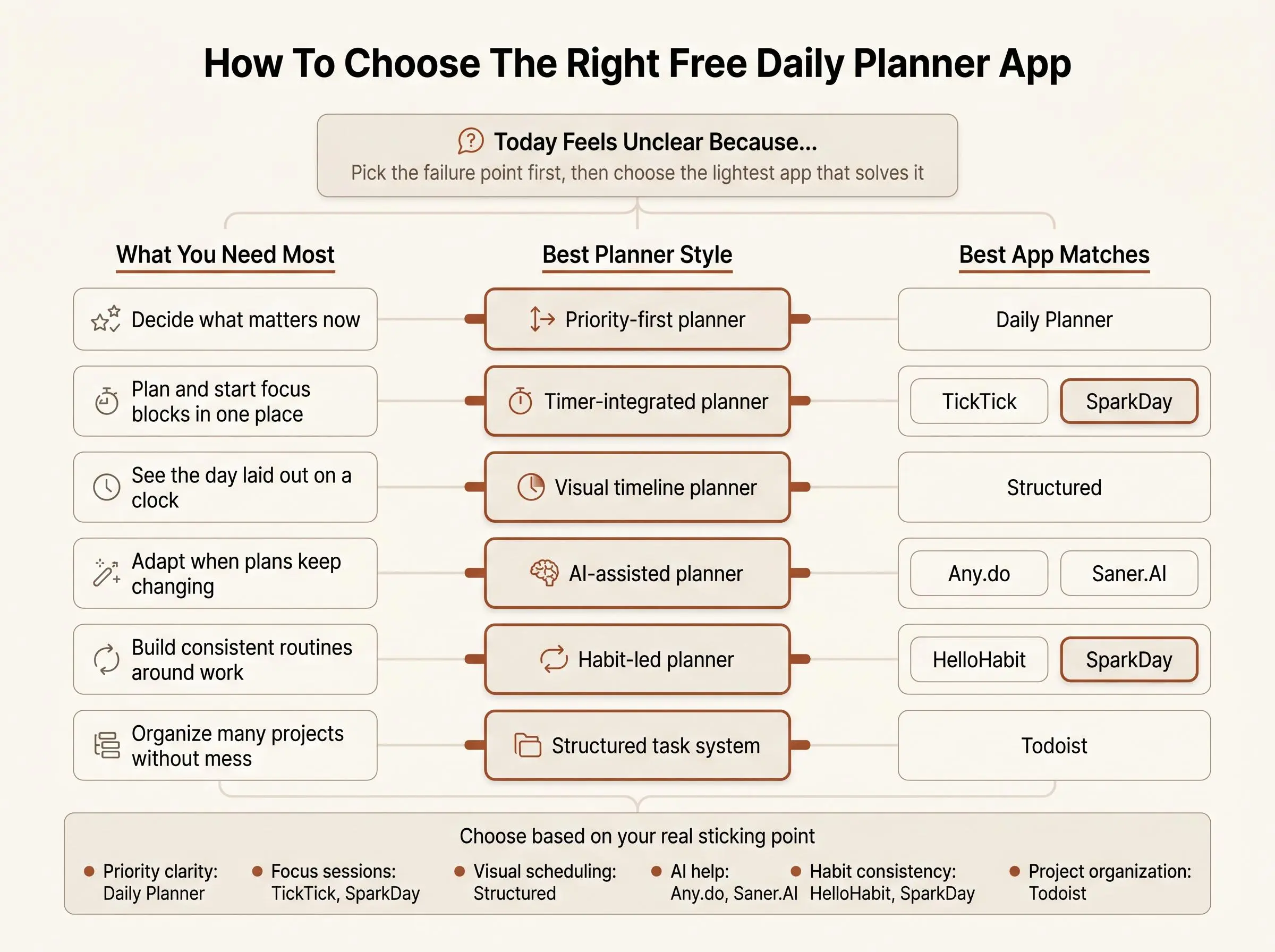
The real choice isn't between brands. It's between failure points. Do you need help deciding what matters, seeing your schedule visually, staying consistent with routines, or automating the day when it changes under you?
A simple way to sort the field:
- Priority-first planners for calm execution: Daily Planner
- Timer-integrated planners for focused work blocks: TickTick, SparkDay
- Timeline planners for visual scheduling: Structured
- AI-assisted planners for shifting workloads: Any.do, Saner.AI
- Habit-led planners for routine building: HelloHabit, SparkDay
Then look at a few practical filters:
- Does the free version feel usable in real life, or like a waiting room?
- Is there a built-in focus timer, or only task management?
- How much setup is required before the app becomes helpful?
- Does it work where you'll actually use it: phone, desktop, browser?
- Does it make today clear, not just store everything?
- Can you review the day and learn from it afterward?
Tradeoffs matter here. More features often mean more friction. AI can save planning time, but it can also add abstraction between you and the work. Visual timelines help some people commit, while others feel trapped by them. Habit ecosystems are excellent when consistency is the issue, and distracting when the actual problem is deep work avoidance.
Pick the lightest tool that still solves your real planning failure point. Not the fanciest one. Not the one with the loudest homepage.
What Actually Makes a Daily Planner With Focus Timer Stick
Most planner apps are decent at capture. That's not the hard part. The hard part is building a believable plan for the next few hours.
The habits that make a free focus planner stick are not glamorous:
- one clear priority
- a short, realistic daily list
- time estimates before starting
- focus blocks tied to real tasks
- a visible sense of completion at day's end
That's why a free focus planner often works better than a plain Pomodoro app. A timer-only app counts sessions. A to-do app holds tasks. A planner-plus-focus tool connects intention, time, and review. That third model is where follow-through usually improves.
Calm clarity beats hustle aesthetics.
For this audience, that's not branding. It's survival. If you've already tried study dashboards and timer apps and still finish the day feeling oddly busy and oddly blank, the missing piece is usually planning logic, not another countdown circle.
And the best planner is the one you can reopen tomorrow without resistance. If the system starts to feel morally exhausting, it's done.
Which Type of Focus Planner App Fits Your Work Style
Different work styles break in different places. Choose accordingly.
For students
Visual schedules and timer-integrated planners usually work well because they make study blocks concrete. Structured, TickTick, SparkDay, and Daily Planner all fit here, with different flavors. If your challenge is seeing the day, lean visual. If your challenge is starting the hard block, lean timer-first or priority-first.
For knowledge workers juggling multiple projects
Task architecture and AI-assisted prioritization matter more once the workload sprawls. Todoist, Any.do, and Saner.AI make the most sense here. The question is whether your chaos is structural or contextual.
For people rebuilding consistency
If the issue is irregular routines, habit and reminder systems help more than prettier task lists. HelloHabit and SparkDay are the obvious fits. Repetition is often the treatment.
For readers who dislike complicated systems
Use the smallest method that gives you one clear daily target. Daily Planner fits this best. Fewer decisions, less drift.
For neurotech-curious deep workers
If you want to go beyond counting minutes and measure focus more directly, Daily Planner stands out because of optional Muse support. That's niche, yes. But for some readers, measured focus is more interesting than guessed focus.
The right app depends less on the longest feature list and more on whether it matches how you naturally work when you're tired, busy, and slightly annoyed. Which is to say, your actual life.
Conclusion
The best free daily planner app isn't the one with the most features. It's the one that makes today feel clear enough to start and contained enough to finish.
The strongest fits are pretty distinct:
- calm priority-first planning: Daily Planner
- all-in-one focused daily routine: SparkDay
- mainstream AI-assisted planning: Any.do
- structured task management: Todoist
- built-in planner and timer free workflow: TickTick
- visual day planning: Structured
- context-aware AI support: Saner.AI
- habit-centered planning: HelloHabit
A practical next step is simple. Pick the two that match your actual sticking point, use each for a few real workdays, and keep the one that helps you start faster and end the day with less mental residue.
That last part is the test. Not whether the app looks capable. Whether you feel more capable after using it.
Article Record
ReferencesPrimary sources used for this article
Update HistoryMeaningful revisions to this article
- Updated pricing details for eight daily planner apps to make free-plan information easier to compare.
- Added a comparison section to help readers evaluate daily planner apps more quickly.