

A focus planner app sounds simple until you try a few and realize half of them are just timers wearing nicer clothes.
What matters is whether the app helps you pick the right task, stay with it, and see where the time went. Nice visuals don't save you if your day still disappears by 4:17.
We cut the list hard. These are the options worth your attention.
Show 5 more productsShow fewer products
1. Daily Planner

- Planning-first daily workflow
- Clarifies one top priority
- Pomodoro estimates improve realism
- Helpful end-of-day closure
- Weekly goals connect daily work
- Light on project management
- Muse layer feels niche
- Less ideal for teams
This is the best fit for people who don't need another timer staring back at them. They need help deciding what deserves the timer in the first place.
Our Daily Planner is built for students and knowledge workers who want a free focus planner that starts with one most-important task, keeps the list short, and gives the day a proper finish. Not a sprawling system. Just enough structure to stop drift.
What changes in real use is the order of operations:
- choose the one task that matters most
- keep the rest of the list deliberately short
- estimate the work in Pomodoros before you begin
- run focused sessions against that plan
- close the day by finishing your Focus Ring and reviewing what actually happened
That sounds simple because it is. Simple is not the same as shallow.
A lot of planner with focus timer tools are really timer apps with a task field attached. Ours is planning-first. The timer supports the plan, not the other way around. That matters by the second afternoon, when novelty has worn off and you're back to making tradeoffs with limited energy.
A few details make the method hold up:
- browser-based on laptop or phone, so there's no heavy setup ritual
- weekly goals link daily work to something larger
- every focus block compares estimated versus actual time
- end-of-day closure is visible, not vague
- weekly and monthly recaps are based on real days, not wishful thinking
The estimate versus actual layer is more important than it looks. Most people aren't bad at working. They're bad at guessing. A planner that never corrects your time assumptions quietly trains you to overcommit.
For neurotech-curious readers, Muse support adds an optional measured-focus layer. That's optional by design. The core value should stand on its own as a daily planning app for deep work, and it does.
This won't suit everyone. If you want dense project management features, dependency views, or a system to run a team, it's not that. It's calmer than that. More method, less machinery.
Focus doesn't usually fail in the session. It fails before the session starts.
2. Focus To-Do
- Direct timer-to-task accountability
- Cross-platform workflow stays consistent
- Customizable Pomodoro sessions
- Tracks focus time by task
- Good fit for execution discipline
- Limited daily reflection tools
- Can feel a bit mechanical
- Less help with prioritization
Focus To-Do makes the strongest case for people who already know their tasks and mainly need execution discipline. If your problem is not priority confusion but follow-through, it's a practical option.
Its main strength is direct timer-to-task linkage. You pick a task, start a session, and the app logs those minutes against real work instead of letting them float off into a generic total. That sounds obvious. It isn't common enough.
In practice, this makes it useful for task planning with focus sessions because each block answers a basic question: what was this time for? For many users, that alone clears up a lot of end-of-day fog.
It tends to fit people who want:
- a customizable Pomodoro timer
- built-in task management
- cumulative focus tracking by task or project
- a cross-platform setup that follows them between devices
Compared with more timer-centered tools, it's more accountable. Compared with planning-first tools, it's more utilitarian. That's not a criticism. Sometimes a clean workhorse is exactly the point.
Where it falls short is in reflection and daily framing. If you need help narrowing to one clear priority, or you want the app to give the day a visible arc from plan to review, Focus To-Do may feel a bit mechanical. It tracks the work well. It doesn't necessarily shape the day.
That makes it a better fit than a free daily planner app built around ritual if your tasks are already defined and your real gap is staying attached to them long enough to finish.
3. Forest
- Makes distractions feel less tempting
- Visual sessions build focus habits
- Very easy to start using
- Good for students and study blocks
- Limited daily planning depth
- Weak for vague task lists
- Little review or insight data
Forest is for people who need a little friction between themselves and distraction. Not a whole system. Just a nudge with consequences.
Its appeal is obvious once you use it. Instead of treating focus as a sterile countdown, it turns the session into a visible commitment. That visual reinforcement is why it sticks with students especially well. You don't need to learn a method before the app becomes useful.
It works best as a lightweight habit builder:
- timed focus sessions
- simple task accountability
- strong visual reinforcement for staying off distracting apps
The tradeoff is equally clear. Forest helps you stay with the work block. It does much less to help you decide which work block is worth doing. For some people, that's enough. For others, it's how they end up having a full day that felt disciplined and still moved the wrong things forward.
That's the difference between a focus tool and a focus planner app.
If you're comparing it with more planning-driven options, Forest is simpler and friendlier, but it won't give you estimate-versus-actual feedback, weekly review depth, or much help when your task list is vague. It is better understood as a session companion than a full daily planning app for deep work.
Still, there's a reason it remains popular. A lot of people don't need philosophy. They need to stop checking their phone for 25 minutes.
4. Focusmo

- Personalized schedules fit real energy
- Helpful for time blindness
- Better guidance than generic timers
- Adapts to variable attention patterns
- May feel overly tailored
- Extra setup versus simple timers
- Less universal than broader planners
Focusmo is more specialized, and that's exactly why some people will get more from it than from broader tools. If your focus is inconsistent, your energy swings, or task initiation is the real problem, generic timer apps can feel oddly insulting.
Its method starts with personalization. Instead of assuming one ideal session rhythm, it asks about concentration length, task-switching habits, energy peaks, and other patterns that affect how your day actually behaves. Then it uses that to shape a more realistic schedule.
That makes it especially relevant for readers looking for a free focus planner or daily planning app for deep work that adapts to them instead of lecturing them.
Where it earns its place
Focusmo is strong when you need help with:
- variable attention and time blindness
- building a schedule around real energy patterns
- planning guidance, not just a session tracker
- ADHD-oriented support without reducing everything to motivation
It's more adaptive than conventional timer-first tools. It's also more tailored than many people need. If your work rhythm is already stable and you mainly need a clean timer or task logging, the personalization layer may feel like extra ceremony.
Still, for the right user, that ceremony is not fluff. It's diagnosis.
Compared with broader planning tools, Focusmo is less calm and universal in method, but more explicit about the messier realities of focus. Compared with habit tools like Forest, it targets planning around variability rather than motivation inside a block.
5. Focus Keeper
- Simple Pomodoro routine
- Very low setup friction
- Good for repeatable study blocks
- Clean cadence for deep work
- Limited planning depth
- No strong task linkage
- Weak review and goal features
Focus Keeper is what many people think they want when they search for a focus app: a straightforward Pomodoro routine, not much setup, no lifestyle sermon attached.
There is real value in that. If session structure is your main missing piece, a simple timer can be enough to make deep work repeatable.
Focus Keeper is best seen as a clean companion for:
- Pomodoro work and break cycles
- study blocks that benefit from familiar rhythm
- users who want less setup and fewer decisions
It compares well against more complex tools when complexity itself is the friction. You open it, start, and go. No architecture. No overbuilt planning layer.
The limitation is not subtle. It is stronger as a timer habit tool than as a full focus planner app. If you need weekly goals, task-level linkage, or a proper review loop, you'll start to feel the edges quickly.
That doesn't make it weak. It just means you should be honest about the job. A timer can enforce cadence. It can't tell whether the cadence is attached to meaningful work.
6. Focus Friend

- Makes focus sessions feel rewarding
- Strong motivation for consistency
- Visual progress reinforces habits
- Personalization adds emotional payoff
- Weak on planning and priorities
- Gamification may not suit everyone
- Less useful for reflective reviews
Some people do not have a planning problem. They have a showing-up problem. Focus Friend is built for that reality.
Its center of gravity is progression. Deep-work sessions feed into rewards, currency, and a visual world you build over time. That makes focus feel less dry, which sounds trivial until you notice how many sterile tools get abandoned after a week.
A motivation-led app can be the right answer when consistency is the real bottleneck. Focus Friend leans into that with:
- deep-work sessions tied to in-app rewards
- progression currency
- personalization through building and decorating
- a companion or environment that reflects accumulated effort
It's more overtly gamified than Forest. It is also less planning-oriented than a planner with focus timer support built around priorities and review.
That distinction matters. If your actual problem is unclear priorities, rewards won't fix it. They may just help you work hard on whatever happens to be in front of you. But if you already know what matters and keep failing to return to it, a visible payoff loop can be surprisingly effective.
An experienced operator would treat this as a retention tool, not a planning tool. Used that way, it makes sense.
7. Tide

- Calmer focus atmosphere
- Accessible for broad audiences
- Useful timer-based study support
- Good middle ground experience
- Limited task accountability
- Less deliberate daily planning
- Not especially sticky or motivating
Tide sits in the middle of the pack for a reason. It appeals to people who want a softer focus environment without committing to a strict planning system.
It is a broad, widely used focus and study app with timer-based planning features, and that broadness is both its strength and its limitation. It feels accessible. It also means it rarely pushes hard in any one direction.
Tide tends to work well for people who want:
- a general focus atmosphere
- timer-based support for study or work
- something calmer than a bare countdown
Compared with task-linked tools, it is less accountable. Compared with planning-first tools, it is less deliberate. Compared with gamified apps, it is less sticky. That may sound like faint praise, but plenty of users want exactly that middle ground.
If you're still figuring out whether you need a free daily planner app or just a more usable focus routine, Tide is a reasonable place to test your preferences. Just don't mistake broad appeal for depth. It supports focus. It doesn't necessarily sharpen your decisions.
8. Pomodone App
- Pomodoro sessions tied to tasks
- Good fit for execution workflows
- Keeps timing connected to work
- Useful alternative to standalone timers
- Little guided prioritization help
- Best if tasks are preplanned
- Less reflective than planning-first apps
Pomodone App belongs on this list because it solves a practical problem cleanly: keeping Pomodoro timing connected to actual tasks.
That makes it relevant for users who already think in tasks and want the timer to reinforce that workflow instead of living off to the side like a kitchen appliance.
Its fit is straightforward:
- Pomodoro-focused session structure
- task-management linkage
- better relevance to focus planning workflows than standalone timing apps
In the lineup, it sits close to Focus To-Do in spirit. Both are strongest when you want timer-task coupling. The differences usually come down to interface preference, workflow feel, and how much task structure you already bring with you.
Where Pomodone App is less compelling is guided prioritization. It does not really aim to decide the day for you. It assumes you have a task mindset already. If you don't, the app can feel precise in the wrong place.
This is common with execution-oriented tools. They help you move faster once pointed in a direction. They do not always help you choose the direction.
How to Choose the Right Focus Planner App
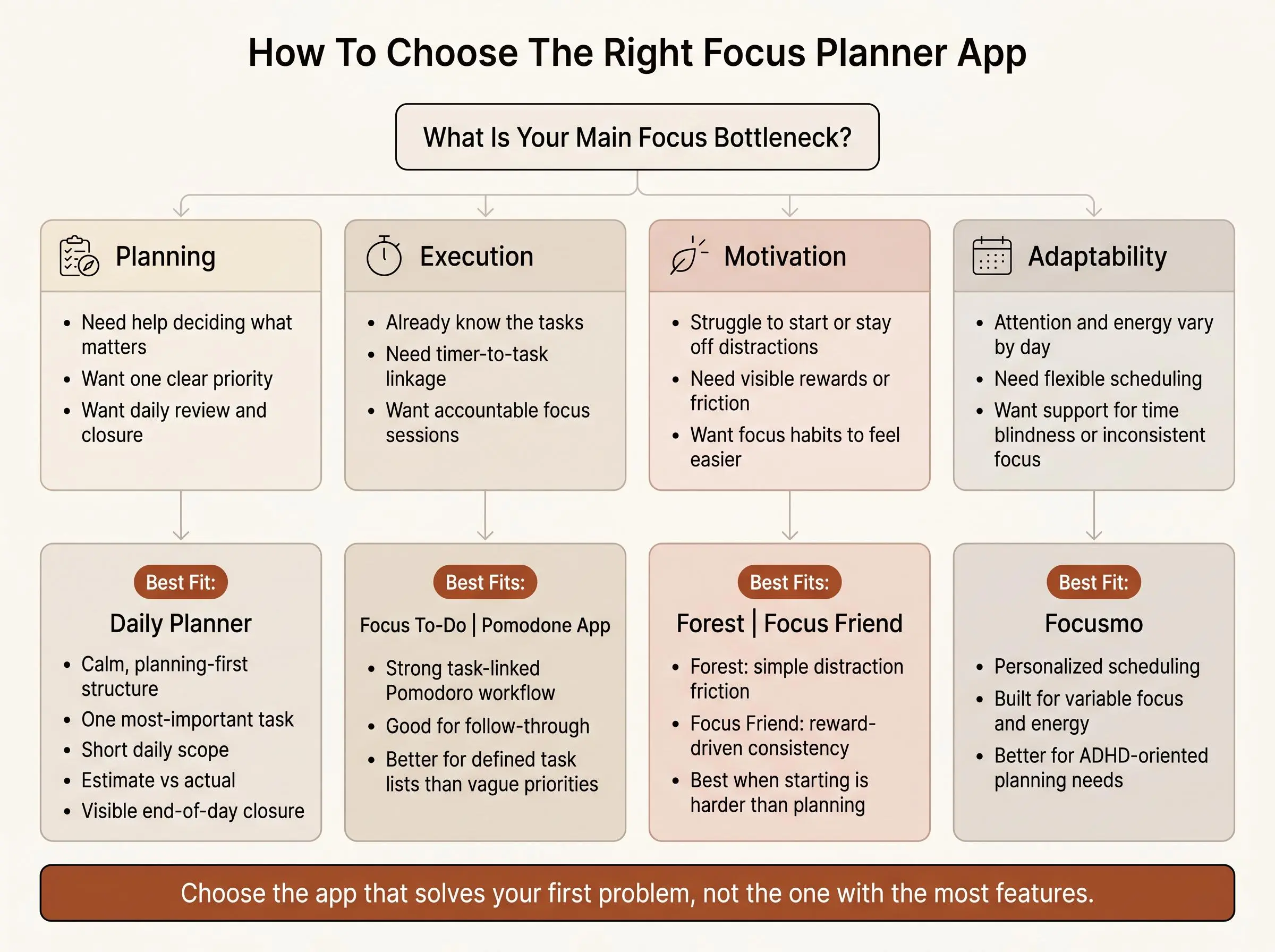
Most readers are not really choosing between apps. They're choosing which problem to solve first.
Do you need help deciding what to work on, staying with the work once started, or reviewing where the day went? Many apps solve one of those three. Very few cover all of them well.
Here's the simplest way to sort the field.
Start with the bottleneck
- Planning-first vs timer-first: If vague priorities are eating your day, look at Daily Planner or Focusmo before anything timer-led.
- Single-priority clarity vs multi-task management: If one clear target helps you work, choose a method built around that. If you already manage many tasks well, Focus To-Do or Pomodone App make more sense.
- Motivation vs calm structure: If you know the work but resist starting, Forest or Focus Friend may help more than a stricter planner.
- Personalized scheduling vs fixed rhythm: If your attention varies a lot, Focusmo has a better angle than conventional Pomodoro tools.
- Review depth vs simple completion: If you want to improve your planning over time, choose a tool that tracks what actually happened, not just whether the timer ended.
A free focus planner is enough if it helps you choose, start, and close one meaningful block of work each day. Paid features become more useful when you need syncing, deeper analytics, or unlimited sessions. The paid line should follow a real need, not curiosity.
If you want the shortlist in plain English:
- calm daily planning: Daily Planner
- task-linked Pomodoro execution: Focus To-Do or Pomodone App
- gamified focus consistency: Forest or Focus Friend
- personalized ADHD-oriented planning: Focusmo
What Actually Matters in a Daily Planning App for Deep Work
Plain timers often fail this audience because urgency is not the same as direction. You can have a productive-feeling day and still be unable to say what moved.
For deep work, the features that matter are not glamorous:
- one clear priority
- short daily scope
- focus sessions attached to real tasks
- estimate-versus-actual feedback
- visible closure at the end of the day
That's the backbone.
Across this list, those strengths show up in different forms. Daily Planner and Focusmo give more planning depth. Focus To-Do and Pomodone App are stronger on execution linkage. Forest and Focus Friend support habit consistency. Focus Keeper and Tide keep session structure simple.
There are tradeoffs, and they're worth saying plainly:
- more planning usually means more intentional setup
- more gamification may improve consistency without improving prioritization
- more simplicity lowers friction but leaves larger gaps in review and accountability
For neurotech-curious readers, one final note. Most apps count minutes. Very few add measured-focus data as an optional layer. That's niche, and it should stay niche. Still, for some users, real-time flow tracking is a more interesting feedback loop than yet another streak.
Common Mistakes When Picking a Planner With Focus Timer Support
People often choose these tools by vibe and then act surprised when the workflow doesn't hold. A nice interface can help. It can't compensate for a mismatch.
The usual mistakes are predictable:
- choosing by aesthetics instead of workflow fit
- confusing a study timer with a real focus planner app
- assuming more features will create better follow-through
- picking gamification when the real issue is unclear priorities
- picking a task-heavy tool when the real issue is starting
- ignoring review features, then wondering why planning never improves
- not deciding whether you need daily structure, cross-platform task logging, or motivation first
A short checklist helps before you switch or download:
- Name your real bottleneck in one sentence.
- Decide whether you need planning, execution, or motivation most.
- Test one kind of work for a full week.
- Check whether the app leaves you clearer at day's end, not just busier.
The wrong focus app can make you feel organized while staying confused.
How We Evaluated These Tools
We evaluated these focus planner apps by the job they are designed to do, not by feature count alone. The comparison focused on how well each tool supports the parts of a productive day that matter most: deciding what to work on, starting a focused session, staying attached to a task, and reviewing what happened.
The main criteria were:
- Planning depth: whether the app helps set priorities, shape the day, or adapt a schedule to changing attention patterns.
- Task and timer connection: whether focus sessions are tied to specific tasks or projects rather than recorded as standalone minutes.
- Session structure: the availability and role of Pomodoro cycles, timers, breaks, or other focused-work routines.
- Motivation and consistency: whether visual reinforcement, rewards, progression, or a calmer environment support repeated use.
- Review and feedback: whether the tool supports estimate-versus-actual comparisons, daily closure, progress tracking, or broader recaps.
- Simplicity and fit: how appropriate the workflow is for someone who wants a lightweight timer, task execution, personalized planning, or a more complete daily system.
We then weighed the tradeoffs between planning-first tools, execution-focused apps, timer habits, personalized scheduling, and gamified consistency. That approach explains why a simple timer can be a strong choice for one reader while a planning-first app or task-linked Pomodoro tool may be better for another.
The recommendations reflect the capabilities and use cases described for each product. They are intended to help match a tool to a reader's main bottleneck rather than suggest that one workflow suits everyone.
Conclusion
The right choice depends less on feature count than on where your day tends to break.
If you need help deciding what matters, choose a planning-first tool. Daily Planner is strongest here if you want calm structure, focus sessions, and review without turning your life into a project board. If you need focus sessions tied tightly to tasks, Focus To-Do or Pomodone App are the more direct answers. If your schedule needs to adapt to real attention patterns, Focusmo earns a serious look. If motivation is the missing piece, Forest or Focus Friend will do more for you than another serious-looking timer. And if you mainly want a simple routine, Focus Keeper or Tide keep things light.
The practical next step is boring, which is usually a good sign. Pick the category that matches your real problem, then test one app for a full week using the same kind of work each day. That gives you a fair read on the method instead of just the novelty.
A good focus planner app should leave you with fewer open loops, not more. That's the bar.
Article Record
ReferencesPrimary sources used for this article
- Focus To-Do - Pomodoro Technique & Tasks
- Forest — The #1 Focus App for Time Well Spent
- Flora - Green Focus
- Pomodoro Timer - Focus Keeper
- Focus Friend By Hank Green
- TIDE - Sleep. Focus. Meditation. Breath.
- Flocus | Your Aesthetic Productivity Dashboard
- Daily Planner App — today | today
- Focusmo — Focus Timer & App Blocker for Mac | Block Distractions, Do Deep Work
- Features
Update HistoryMeaningful revisions to this article
- Added a comparison section to make it easier to evaluate the featured focus planner apps side by side.
- Explained how the tools were evaluated to help readers choose an app that fits their daily planning needs.