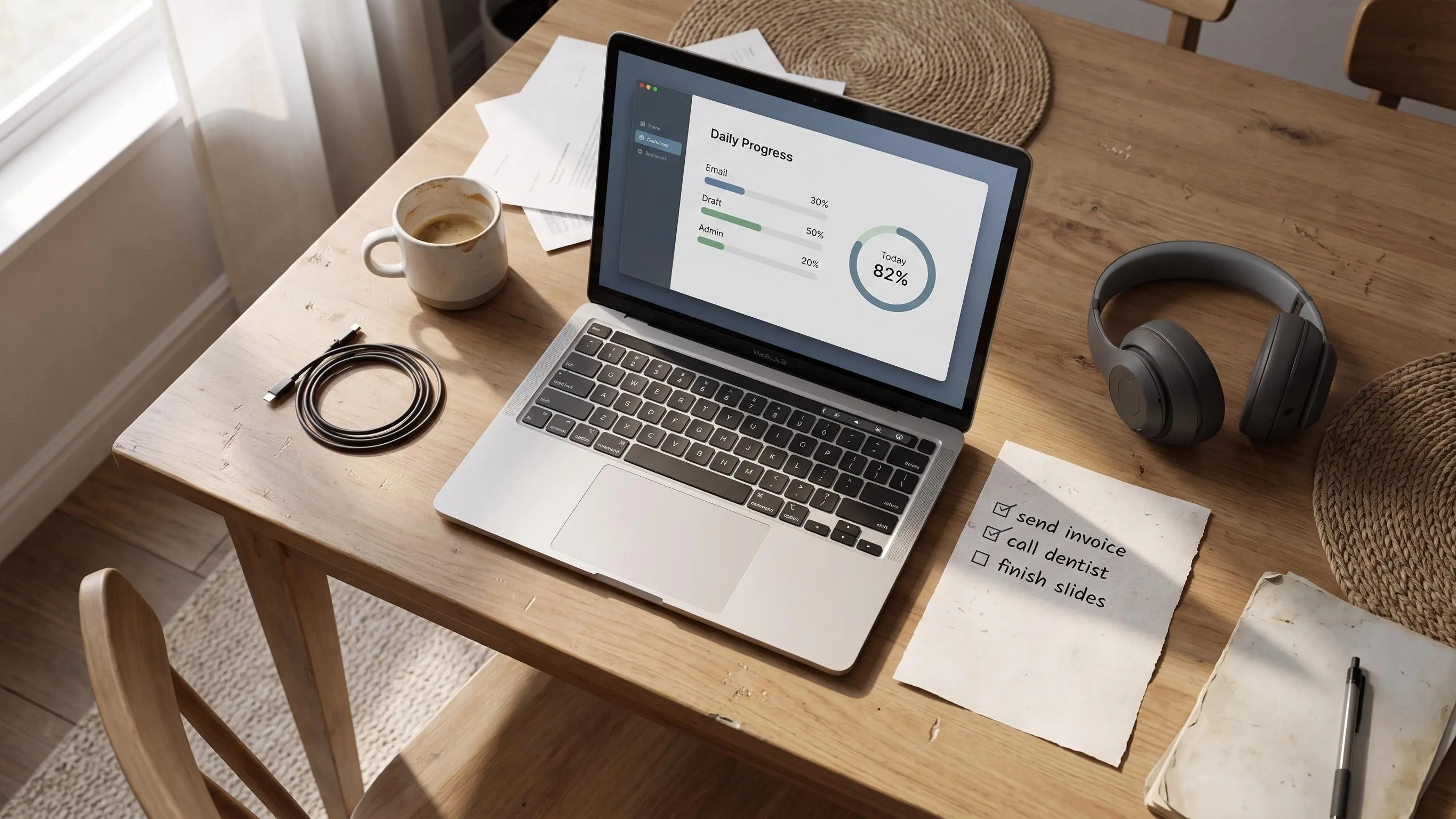

Most people do not need another timer. They need visual progress tracking that shows whether the right work is moving, because by 4:17 p.m. you can log two sessions and still have no clue what actually changed.
What works is simpler: one real target, one visible signal, one quick check before drift turns into guilt. Start here:
- Define done before you start, or the task keeps changing shape.
- Track completion, not just minutes, or you reward sitting there.
- Compare estimated and actual time, so you can trust what got done.
Why Focus Falls Apart When Progress Stays Invisible
Most people don't lose the day in one dramatic collapse. It goes in smaller ways. You start with a decent plan, get pulled into messages, half-finish three things, then hit evening with that familiar question: what actually moved?
That's the hole visual progress tracking fills. Not by making you work harder. By making progress visible before the day disappears into memory and mood.
Plain timers often disappoint the exact people who want structure most. They tell you 25 minutes passed. Fine. But did those 25 minutes move the right task forward, or were you just sitting near it while your tabs multiplied? A timer measures duration. It doesn't prove direction.
That difference matters more than people admit.
- Busyness is activity without a clear target.
- Progress is movement against something you decided matters.
- Focus gets easier when you can tell which one you're doing in real time.
Without a visible target, every work block feels oddly negotiable. You can drift for ten minutes and still tell yourself you're "in a session." By the second afternoon, that starts to feel less like productivity and more like supervised guilt.
A usable system should interrupt that spiral. You shouldn't have to wait until 8:30 p.m. to discover whether today counted.
Visible progress is calmer than self-judgment, and usually more accurate.
What Visual Progress Tracking Actually Means
In plain terms, visual progress tracking turns invisible effort into a signal you can read quickly. A ring filling up. A checklist moving. A bar advancing. Something that answers, at a glance, how far along you are.
The point isn't more data. It's faster self-understanding.
A good visual helps you see progress during the day without opening a spreadsheet in your head. That's why lightweight systems tend to work better for structure-seekers than elaborate productivity setups. Most people aren't asking for a personal analytics lab. They want to know whether the work is moving.
A few common forms do this in slightly different ways:
- A daily completion ring shows how much of today's planned work is actually done.
- A progress ring for tasks shows completion against a defined piece of work, not just general effort.
- Timeline and streak views show whether your process is repeatable across days and weeks.
- Insight views compare planned time with actual time, which is where a lot of useful honesty begins.
The important distinction is simple: track outcomes, not just motion.
If your visual only says you've been active for 90 minutes, that's not very useful. If it says you've finished one of the three work blocks required to complete your priority, now you have something you can act on. One creates a record. The other creates a decision.
Why Progress Visuals Change Behavior More Than Timers Alone
A goal helps, but a visible gap between where you are and where you meant to get to is what sharpens attention. That's the practical lesson from goal progress monitoring. The brain doesn't just want intention. It wants feedback.
Kept simple, the science points in a familiar direction:
- Progress monitoring leans on systems involved in attention and working memory.
- Your brain notices conflict between the current state and the target state.
- Visual targets can make goals feel more concrete because they recruit additional visual processing support.
You don't need to speak neuroscience to feel the effect. When the target is visible, drift becomes easier to catch. You notice it sooner. You correct it with less drama.
That's where motivation from progress visuals tends to come from. Not from hype. From early evidence. Abstract work often feels unrewarding because the payoff is delayed. A visible cue shortens that delay. You finish a block, the ring moves, and your brain gets a clean signal that the effort counted.
Small thing. Real effect.
There is also a trap here. People are surprisingly bad at reading cluttered graphs well. Research on visual inspection keeps showing that if a display is crowded or badly structured, users miss what matters. Productivity tools make this worse when they confuse decoration with feedback.
A progress visual should help you decide your next move in about two seconds.
If it takes analysis, it's not helping focus. It's becoming another task.
The Anatomy of a Progress System That Actually Sticks
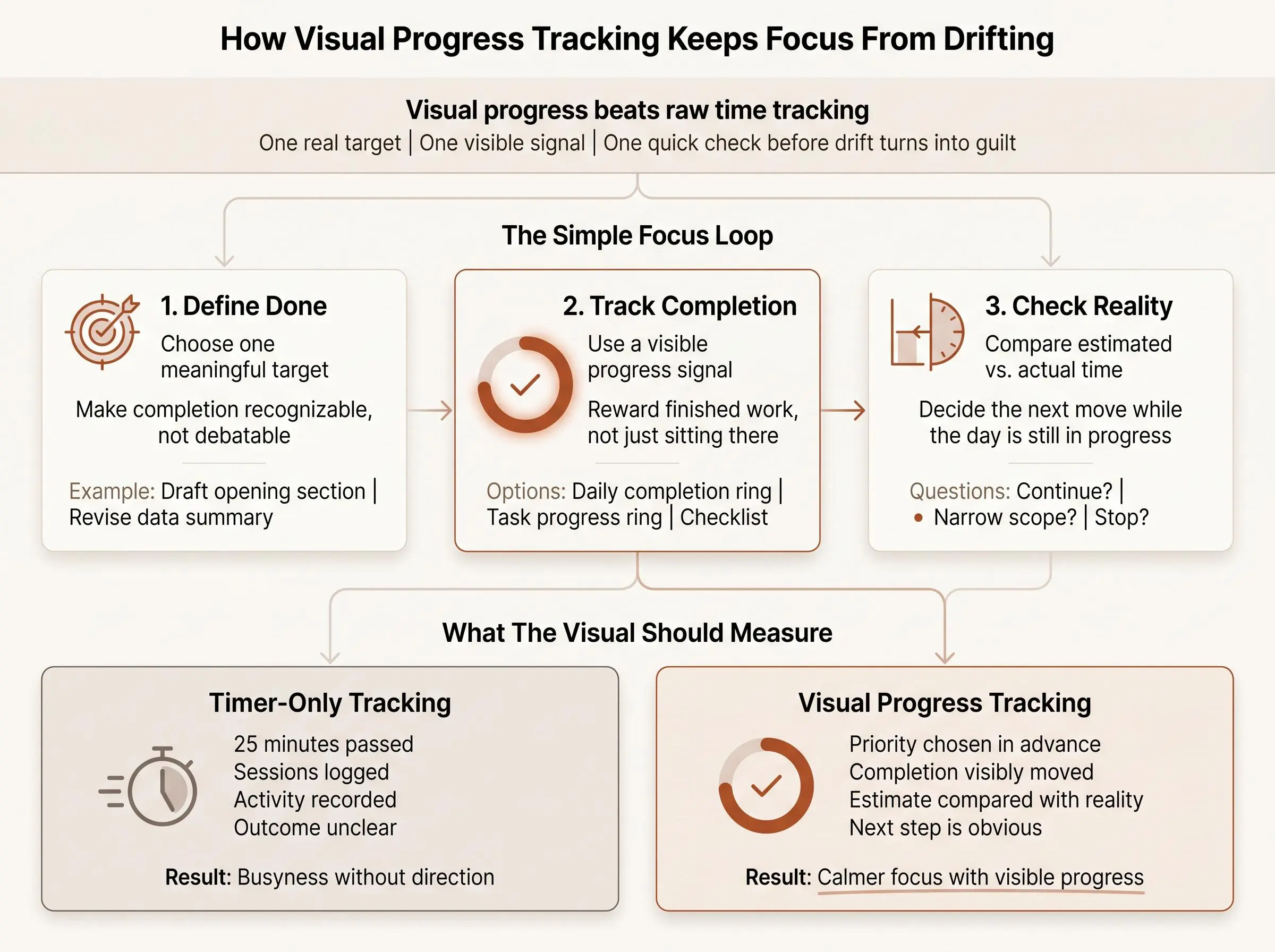
The system doesn't need to be elaborate. It needs four parts that fit together:
- One clearly chosen priority
- One defined unit of work
- One visible completion signal
- One review loop
That's the minimum viable structure.
For this audience, one most-important task usually works better than an endless task list. Not because the other tasks vanish, but because ambiguity drops. Completion becomes visible. You either moved the main thing or you didn't. A long list gives you more places to hide.
A progress ring for tasks becomes useful only when it's tied to a real plan. Otherwise it turns vague ambition into prettier vague ambition. We've seen this often enough: people love the look of progress until they're forced to define what counts.
Each layer has a job:
- Planning decides what matters.
- Focus blocks protect time for doing it.
- The ring turns invisible effort into visible completion.
- Streaks make consistency tangible over time.
- Reflections and weekly insights turn repeated patterns into something you can actually learn from.
This is why the planning layer matters more than another timer skin. A timer without a plan is tidy chaos.
At Flocus, that's the approach we built around. Browser-based, calm, one priority, timed work blocks, a daily ring. The timer isn't the product. The plan is.
How to Set Up Visual Progress Tracking for a Real Workday
A useful setup should survive a messy Tuesday, not just a perfect morning. Keep it simple enough that you can still use it after interruptions, bad sleep, or a meeting that ran long.
Here's the method.
1. Choose one meaningful target for the day
Define what done looks like before you begin. Not "work on report." Better: "draft the opening section and revise the data summary." Completion should be recognizable, not debatable.
2. Break that target into honest work blocks
Estimate how many focus sessions it will likely take. Be conservative. Most people are poor judges of effort until they start comparing estimated versus actual time. That gap is not a character flaw. It's information.
3. Pick the visual that updates while you work
Different work suits different signals:
- A daily completion ring works well when you want one simple indicator for the whole day.
- A progress ring for tasks works better when one project has several clear steps.
- A checklist is often better for highly segmented work where each piece is distinct and finishable.
4. Update the visual immediately after each block
Do it right then. Not at the end of the day when memory starts rewriting events. Near-real-time feedback is where the value lives.
5. Review what changed
Ask three things:
- Did the visual move because the right work got done, or just because time elapsed?
- Did actual time match the estimate?
- Should the next block continue, narrow, or stop?
That's enough. You don't need a ceremony around it.
Why a Daily Progress Ring Works So Well for Focus
Some visuals ask too much from the reader. A ring usually doesn't. You can read it in half a second.
That shape has a few practical advantages for daily progress ring productivity:
- It gives an immediate sense of proportion.
- It feels complete when closed, which matters more than it sounds.
- It can stand in for the whole day without looking like enterprise software.
A daily completion ring also fits calm productivity better than quota boards and giant task matrices. It doesn't shout at you. It simply shows whether today's planned work is becoming real.
What the ring represents is the whole game:
- daily progress ring productivity works best when the ring reflects meaningful completion against the day's plan
- a daily completion ring should not fill from random task volume
- it also shouldn't fill from minutes logged alone
- the relationship between planned work and finished work should be obvious
Good ring design is usually boring, which is a compliment.
- One clear completion rule
- Consistent updates
- Minimal clutter
- A visible link between plan and finish
That last part matters because people often inspect graphs in messy ways. If the display is busy, attention goes to the wrong places. A ring avoids a lot of that. You don't need to interpret it. You just need to read it.
The Missing Piece: Honest Planning Before the Timer Starts
Most focus tools track time. Fine. But time tracking without a pre-decided target often becomes performance theater. You can log plenty of minutes and still avoid the work that mattered.
Visual progress tracking is only trustworthy when it's attached to something chosen in advance.
The useful feedback loop comes from estimated versus actual time:
- It shows when a task was under-scoped.
- It shows when you overcommitted, again.
- It replaces vague self-blame with observable patterns.
That shift is underrated. "I'm bad at focusing" is usually too foggy to help. "This kind of task consistently takes two blocks longer than I expect" is actionable.
Automated progress monitoring research lands on a similar practical lesson: systems become more useful when they collect and visualize data in real time, not from after-the-fact summaries. Personal productivity is no different.
So the operating rule is simple:
- don't rely on memory at the end of the day
- log progress as you go
- let the visual affect decisions while there's still time to adjust
This planning-first method sits at the center of Flocus. Each focus block is anchored to a chosen priority, and estimated versus actual time gets logged as part of the process. Not to create more admin. To keep planning honest.
How to Use Visual Progress Tracking Without Turning It Into Another Chore
The objection is fair. Any tracking system can become procrastination dressed up as self-improvement. We've all seen the dashboard that gets polished more than the work itself.
The guardrails are plain:
- One screen, not five
- One daily target, not a life operating system
- One meaningful visual, not a dashboard museum
- One short reflection, not a weekly essay
The easiest system to maintain is the one tied directly to the moment work ends. Finish a block, update the ring, note the time, move on. If the process asks for too much context-switching, you'll quietly stop doing it.
Low friction matters more than cleverness:
- browser-based access helps
- setup-heavy project structures usually don't
- fast session start matters
- immediate ring updates matter more
If the system starts slipping, simplify fast.
- If you skip the review, shrink it to one sentence.
- If the ring feels vague, tighten the definition of done.
- If everything feels urgent, return to one most-important task.
Consistency beats sophistication. Usually by a lot.
Common Mistakes That Make Progress Tracking Demotivating
Progress tracking fails in predictable ways. Not because the idea is wrong, but because the signal gets corrupted.
A few mistakes show up over and over:
- Tracking too many things at once until nothing feels meaningful
- Filling a ring with raw time instead of real completion
- Choosing visuals that look good but don't help you decide what to do next
- Turning streaks into guilt machines
- Measuring every micro-task and losing the day's actual priority
- Reviewing only at the end of the week
- Using progress visuals without a plan
- Ignoring estimation accuracy
- Overcomplicating charts so the important part disappears
The raw-time problem is especially common. It feels productive because the visual moves, but it's false satisfaction. A ring that fills because you sat at your desk is not a progress tool. It's attendance.
And streaks need handling carefully. They should be gentle evidence of consistency, not a moral scoreboard. Miss one day, note it, continue. If your system punishes interruption harder than real life does, you won't trust it for long.
A good visual should reduce confusion, not decorate it.
When You Want More Than a Ring: Measured Focus and Neurofeedback
This part is optional. A ring is enough for most people. But some readers want a deeper layer of feedback, especially if they already own a Muse headband or are curious about measured focus rather than self-report.
The distinction is straightforward:
- A timer tells you how long you were working.
- Neurofeedback tries to show what your focus state is doing during the session.
In plain language, EEG-based tools aim to provide real-time signals related to attention. That doesn't make them magic. It does make focus feel a little less mysterious, because the feedback is happening while you work rather than later from memory.
That fits the broader point of this article. The more immediate and observable the feedback, the easier it is to regulate effort calmly.
For the niche group this suits, the appeal is obvious:
- readers who already own a Muse headband
- readers curious about flow but skeptical of self-report alone
Flocus can layer this in by connecting with Muse to add real-time flow-state tracking on top of planning, focus blocks, and the ring. Still, it's a support signal, not a truth machine. The foundation doesn't change. Choose the right task. Do the block. Read the feedback, don't worship it.
How to Choose the Right Visual Progress Tool for Your Style
You don't need the "best" tool. You need one you'll still use next Thursday.
A few decision rules help.
If you hate complexity, use a daily completion ring paired with one priority. If you routinely underestimate tasks, choose something that shows estimated versus actual time. If you need motivation from progress visuals, favor immediate, glanceable feedback that updates after each block.
If you've abandoned pure Pomodoro apps before, that's useful information. The issue may not be your discipline. It may be that timer-first tools start too late. A planner-plus-timer approach usually fits better because it answers what the block is for before the countdown starts.
Use these criteria:
- Does it show meaningful progress, not just elapsed time?
- Can you see progress during the day without analysis?
- Does it help you decide what to do next?
- Is it simple enough to repeat tomorrow?
For readers who want structure without adopting a heavyweight productivity system, a free, browser-based option like Flocus can be a good fit. Especially if what you've been missing isn't another timer, but a method.
What a Good Day Looks Like With Visual Progress Tracking
A good day doesn't need to be perfect. It just needs to stay legible.
In the morning, you choose one most-important task. You define completion. You set the first block before the day starts making offers on your behalf.
By midday, you've finished a session. You update the ring. You compare actual time with the estimate and decide whether to continue, narrow the scope, or defer the rest. No drama. Just signals.
In the afternoon, the benefit gets more obvious. You can see progress during the day instead of trying to infer it from how busy you feel. The visible ring helps protect momentum because switching away now costs something concrete. The day already has shape.
By evening, one of two things is true. You close the ring, or you note what remains. Then a brief reflection: what matched the plan, what didn't, what took longer than expected. That's enough to make tomorrow better.
Across the week, streaks and insight patterns start building something more valuable than intensity. Self-trust.
Focus begins to feel less like forcing yourself and more like following visible signals.
Conclusion
Visual progress tracking works because it turns effort into feedback you can use while the day is still unfolding. That's the part people miss. Progress isn't only motivating at the end. It's stabilizing in the middle.
The structure is simple: one clear priority, honest work blocks, a visible completion signal, and a short review loop. Not a productivity performance. A repeatable method.
For tomorrow, keep it plain. Choose the most-important task. Decide what completion looks like. Use a simple daily ring so progress is visible from the first block onward. That alone fixes more than another timer ever will.
Article Record
ReferencesPrimary sources used for this article
- Does monitoring goal progress promote goal attainment? A meta-analysis of the experimental evidence
- The neural basis of monitoring goal progress
- Frontiers | Teachers’ visual inspection of Curriculum-Based Measurement progress graphs: An exploratory, descriptive eye-tracking study
- Chapter 11 Data visualization principles