

A pomodoro to do list app sounds simple, but most of them still leave you staring at 12 tasks and no real starting point.
The good ones do more than run a 25 minute clock. They help you pick what matters, keep the list tight, and make it obvious whether your plan was fantasy or work.
We cut the noisy options and kept the few that are actually worth your attention.
1. Daily Planner

- Planning-first daily workflow
- Highlights one most-important task
- Pomodoro estimates improve realism
- Links daily tasks to goals
- Calm insights close the loop
- Not a full project manager
- Muse features are niche
- Less ideal for complex teams
If plain Pomodoro apps have left you with a neat timer history and a vague sense of regret, this is the category shift worth paying attention to. Daily Planner is less about squeezing work into 25-minute blocks and more about deciding what deserves those blocks in the first place.
We built it for people who don't need another timer. They need a quieter way to choose.
A lot of apps assume you already know your priorities. That's a generous assumption. Daily Planner starts by asking for one most-important task, then keeps the rest of the day intentionally short. That sounds almost too simple until you try working without it for a week and notice how quickly your list starts breeding.
Here’s the practical shape of it:
- choose one most-important task for the day
- keep the task list short enough to mean something
- estimate work in pomodoros before you begin
- tie daily tasks back to weekly goals
- review estimated versus actual time after the work is done
That last part matters more than people expect. Most planning systems let you be optimistic forever. Ours logs estimated vs actual time for every focus block, which is a polite way of exposing fiction. If you keep thinking a task is "one pomodoro" and it keeps taking three, the problem stops being motivation. It's planning.
A timer measures time spent. A plan measures whether the time had a job.
Daily Planner also closes the loop in a way many timer-first tools don't. The Focus Ring, streaks, reflections, and weekly or monthly insights give you a visible end to the day. Not just "you worked." More like "you moved the thing that mattered."
Compared with Focus To-Do or TaskPomo, this is more planning-led. Compared with TickTick, it's much lighter and calmer. Compared with Forest or Focus Keeper style tools, it's built around priorities, not just concentration. That's the distinction.
There's also optional Muse headband support for real-time flow-state tracking. Useful for a small group of deep workers, interesting for the neurotech-curious, and absolutely not the reason most people should start. The core value is still the planning layer. Measured focus is a depth feature, not a personality trait.
This works best if you want a lightweight daily system rather than a full project command center. If your real problem is "I did plenty, but not the right thing," a most important task app with a built-in task planning and focus timer tends to beat a prettier stopwatch.

2. Focus To-Do
- Tasks and timer in one place
- Very low-friction daily workflow
- Easy entry for classic Pomodoro users
- Reduces app switching during sessions
- Limited help choosing priorities
- Can enable busywork over impact
- Less planning depth than rivals
Focus To-Do makes sense the minute you open it. That's part of its appeal. You get a task list and a Pomodoro timer in the same place, which removes the small but real friction of bouncing between apps all day.
For a lot of people, that's enough.
Its strength is that it doesn't try to reinvent the method. If you already know how you want to prioritize your day, Focus To-Do gives you a direct execution setup:
- add tasks
- start the timer
- work the task
- repeat without much ceremony
That sounds basic, but basic is often underrated. By the second afternoon, many people don't want a system. They want fewer tabs and fewer excuses. Focus To-Do respects that.
Where it differs from a planning-first option like Daily Planner is simple: it combines tasks and timer well, but it does less to help you decide which task actually deserves your best attention. If you're already solid on that part, no issue. If your list is the problem, not your timer habit, you'll feel the gap.
It's also a cleaner entry point than broader workflow tools. You don't need to adopt a bigger operating system for your work. You just need to stop switching contexts every time a session starts. That alone helps.
The tradeoff is quiet but important. A timer-plus-list app can keep you moving while still letting you move in the wrong direction. Plenty of productive-looking days are just organized avoidance.
3. Allero

- Combines tasks and Pomodoro sessions
- Supports priorities and day planning
- Works well for complex days
- Keeps focus tied to plans
- Can feel heavier than needed
- Less ideal for single-priority workflows
- More structure may invite overplanning
Allero sits closer to the task-management side of this category. It's for people who want priorities, day planning, and Pomodoro sessions living inside one more complete system, not as separate habits stitched together by willpower.
That added structure can be useful. It can also be more than some readers need.
If your day regularly spans multiple active tasks or projects, Allero has the right shape. It gives you:
- task management
- built-in Pomodoro sessions
- priority handling
- support for planning the day as a whole
Compared with Focus To-Do, it leans more into organization. Compared with Daily Planner or Mursa, it feels closer to a fuller work management experience. That's good if your workday is genuinely complex. Less good if you're mostly trying to stop drifting.
A common mistake here is choosing the most capable system when you actually need the most usable one. More structure can help if the problem is scattered commitments. It can also give procrastination better furniture.
Allero is strongest when your priorities don't live as one clear task but as several moving pieces that still need sequencing and focused execution. In that context, the built-in Pomodoro support is doing real work because it's attached to a broader plan, not floating beside it.
If your ideal setup is "tell me what matters today, then let me work," this may feel heavier than necessary. If your day already has five real priorities before lunch, it starts to make more sense.
4. TaskPomo
- Combines tasks with Pomodoro sessions
- Estimates make planning more realistic
- Stats reveal work pattern trends
- Progress tracking adds useful accountability
- Less helpful for choosing priorities
- Stats can become a distraction
- Not ideal for simple workflows
TaskPomo is for people who like evidence. Not inspirational evidence. Actual evidence. How long did this task take, what did you estimate, and what patterns are showing up after a few days of work?
That makes it one of the more interesting options in this group.
It pairs Pomodoro sessions with task management, estimates, and stats. In practice, that means your work stops being a blur of completed timers and starts becoming something reviewable. For some users, that's the difference between feeling busy and learning how they actually work.
A few things stand out here:
- you can estimate work before starting
- you can track progress against those estimates
- you can review stats instead of relying on memory
- the task layer gives those numbers some context
This puts it in a different lane from Mursa and even a bit beyond Focus To-Do. It's more execution-and-review oriented. Less about ambiance, more about feedback. Not everyone wants that. Some people see stats and immediately begin managing the stats instead of the work. That's not a software issue. That's just being human.
If measurement helps you choose better tomorrow, keep it. If it turns into a side hobby, scale it back.
TaskPomo is a solid fit if you want a pomodoro to do list app that keeps your planning honest through numbers, but without requiring a full task manager. It is less centered on one most-important task than Daily Planner, so if your main issue is direction rather than follow-through, that difference will show up quickly.
5. Mursa

- Calm, low-pressure daily workflow
- Built-in Pomodoro and task list
- Supports gentle daily planning
- Good fit for routine building
- Less emphasis on top priority
- Limited planning feedback depth
- Light analytics may feel basic
Mursa feels like it was designed by someone who understands that not everyone wants productivity software to sound like a boot camp. That alone makes it worth considering.
Its appeal is less about aggressive optimization and more about calm daily structure. You get a to-do workflow, a built-in Pomodoro timer, and daily planning features without the usual pressure-heavy tone that some tools quietly radiate.
For the right user, that matters.
People who are skeptical of hustle culture often don't need less discipline. They need less noise. Mursa suits that mood well. It gives enough structure to support a routine, but it doesn't turn every work session into a performance review.
Relative to the rest of this list:
- it's more atmosphere- and routine-oriented than Focus To-Do
- it's less analytics-centered than TaskPomo
- it shares some tonal overlap with Daily Planner, but with less emphasis on one most-important task and estimate-versus-actual feedback
That last point is the practical difference. Mursa helps you plan and focus. It doesn't push as hard on choosing one defining priority or learning from time estimates over time. Depending on your habits, that may feel refreshingly light or slightly under-shaped.
If what you want is a quieter planning ritual, Mursa earns a serious look. If you want a focus app for priorities that actively narrows your day and shows whether your plan was realistic, you'll probably want more structure than this.
6. TickTick
- Robust task organization for busy days
- Pomodoro timer inside one system
- Handles deadlines and recurring tasks
- Good fit for multi-project workflows
- Can feel heavy for simple focus
- Less planning-first than calmer tools
- Easy to over-organize instead of work
TickTick is a task manager first. The Pomodoro support is valuable, but it's living inside a broader system built for organizing a lot of commitments.
That makes it useful and potentially too much.
If your day includes deadlines, recurring tasks, projects, personal admin, and actual work that still needs focused time, TickTick can keep all of that in one environment. There's a practical relief in that. Your tasks and focus blocks don't need separate homes.
The shape is different from the simpler tools in this roundup:
- robust task organization comes first
- Pomodoro support is built into that larger setup
- the workflow works best when you already live inside a fuller planning system
Compared with Focus To-Do, it's heavier and broader. Compared with Daily Planner or Mursa, it's much less narrow. That's not a flaw. It's just a different job.
The question to ask is whether you need an all-day organizing system or a daily focus ritual. People often confuse those. Then they end up maintaining a beautifully sorted task manager while still not doing the hard thing before noon.
TickTick is a strong candidate if your real problem is juggling many moving parts. If your real problem is choosing what matters now and protecting time for it, it may feel like using a very capable office to hold one chair.
7. Pomodone

- Focus sessions tied to tasks
- Better link between effort and output
- Fits process-heavy workflows well
- Makes review feel more meaningful
- Less planning-first than some rivals
- Can feel process-heavy for simple needs
- Not the calmest daily workflow
Pomodone is for process-minded users who care about the link between focus time and actual work items. Not just "I did four sessions today," but "those sessions were attached to this task, in this workflow, for this output."
That sounds subtle. It isn't.
A lot of people track focused time separately from the work itself, which creates a quiet disconnect. Pomodone is relevant because it treats the Pomodoro method as part of workflow, not a parallel habit. The session is tied to a task. That changes how review feels later.
Its fit becomes clearer when you look at the use case:
- focus sessions are connected to real work items
- prioritization happens through the workflow around those items
- the timer supports execution instead of existing as a separate ritual
This makes it more workflow-centric than Focus To-Do and Mursa. It also has a stronger connection between focus and output than timer-only tools. Compared with Daily Planner, though, it's less obviously planning-first. The emphasis is on linking work and time, not necessarily narrowing the day to one defining priority.
If your main frustration is that planned tasks and logged focus time never line up, Pomodone addresses a real problem. If you mostly want a simple way to prioritize tasks before Pomodoro sessions start, it may feel a bit process-heavy. Useful, but not especially gentle.
8. PomoDoit
- AI-assisted task prioritization
- Helps organize messy workloads
- Pomodoro workflow with guidance
- Useful for experimentation-minded users
- Can feel overly interventionist
- Less calm than simpler tools
- AI guidance may not suit everyone
PomoDoit is the AI-assisted option in this group. That's the draw. It's aimed at people who want help organizing work and prioritizing time, not just a timer sitting there waiting to be told what to do.
Some readers will like that immediately. Others will feel tired just hearing it. Fair enough.
Its positioning is more optimization-oriented than Mursa or Daily Planner. It leans into assistance, guidance, and AI-shaped time management inside a Pomodoro workflow. That makes it distinct from the simpler timer-plus-list setups.
The practical appeal looks like this:
- AI-powered Pomodoro workflow
- task organization support
- help with time management and prioritization
The tradeoff is mostly about how much intervention you want from the tool itself. Some people want the app to help sort the mess. Others want the app to stay quiet once they've made a decision. Neither camp is wrong, but they should not pick the same software.
PomoDoit is better suited to experimentation-minded users who enjoy tuning their systems or getting guidance from the tool. If your preference is a calmer, lower-intervention method, an AI-led setup can start feeling like one more voice in the room.
How to Choose the Right Pomodoro To Do List App
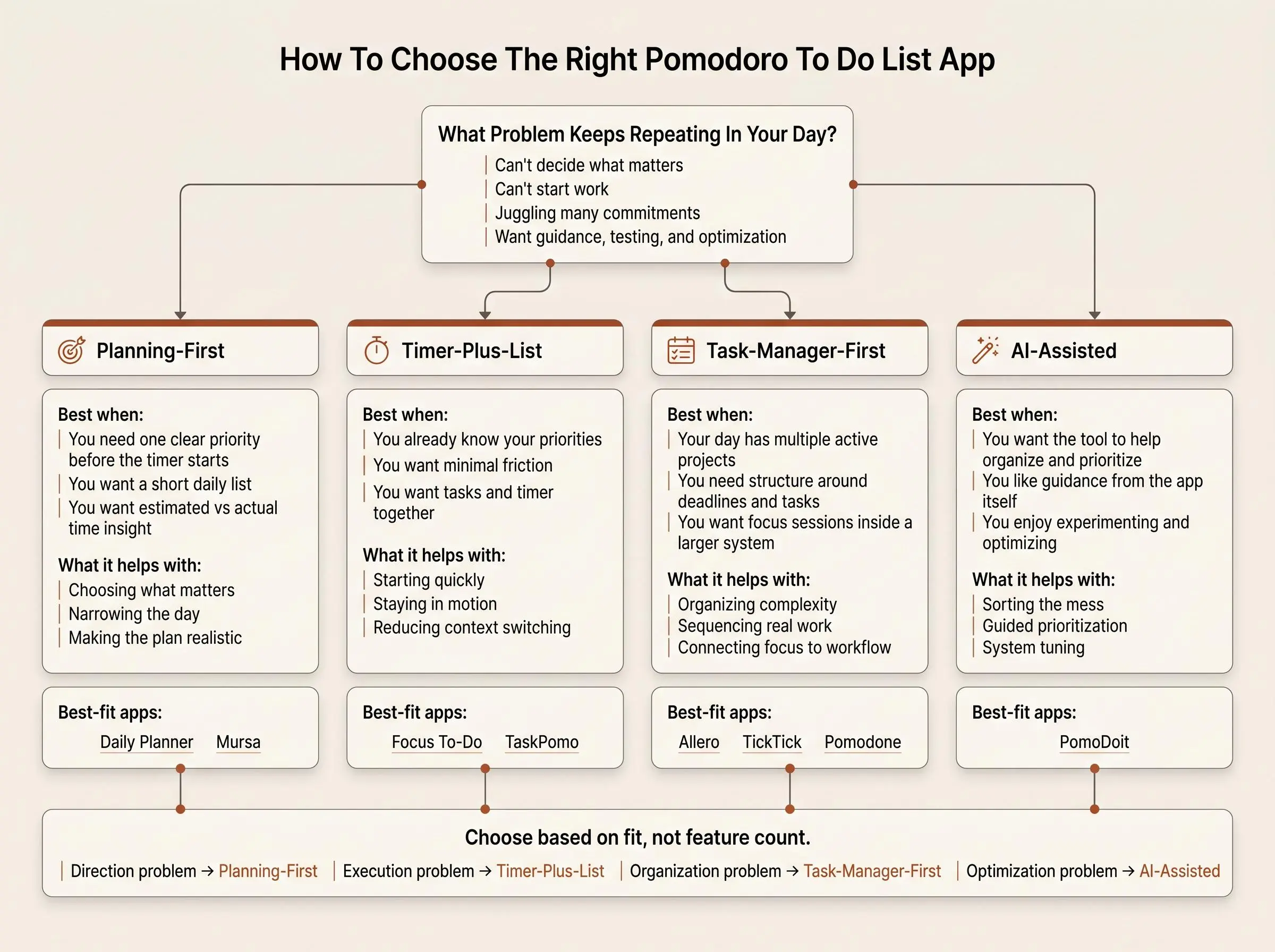
The cleanest way to choose is to stop asking which app has the most features and start asking which problem keeps repeating in your day.
Usually it's one of four:
- you can't start work
- you can't decide what matters
- you lose focus halfway through
- you finish sessions but not meaningful tasks
Different tools solve different failures. That's why this category is more varied than it first appears.
A practical way to sort the options:
- Planning-first tools help you choose one clear priority before the timer starts
- Timer-plus-list tools are for straightforward execution with minimal friction
- Task-manager-first tools fit people already operating inside larger systems
- AI-assisted tools suit users who want active guidance and optimization
When comparing, ask a few plain questions:
- does it help you prioritize tasks before Pomodoro sessions, or does it assume you've already done that?
- can you choose a most important task without turning planning into a second job?
- does it offer estimates, reviews, or insights that improve your planning over time?
- is it calm enough to use every day?
- does it match the amount of structure you actually want, not the amount you think you should want?
If your issue is direction, choose planning-first. If it's execution, choose timer-plus-list. If it's juggling many commitments, go task-manager-first. If you want to test, measure, and optimize, the AI-assisted or insight-driven tools make more sense.
What Matters Before You Start a Pomodoro
For this audience, a timer alone usually isn't the fix. That's the uncomfortable part. You can focus for 25 minutes on something that never needed doing today.
The missing step is deciding what success looks like before the clock starts.
A good planning layer should do a few specific things:
- force a clear choice
- keep the daily list short
- make work estimateable in pomodoros
- connect today's work to a bigger goal
- show whether the plan was realistic after the fact
That is why a most important task app often works better for scattered attention than a generic study timer. It narrows the field before effort begins. And that is also why "task planning and focus timer" should really be one workflow, not two unrelated habits stitched together by guilt.
A decent focus app for priorities does more than count sessions. It gives the session a purpose. The point isn't to look productive for 25 minutes. The point is to end the day knowing what moved.
Which Type of App Fits Your Working Style
Most people don't need the best app in theory. They need the one that matches how they already work when they're tired, distracted, and a little too willing to reorganize their list instead of doing it.
Here's the short matching guide.
For structure-seekers who want one clear daily priority:
- Daily Planner
- Mursa
For classic Pomodoro users who want tasks and timer together with minimal friction:
- Focus To-Do
- TaskPomo
For people who need a fuller system around priorities, projects, and execution:
- Allero
- TickTick
- Pomodone
For readers curious about optimization and guidance from the tool itself:
- PomoDoit
There is one narrower lane worth mentioning. If you're neurotech-curious and already own a Muse headband, optional flow-state tracking can be a meaningful differentiator. But it's niche. Most readers should choose based on planning fit first, measured focus second.
A few useful questions tend to settle the decision fast:
- do you want one priority or a whole system?
- do you want insight into estimates versus actual time?
- do you want calm structure or active optimization?
- are you building a daily ritual or managing many moving parts?
How We Evaluated These Tools
We compared the publicly described features and workflows for each app, focusing on how well each one connects task planning with Pomodoro focus sessions. The evaluation emphasized practical fit rather than feature count alone.
We looked at:
- Task and focus integration: whether tasks and Pomodoro sessions work together in one workflow
- Prioritization: how much the app helps users decide what to work on before starting a session
- Planning depth: whether it supports a simple daily plan or a broader system for projects and commitments
- Estimates and review: whether users can estimate work, compare plans with actual time, or review productivity patterns
- Usability and tone: whether the structure feels lightweight, calm, process-oriented, or more intervention-heavy
- Best-fit audience: which recurring work problem each app appears best suited to address, such as prioritization, execution, organization, or guided optimization
The rankings and scores reflect the relative fit of these capabilities for people looking for a Pomodoro to-do list app for focused study and work. Because app features and pricing can change, confirm current details on the product’s own website before choosing.
Conclusion
Feature count is not the decision. Fit is.
The best pomodoro to do list app is the one that helps you choose the right task before the timer begins, then makes it easy to stay with that choice. Everything else is secondary.
If you want a calm planning-first workflow built around one most-important task, Daily Planner is the clearest pick. If you want a straightforward Pomodoro-plus-list setup, Focus To-Do stays simple on purpose. If you need more system-level organization, look at Allero, TickTick, or Pomodone. If estimates and stats keep you honest, TaskPomo earns its place. If calm daily planning matters most, Mursa has the right tone. If AI-guided prioritization is part of the appeal, PomoDoit is the obvious experiment.
Start with the real problem: prioritization, execution, or organization. Then trial the app that matches that problem. Not the one with the busiest feature list.
A good timer helps you work.
A good plan helps you work on the right thing.
Article Record
ReferencesPrimary sources used for this article
- Focus To-Do
- Stay Organized, Stay Creative.
- Features - TickTick
- Forest — The #1 Focus App for Time Well Spent
- Pomodoro Timer - Focus Keeper
- Allero — Organise Tasks, Focus Deeply with Pomodoro
- Flocus | Your Aesthetic Productivity Dashboard
- Tasks | Flocus
- Focus better.Achieve more.
- Locu - Focus Timer, To-Do List & Notes for Daily Execution
- Best Productivity & Time Management Tool | PomoTodo
- Pomello - Stay focused. Accomplish more.
- Pomodoro Timer - PomoDone
- Focus Keeper - Pomodoro Timer App - App Store
- Todoist | A To-Do List to Organize Your Work & Life
- Features | Todoist
- Pricing | Todoist
Update HistoryMeaningful revisions to this article
- Updated pricing information for eight Pomodoro and task-planning apps to make cost comparisons easier.
- Added a methodology section explaining how the featured tools were evaluated.
- Clarified which apps offer free plans and which have paid starting prices.