

A planner for office work gets messy fast once you realize half the tools are really desk maps with nicer screenshots. If you're comparing options, the usual mistake is treating every product like it solves the same problem.
It doesn't. The good ones are clear about their job: booking rules, team office days, rooms, visitors, or space data. The weak ones try to do a bit of everything and leave you clicking in circles.
We've cut this list down to the options worth your time.
Show 5 more productsShow fewer products
1. Skedda

- Strong booking rules and controls
- Fair shared-desk policy enforcement
- Clear access by zone or team
- Reduces disputes over shared spaces
- Well suited to hot-desking offices
- Less ideal for light scheduling
- Can feel admin-heavy for staff
- Not focused on visitor workflows
Skedda is the one we’d look at first when the real problem is not booking itself, but booking behavior. Some offices don’t need a friendly suggestion layer. They need rules that hold up on a busy Tuesday.
It’s positioned as global desk booking and office planning software, and that shows in how seriously it treats policy.
For hybrid offices with hot desks or hoteling, Skedda fits when fairness and clarity matter more than a light touch. If your team keeps running into the same small frictions, the “who booked this desk again?” kind, stronger booking logic is often the fix.
A few situations where it makes particular sense:
- different desk zones need different access rules
- rooms and desks can’t just be first come, first served
- certain teams should only book certain spaces
- admins need to stop disputes before they start
Compared with deskbird or Kadence, Skedda leans much harder into control. That can be good news or bad news. Good if your office has real usage policies. Less good if people mainly need a simple weekly “I’m in on Wednesday” rhythm.
It’s also less about visitor flow than Envoy Workplace, and more specialized in booking control than Archie. That matters because some platforms spread wider, while Skedda goes deeper on the actual reservation logic.
Good office systems remove awkward conversations.
We’d choose Skedda when admin control matters almost as much as employee convenience. That sounds strict, but in shared environments it’s often kinder than leaving everyone to interpret the rules on their own.
2. deskbird

- Strong weekly office scheduling
- Mobile experience encourages regular use
- Easy team office-day visibility
- Low-friction hybrid coordination
- Good fit for fast-moving teams
- Less control for strict policies
- Lighter on analytics and operations
- Weaker fit for visitor workflows
deskbird is for teams that want a planner for office work people might actually keep using after the first week. That sounds obvious. It isn’t.
A lot of workplace tools are bought by operations and tolerated by everyone else. deskbird has a different center of gravity. It’s known as a hybrid workplace planner, with weekly office scheduling and a strong mobile experience, which makes it better suited to day-to-day adoption.
If your employees are deciding week by week when to come in, deskbird fits that habit well. It supports the practical question people ask on a Sunday night or Monday morning: who’s going in, and should we line up our office days?
That makes it stronger than rules-heavy options for teams that need lighter coordination. It’s also less enterprise-analytics oriented than OfficeSpace, and less focused on visitor workflows than Envoy Workplace.
Where it tends to land well:
- fast-moving hybrid teams
- companies trying to improve office-day visibility without adding a lot of process
- teams where mobile use is normal, not an edge case
There is a tradeoff. Simplicity helps adoption, but it can leave policy-heavy offices wanting more structure. If your pain point is misuse of shared space rather than weak attendance visibility, Skedda will likely feel tighter.
Still, for weekly planning rhythms, deskbird is easier to picture in real life. That matters. The best tool on paper is useless if nobody opens it by the second afternoon.
3. OfficeRnD Workplace

- Combines desks, rooms, and analytics
- Helps reduce workplace tool sprawl
- Broader hybrid office coordination
- Good fit for consolidation goals
- May be too broad for desks
- Likely heavier for smaller offices
- Less visitor-focused than some rivals
OfficeRnD Workplace is a broader bet. If you’re trying to reduce tool sprawl and run desks, rooms, and workplace visibility from one place, this is the kind of platform to shortlist early.
It’s positioned as a comprehensive hybrid office platform, and the scope reflects that. Desk booking is there, room scheduling is there, and workplace analytics are part of the package rather than an afterthought.
That combination changes the buying question. You’re not just asking whether people can reserve a desk. You’re asking whether one system can become the operating layer for how the office works.
Where the breadth helps
OfficeRnD Workplace makes the most sense when your office team doesn’t want separate tools for:
- seat reservations
- meeting room scheduling
- occupancy and usage visibility
- wider hybrid office coordination
Compared with desk-first tools like Archie, it covers more of the workplace. Compared with Kadence, it’s more all-in-one than team-office-day centric. And unlike Envoy Workplace, it’s not primarily defined by visitor operations.
The caution is simple. If desks are the only urgent need, this may be more platform than you need. That’s not a flaw. It’s just expensive complexity in disguise if you buy too wide for a narrow problem.
We’d put OfficeRnD Workplace in front of organizations that already know consolidation is the goal. When that’s true, narrower tools can feel tidy at first and fragmented six months later.
4. Envoy Workplace
- Combines desks and visitor flows
- Strong front-of-house workflow coverage
- Useful for guest-heavy offices
- Supports workplace presence visibility
- More than small teams need
- Less focused on space analytics
- Can feel like facilities software
Envoy Workplace enters the picture when office planning includes arrivals, guests, and front-of-house reality. Not every office has that problem. Some absolutely do.
It’s widely used as a workplace management tool, and the distinction matters. This is not only about desks. It’s about workplace logistics where employee presence and visitor workflows intersect.
For offices that regularly host clients, partners, or guests, splitting those functions across separate tools creates quiet friction. Reception has one system. employees have another. Nobody quite sees the full picture.
Envoy Workplace is stronger when you want one layer for:
- desk booking
- workplace presence
- visitor workflows
- everyday office coordination tied to who is actually coming through the door
Relative to Skedda or Kadence, it’s much more visitor-aware. Relative to Archie, it’s broader operationally. OfficeSpace goes further on floor-plan analytics, but that’s a different problem set.
A useful test is this: does your workplace planner need to care about guests as much as staff? If yes, Envoy moves up the list quickly.
Small teams that only want simple desk booking may find it more than they need. That’s common with workplace software. The risk is not bad software. It’s buying a facilities layer when all you needed was a reservation layer.
5. MyDesk

- Strong Outlook workflow fit
- Books desks and meeting rooms
- Lower adoption friction for Microsoft teams
- Useful single scheduling hub
- Good for desk-plus-room planning
- Less compelling outside Outlook
- Lighter on analytics depth
- Less differentiated for simple booking
MyDesk is a practical option for teams that live inside Microsoft workflows and don’t want to fight those habits. That usually matters more than people admit during software selection.
It’s officially positioned as a workplace planner, with desk booking, meeting room booking, and Outlook integration. For many offices, that combination is the point.
If desks and meetings are planned together, and Outlook already anchors the day, MyDesk can reduce adoption friction in a way flashier tools can’t. People rarely complain about software that fits how they already work. They just keep using it.
A few places where it lines up well:
- offices where room bookings and desks need to be coordinated together
- teams that rely heavily on Outlook calendars
- buyers who want one scheduling hub instead of separate apps for separate tasks
Compared with pure desk-booking tools, it’s more calendar-and-room oriented. Compared with OfficeSpace, it’s less explicitly about analytics and space strategy. That makes it a steadier operational choice for Microsoft-centered environments.
There’s also a limit. If your team doesn’t depend much on Outlook, part of MyDesk’s appeal disappears. At that point, it becomes just another booking platform competing on more ordinary terms.
We’d treat this one as a workflow fit decision first, feature decision second. In office software, familiar beats clever more often than vendors like to admit.
6. Kadence

- Strong team office-day coordination
- Works well across multiple offices
- Links attendance plans with desks
- Improves visibility into team presence
- May be overbuilt for single sites
- Narrower than all-in-one platforms
- Less suited for visitor workflows
Kadence is strongest when the issue is coordination, not mere availability. Some offices have enough desks. What they don’t have is alignment.
It’s described as a hybrid work planner built around coordinating team office days and desk booking across offices. That makes it especially relevant for distributed companies trying to make in-person time intentional rather than accidental.
When managers are asking, “Which day should this team come in?” Kadence is closer to the actual problem than a booking tool that starts and ends with desk inventory.
Why it stands apart
Kadence has a clearer edge when you need:
- hybrid work planning across multiple offices
- team attendance coordination
- desk booking connected to office-day decisions
- better visibility into who will be where, and when
That makes it stronger on office-day coordination than Skedda or Archie. It’s narrower than OfficeRnD Workplace if you need rooms and broader analytics together, and less visitor-focused than Envoy Workplace.
There’s a non-obvious difference here. Coordinating attendance patterns is a social problem before it’s a software problem. Tools that ignore that usually become passive booking maps. Kadence at least points at the right issue.
If your office is single-site and mostly needs straightforward reservations, it may feel like more coordination logic than you need. But for multi-office hybrid teams, that logic is often the reason to buy.
7. OfficeSpace

- Strong floor-plan management tools
- Useful utilization and occupancy insights
- Built for enterprise space strategy
- Supports broader desk management needs
- Likely too heavy for small teams
- More complex than basic booking tools
- Less ideal for simple reservations
OfficeSpace is the heavyweight in this group. We’d bring it into the conversation when floor plans, utilization, and space strategy are part of the brief, not just desk booking.
It’s positioned as enterprise-oriented office planning and desk management software, with emphasis on space management and utilization analysis. That puts it in a different lane from lighter employee-scheduling tools.
For larger organizations, daily reservations are only one layer. They also need to know whether the office footprint makes sense, which areas are underused, and how layouts should change over time.
That’s where OfficeSpace has the clearest fit.
- floor-plan support matters here in a real operational way
- utilization visibility helps justify expansion, consolidation, or redesign
- desk management sits inside a broader space-planning frame
Compared with deskbird, MyDesk, or Archie, it leans much more enterprise. Compared with Envoy Workplace, it’s more analytics and layout oriented. If you’re making workplace strategy decisions, those differences aren’t cosmetic.
The tradeoff is obvious. Smaller offices can get buried under systems like this. If your main need is simply helping employees reserve a desk, OfficeSpace is probably too much software.
But if leaders are asking how space is actually used, not just whether it can be booked, lighter tools stop being enough very quickly.
8. Archie

- Transparent pricing aids budgeting
- Straightforward hybrid booking coverage
- Simpler buying process to evaluate
- Understandable scope for smaller teams
- Limited visitor workflow depth
- Less suited to space analytics
- Fewer policy controls than Skedda
Archie fits teams that want solid workplace booking without turning the buying process into its own project. Sometimes clarity is the feature.
It’s described as a desk and workplace booking tool with transparent pricing and a clear fit for hybrid office teams. For small to mid-size companies, that alone makes it easier to shortlist than some broader workplace suites.
Archie tends to make sense when the need is straightforward: cover hybrid desk and workplace booking, keep the implementation understandable, and avoid wandering into a much larger facilities stack.
Here’s where it usually lands well:
- hybrid teams that want practical booking coverage
- buyers who need budgeting clarity early
- offices that don’t need extensive analytics or visitor operations
Compared with Envoy Workplace, it’s less visitor-focused. Compared with OfficeSpace, it’s much less about enterprise space strategy. And compared with Skedda, it’s easier to frame as a simpler booking option rather than a policy-heavy one.
That doesn’t mean it’s the “basic” choice. It means the scope is easier to understand. In software buying, that can save a surprising amount of time.
We’d keep Archie in the mix when simplicity is not a compromise, but the actual goal.
| Skedda | deskbird | OfficeRnD Workplace | Envoy Workplace | |
|---|---|---|---|---|
| Best suited for strict booking rules and policy enforcement | ✓ | × | × | × |
| Strong fit for weekly office scheduling rhythms | × | ✓ | × | × |
| Includes meeting room scheduling | ✓ | ✓ | ✓ | × |
| Includes workplace analytics or utilization insights | ✓ | ✓ | ✓ | × |
| Supports visitor or guest workflows | × | ✓ | ✓ | ✓ |
| Good fit for all-in-one workplace consolidation | × | × | ✓ | ✓ |
How to Choose the Right Planner for Office Work
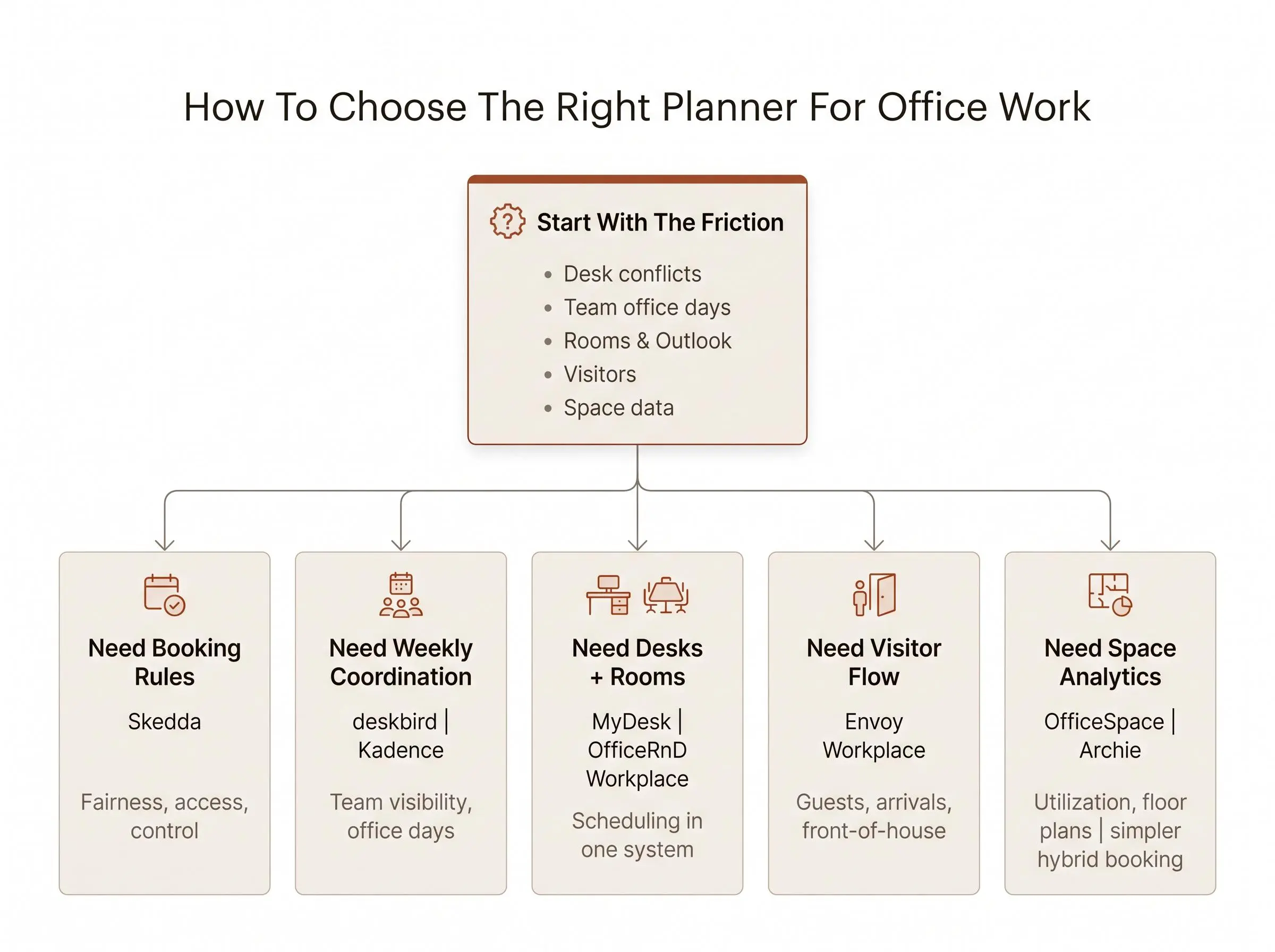
Choosing a planner for office work gets easier when you stop shopping by category and start with the friction you’re trying to remove. “Hybrid workplace platform” is a label. It won’t tell you what to buy.
Start with the real problem:
- desk availability conflicts
- weak office-day coordination
- meeting room clashes
- visitor handling gaps
- poor visibility into space use
Then decide whether adoption or control matters more right now. Adoption-first teams usually care about mobile ease, weekly scheduling, and low friction. Control-first teams need booking rules, access logic, and fewer loopholes.
Next, match the product to your office model.
- Shared desks with strict usage policies usually point toward Skedda.
- Weekly attendance visibility leans toward deskbird or Kadence.
- Desks and rooms together make MyDesk or OfficeRnD Workplace more relevant.
- Visitor-heavy offices pull Envoy upward.
- Large portfolios and utilization analysis push you toward OfficeSpace.
One more check before you get distracted by feature grids: workflow fit. If your team lives in Outlook, that matters. If most bookings happen only on office days rather than daily, that matters too. A tool can be powerful and still be wrong for your habits.
Don’t buy analytics by accident.
Treat analytics as its own buying decision. Some teams need a reservation layer. Others need evidence for footprint and layout decisions. Very different job.
The shortlist usually becomes obvious once you ask one plain question: do you need to plan where people work, or run the whole workplace around that plan?
What Matters Most for Different Office Planning Use Cases
By this point, the choices separate pretty cleanly. Each tool is good at a different kind of office problem.
If policy control and fair use of shared resources are driving the search, Skedda is the sharper fit. If you want an approachable weekly planner experience with strong mobile support, deskbird is easier to live with.
OfficeRnD Workplace is the broader platform pick when desks, rooms, and analytics need to sit together. Envoy Workplace earns its place when office planning overlaps with visitor operations and front-of-house workflows.
MyDesk is the sensible choice for Outlook-centered scheduling and combined desk-plus-room planning. Kadence is the one to watch when the real challenge is coordinating office days across teams or locations.
OfficeSpace belongs in the conversation when floor plans and utilization analysis matter as much as daily booking. Archie works well when hybrid booking needs are clear and pricing transparency is part of the selection process.
There’s no prize for buying the most software. Buy the one that solves the bottleneck you already have.
When You Need a Workplace Planner vs a Personal Workday Planning App
A planner for office work solves shared-space coordination. It does not solve personal execution. Those are different problems, and offices often mix them together.
A workplace planner answers questions like:
- where will you work?
- when is your team in?
- which desk or room is available?
A personal workday planning app answers something else entirely:
- what matters most today?
- when will you do focused work?
- did you actually finish what you planned?
That distinction matters for knowledge workers. We’ve seen plenty of teams get office coordination under control and still end the day wondering where the time went. Booking a desk is not the same as doing the work once you sit down.
For desk jobs, the strongest setup is often two layers. One office planning layer for location and coordination. One focus planner app for desk jobs that helps with focus sessions for knowledge work.
That’s where Flocus fits. We’re not a workplace booking tool. We’re the second layer: a focus app for knowledge workers and a deep work app for professionals who need more than a timer. The method is simple. Pick one most-important task, work it in timed focus blocks, and close the ring with visible daily progress. Estimated versus actual time keeps the plan honest, which is rarer than it should be.
A lot of apps sell focus as countdown theater. We’d rather help you finish something.

How We Evaluated These Tools
We evaluated these workplace planners by comparing how well each one addresses the main problems an office team may need to solve:
- desk and room booking
- hybrid office-day coordination
- booking rules and access control
- visitor and front-of-house workflows
- Outlook and calendar compatibility
- occupancy, utilization, and floor-plan visibility
- ease of adoption, implementation scope, and pricing clarity
We also weighed each tool's primary focus against the needs of different office setups. Tools built around strict reservation policies were considered differently from lighter weekly planning apps, all-in-one workplace platforms, visitor-management systems, and enterprise space-planning software.
The rankings reflect overall fit for office work, not simply the number of listed features. A broader platform was not automatically treated as better than a focused tool, and a simpler option was not penalized when simplicity matched the use case. Comparisons and recommendations are based on the product positioning, capabilities, integrations, and use cases described in this roundup and its linked public materials.
Conclusion
The best planner for office work depends on the job you need it to do. Skedda is the pick for booking rules. deskbird suits weekly mobile planning. OfficeRnD Workplace is the all-in-one hybrid operations option. Envoy Workplace covers desks plus visitors. MyDesk fits Outlook-centered scheduling. Kadence helps with team office-day coordination. OfficeSpace is built for floor plans and utilization analysis. Archie keeps hybrid booking more straightforward, including pricing expectations.
The practical next step is simple. Write down your three non-negotiables, then match them to the two or three closest options here and compare those side by side. Ignore the rest for now. It keeps the process sane.
And if your team still struggles after the desk is booked, add a lighter personal planning layer alongside the workplace decision. Office coordination tells people where to work. It doesn’t tell them what to finish.
Article Record
ReferencesPrimary sources used for this article
Update HistoryMeaningful revisions to this article
- Added a “How We Evaluated These Tools” section to explain how the planners were assessed.
- Made it easier for readers to compare the featured workplace planners and choose one that fits their needs.