

Muse compatible apps get confusing fast because "works with Muse" can mean anything from guided sleep sessions to raw EEG streams. Most people pick by novelty and end up with a tool that technically connects, but doesn't fit how you actually work.
What matters is the job. The good options are clear about it, easy to return to, and useful after the first 10 minutes.
We've already cut the noisy ones. These are the options worth your attention.
1. Flow Tracking
- Measures focus during real work
- Live 0-100 flow score
- Personal calibration improves relevance
- Optional Muse layer, planner works
- Strong privacy around brain data
- Best only for work-focused use
- Less broad than wellness apps
- Needs Muse for full value
If you want a real muse productivity app, this is the one to look at first. Not because it does the most things, but because it does the job most people actually care about: helping you do focused work, on purpose, with some evidence instead of guesswork.
Flow Tracking is built around a simple point that gets missed in a lot of muse compatible apps. Minutes spent are not the same as quality of focus. A 25-minute timer can look very respectable while your attention wanders off by minute six. The headset can tell you more, but only if the app puts that signal inside a usable workflow.
Here, the EEG side sits inside a planning method. You choose one task, estimate the time, start a focus block, and work. If you connect a Muse headband, the browser streams data in real time and gives you a live 0 to 100 flow score while you work. Before that, there’s a short personal calibration so the system can classify states like Flow, Overload, and Low Engagement based on your baseline rather than some abstract average person.
That matters more than it sounds. Brain data without context is mostly expensive weather.
A few details make this a better fit for deep work than many apps that work with Muse:
- it measures focus during actual desk work, not only during guided sessions
- it can extend a session when momentum is still high, which is often the moment most timers rudely interrupt you
- it tracks fatigue during the block, so you can spot the difference between effort and decline
- timelines and longer-term insights show when your best focus windows actually happen
- analytics are flow-weighted, so a strong 40 minutes counts differently from a messy 40 minutes
The other useful piece is restraint. The planner still works without hardware, so the Muse layer is optional rather than all-or-nothing. That tends to be healthier in practice. Some days you want measured focus. Some days you just need to sit down and finish the draft.
We also keep the privacy side tight. Brainwave data stays on the device. Raw EEG is not stored or transmitted. For most normal people, that’s the correct amount of drama.
Compared with the official Muse app, Flow Tracking is narrower and more work-oriented. Compared with Muse LSL, BlueMuse, or MuseStudio, it’s far more approachable if you’re not trying to build a pipeline. If your goal is better sessions at your desk, not broader wellness or research, this is the cleanest fit.
2. Muse: Brain Health & Sleep

- Official Muse device compatibility
- Strong sleep and meditation toolkit
- Real-time guided biofeedback cues
- Smart Wakeup uses live EEG
- Helpful goals and progress summaries
- Premium features require subscription
- Less suited to deep work
- Closed ecosystem limits experimentation
For many people, the official app is the sensible starting point. It’s built for the headset, it supports the Muse device range according to the app listing, and it gives you the polished, guided experience most consumer users expect.
This is one of the best apps for Muse headband owners if your priorities are meditation, sleep, and biofeedback training rather than task execution. That distinction matters. A lot of frustration comes from using the right app for the wrong job.
The app’s structure is broad in a good way. It includes real-time audio feedback tied to brain, body, heart, and breath signals, guided meditations, focus-oriented content, sleep tracking features, and post-session summaries. The sleep side is especially central. Tools aimed at helping you fall asleep faster, stay asleep longer, and wake more gently are not a side feature here. They’re part of the main pitch. Smart Wakeup, powered by real-time EEG, is a good example of that.
You also get some scaffolding that helps people stick with it:
- weekly goals
- personalized challenges
- progress summaries after sessions
That kind of structure is often more useful than another library of calming audio. People usually don’t quit because they lacked content. They quit because the routine never settled.
Premium expands the experience with more content, cognitive performance tracking, and external audio support. That’s useful if you want the full Muse ecosystem, though some of the value is gated behind subscription pricing. No surprise there.
Against the rest of this list, the official app is easier and more consumer-friendly than Muse LSL, BlueMuse, and MuseStudio. It’s broader than Flow Tracking, but also less optimized for real work sessions. If you mainly bought Muse for meditation support, sleep help, or general neurofeedback, start here. If you want to measure deep work while handling actual tasks, you’ll probably outgrow it.
3. Muse LSL

- Streams live EEG into custom workflows
- Works across Windows, Mac, Linux
- Supports visualization and session recording
- Flexible device connection options
- Great foundation for developer experimentation
- Command-line setup deters beginners
- Not a polished consumer app
- Needs companion tools on Windows
Muse LSL is where things get more technical, quickly. If you want live EEG access rather than a closed app experience, this is one of the most important tools in the Muse ecosystem.
It’s less an app in the everyday sense and more a practical bridge between consumer hardware and custom workflows. That’s why technically comfortable users keep coming back to it. It works across Windows, Mac, and Linux, supports Muse 2, Muse S, and classic Muse, and gives you streaming, visualization, and recording rather than a fixed set of end-user experiences.
You can list devices, start streams, and connect by device name or MAC address. It commonly recommends the bleak Bluetooth backend by default. On Windows, BlueMuse is often used alongside it for GUI-based device discovery and connection, which tells you something important about the real experience: this is infrastructure.
That isn’t a criticism. It’s just not where most people should begin.
Where Muse LSL fits best
Muse LSL makes sense when you already know why you want raw EEG data. Examples include:
- feeding Muse streams into your own analysis or neurofeedback setup
- recording sessions for later review
- using Muse as an input device in a custom build
- testing ideas that need open streaming rather than a guided app
Compared with the official Muse app, it’s far more flexible. Compared with Flow Tracking, it offers less structure and less immediate usefulness for everyday work. Compared with BlueMuse, it’s the deeper layer. BlueMuse helps you connect; Muse LSL helps you do something with that connection.
An operator’s rule here: if you’re excited by the command line itself, you’re probably the target user. If not, don’t romanticize the setup.
4. Muse Health

- Strong for sleep research workflows
- Supports remote multi-night recordings
- Exports raw and processed data
- Compatible with multiple Muse devices
- Built for institutional study use
- Overkill for everyday focus users
- Less consumer-friendly than wellness apps
- Best value in research settings
Muse Health sits in a different category from most of the list. It’s for research teams, advanced sleep workflows, and institutional use, not casual focus experiments between meetings.
That makes it one of the more serious muse neurofeedback tools here, but also one of the least relevant for everyday users. If your goal is better study sessions or more consistent concentration, this is probably overkill. If your goal is remote sleep EEG collection with exportable data, now we’re talking.
Its center of gravity is at-home EEG and broader biosignal collection. It supports multi-night home recordings, remote monitoring workflows, compatibility with Muse 2, Muse S, and Athena, plus export of raw EEG and other bio data along with processed metrics. That export layer matters because research work often lives or dies on what you can do after collection.
The company also claims independently validated sleep staging accuracy ranges and notes use in hospitals, universities, and IRB-approved study settings. That places it much closer to study infrastructure than to consumer self-improvement.
Useful for research. Excessive for a Tuesday afternoon focus problem.
Compared with Flow Tracking or the official Muse app, Muse Health is much more research-focused. Compared with Muse LSL or BlueMuse, it’s more institution-oriented and further along the workflow stack. You’d choose it when data rigor, export, and remote collection matter more than polish or convenience.
5. BlueMuse
- Simple GUI device discovery
- Eases Windows headset connection
- Helpful Muse LSL companion
- Reduces command-line setup friction
- Windows-only use case
- Not a full end-user app
- Limited value beyond connectivity
BlueMuse is a small tool with a narrow role, and that’s exactly why it earns a place in this roundup. Windows users often don’t need another destination app. They need the headset to connect cleanly before they can do anything else.
That’s where BlueMuse helps.
It’s a GUI-based utility for discovering and connecting Muse devices on Windows. Not glamorous. Very practical. For technical users who find command-line discovery more annoying than interesting, BlueMuse removes a chunk of friction at the setup stage.
This is one of those apps that matters more before the session than during it. It’s frequently mentioned as a companion option for Muse LSL on Windows because it handles the connection step in a more straightforward way. You can think of it as the plumbing layer for a larger workflow.
A few realities to keep in mind:
- it’s not a productivity platform
- it’s not a meditation app
- it’s not a research suite
- its value is mostly in getting hardware ready for other tools
That limited use case is not a flaw. It’s the point. The mistake is expecting it to do more than it was built to do. If you want practical connectivity without writing code first, BlueMuse earns its keep.
6. MuseStudio
- Structured EEG dataset organization
- Useful Muse data visualization
- Supports deeper analysis workflows
- Good bridge beyond raw streams
- Too technical for most users
- Not built for daily focus
- Limited mainstream consumer appeal
MuseStudio is another tool that makes more sense once you stop thinking like a consumer app shopper. It comes from a research context, and it behaves like one.
Presented in an academic paper as a data management library for low-cost EEG devices, with explicit support for the Muse brain-sensing headband, MuseStudio is built around organizing and visualizing data rather than helping you meditate better or get through your inbox.
That alone tells you whether it belongs on your shortlist.
What it does well
MuseStudio is useful when raw streams alone aren’t enough and you need more structure around collected data. It helps with:
- organizing EEG-related datasets
- visualizing Muse data for analysis
- supporting research workflows that need more than simple recording
That puts it in an interesting spot. It’s more analysis-oriented than Muse LSL, which leans heavily toward streaming and recording. It’s less institution-scale than Muse Health, but still well outside mainstream day-to-day use.
For most people searching for muse deep work apps, this will be too technical and too far removed from the actual work of focusing. But for researchers and advanced users working with low-cost EEG datasets, it’s a credible middle layer between raw collection and formal research pipelines.
Sometimes the right tool is the one that looks boring to everyone else.
7. NeuroHarmony
- Adaptive music from EEG signals
- Creative real-time biofeedback concept
- Uses alpha, beta, theta states
- Interesting Muse LSL foundation
- Too niche for most users
- Not a polished daily app
- Limited practical productivity value
NeuroHarmony is the experimental one. It’s not the safest recommendation, and that’s fine. Some people don’t want the safest recommendation.
Built as a BCI music player project with heavy Muse 2 interfacing, NeuroHarmony uses measured parameters such as alpha, beta, and theta to adapt music playback around states like relaxation, concentration, and creativity. It was forked from the Muse LSL ecosystem, which is a useful reminder that many open Muse-compatible tools grow from streaming foundations rather than from polished consumer products.
The interesting part here is not just the music behavior. It’s the applied idea. Instead of treating EEG as a dashboard to stare at, NeuroHarmony translates signals into a changing environment. That opens up more creative territory than the standard timer-plus-chart approach.
It also means the appeal is highly specific.
You’d look at NeuroHarmony if you want to explore what apps that work with Muse can become when developers use EEG to adapt an experience in real time. You would not choose it because you need a reliable daily system for studying, meditating, or running a sleep protocol. It’s more imaginative than the top-ranked options, and less practical for most readers.
That’s not a failure. It’s just a niche project doing a niche job.
How to Choose the Right Muse App
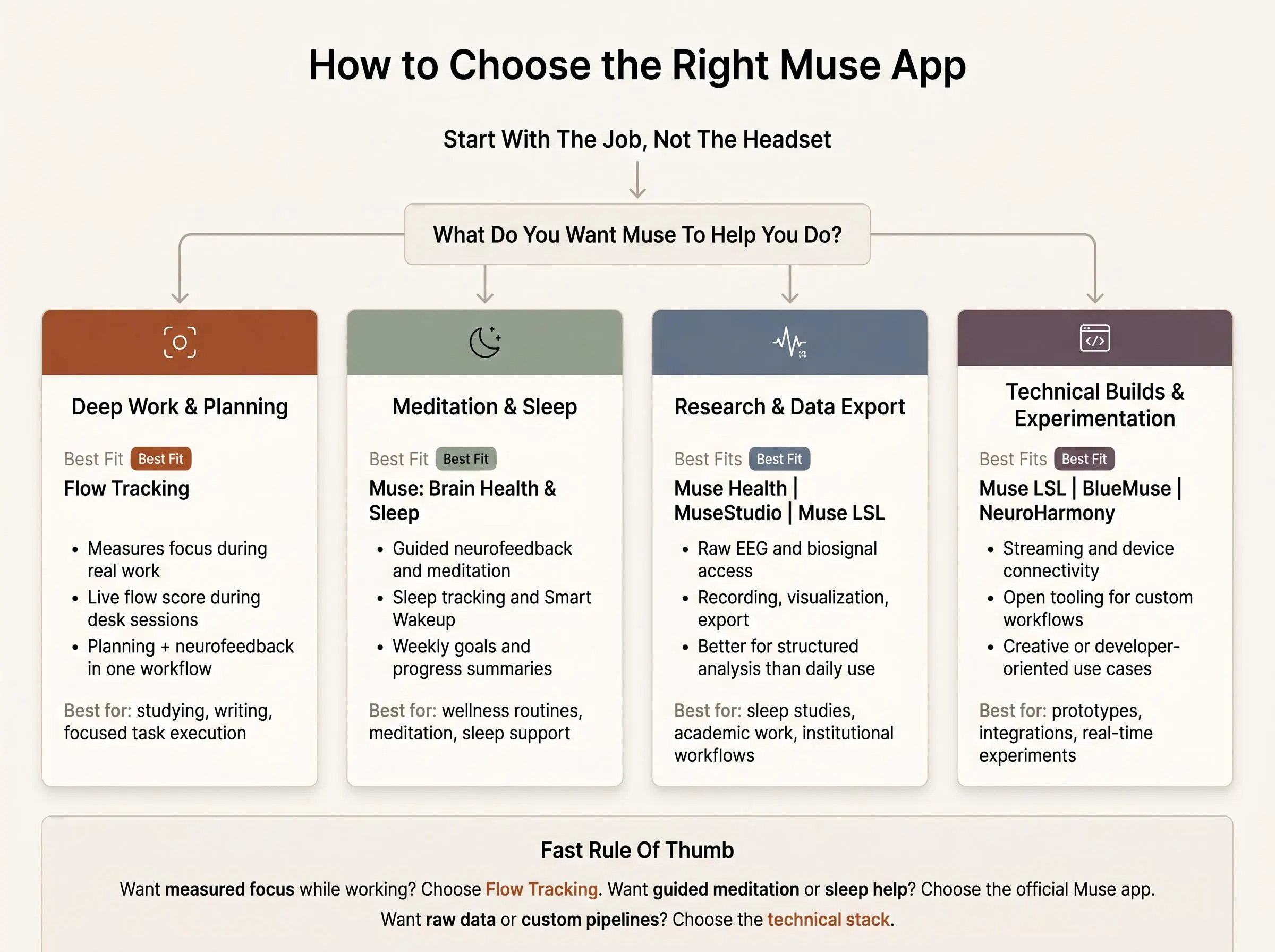
Start with the use case, not the headset. Owning Muse doesn’t automatically narrow the field as much as people think.
Ask a simpler question first: do you want to improve how you work, understand how your brain behaves, or build something with the data?
Here’s the cleanest way to sort the list:
- Deep work and planning: choose something that pairs neurofeedback with a work method. That’s where Flow Tracking stands out.
- Meditation and guided neurofeedback: start with the official Muse experience.
- Sleep tracking: the official app is the consumer default. Muse Health is the research-heavy path.
- Research and data export: look hard at Muse Health, MuseStudio, and Muse LSL.
- Developer experimentation: Muse LSL first, with BlueMuse if you’re on Windows and want easier connection.
A few tradeoffs usually decide it fast:
- official app experience or open tooling
- easy setup or technical flexibility
- real-time feedback or post-session analysis
- focus-specific workflow or broad wellness features
- closed experience or raw data access
If you want structure for study or desk work, don’t overvalue novelty. Most people still need a planning layer before brain data becomes useful. If you mainly bought Muse for meditation or sleep, the official path is the obvious one. If you want exports, integrations, or custom pipelines, move toward the technical stack.
What Actually Matters in Muse Neurofeedback Tools
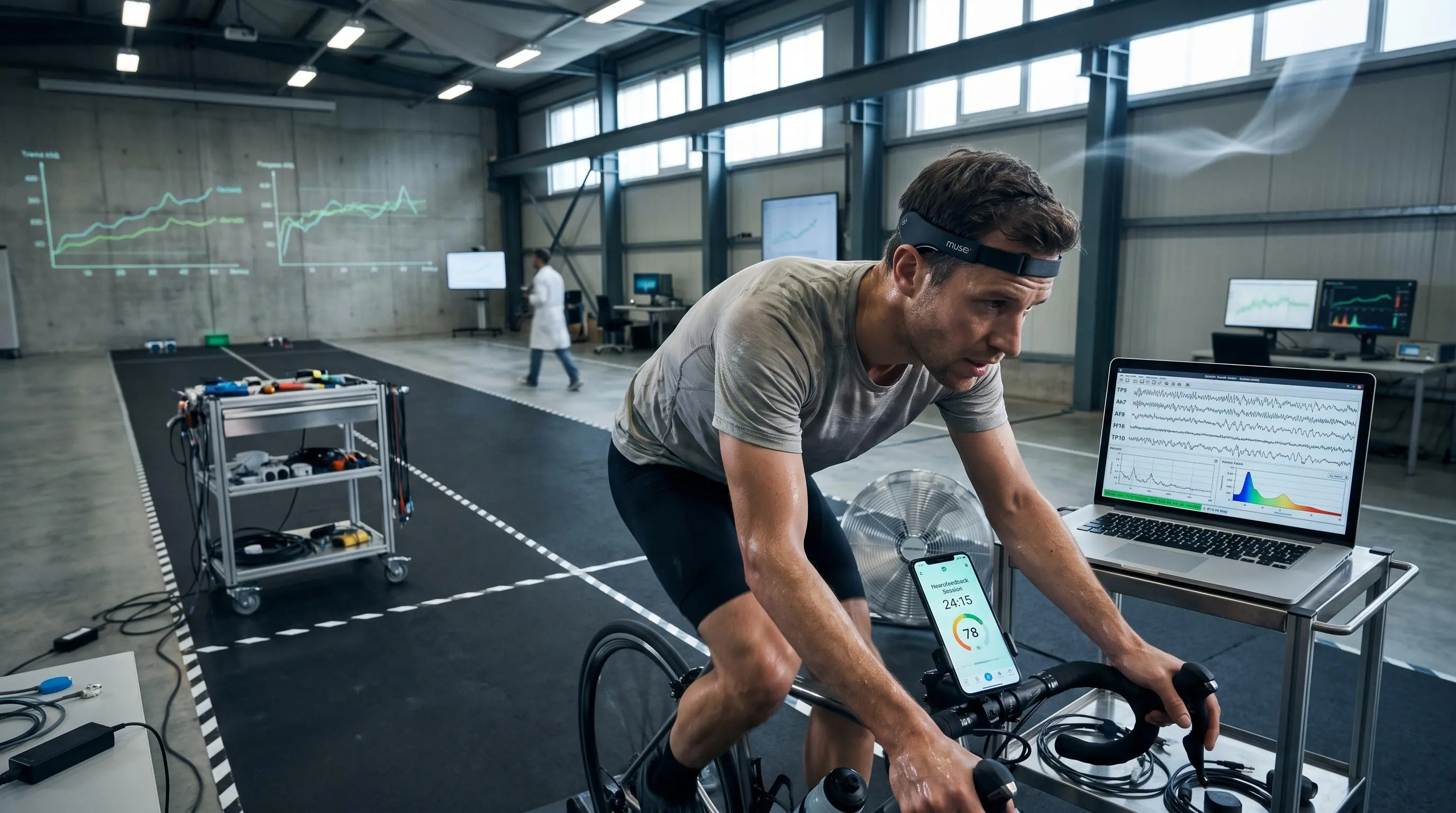
Signal quality matters, but it’s not the whole story. The best tool is usually the one that turns feedback into a repeatable habit rather than the one with the most intimidating feature list.
For everyday users, the basics matter more than they sound:
- fast setup
- clear feedback during the session
- useful insight after the session
- a workflow that fits real life rather than a demo
For technical and research users, the priorities shift:
- streaming support
- recording and export formats
- device compatibility
- visualization and analysis options
- support for longer and repeated workflows
The tradeoffs are pretty consistent. More polished apps usually expose less raw data. More flexible tools usually ask for more setup and more domain knowledge. Real-time neurofeedback is exciting for about a week. Long-term insight is what changes behavior.
You do not need to become an EEG expert to benefit from a Muse-compatible app. You do need a reason for using one. That alone clears up half the market.
Common Mistakes When Comparing Apps That Work With Muse
Most comparison mistakes are not technical. They’re practical.
First, people confuse device compatibility with usefulness. A tool can technically work with Muse and still be completely wrong for your goal. Support is not fit.
Second, it’s easy to choose based on novelty. Brain data feels futuristic. Fair enough. But if you’re trying to study, write, or get through analytical work, the missing piece is often routine, not more signal.
Third, setup friction gets underestimated. Command-line and data-streaming tools are powerful, but they are not the fastest route to better focus for most people. By the second afternoon, friction usually wins.
A few more to watch for:
- expecting one app to handle sleep research, meditation, and deep work equally well
- overlooking what happens after the session
- treating live feedback as the finish line instead of the beginning
The best apps for Muse headband users are not just the ones that show something interesting in real time. They help you learn when you focus well, when you fade, and what to change next time. Otherwise you’ve bought a very clever mirror.
How We Evaluated These Tools
We evaluated these Muse-compatible tools by comparing their documented capabilities, intended users, and role in a practical focus, meditation, sleep, or research workflow. The goal was not to treat every option as the same kind of app: a guided consumer experience, a connection utility, and a raw-data research tool solve different problems.
Our comparison focused on:
- Muse compatibility: whether the tool is designed to work with Muse devices or streams
- Primary use case: how well it fits deep work, meditation, sleep, neurofeedback, connectivity, or research
- Workflow usefulness: whether it provides guided sessions, real-time feedback, planning, recording, analysis, or export
- Setup and accessibility: how approachable it is for everyday users versus technically experienced users
- Data access and flexibility: whether it offers a closed experience, device connection, live streaming, raw data, or structured analysis
- Fit for the intended audience: whether its capabilities match consumer, developer, creative, or institutional needs
We then weighed each tool against the others according to its role rather than rewarding feature count alone. That is why the roundup includes both polished consumer software and more technical tools, while keeping their different purposes clear. The rankings reflect the article's overall fit for readers seeking Muse-compatible options for focus and meditation, not a claim that one tool is best for every workflow.
Conclusion
The best muse compatible apps fall into a few clear groups once you stop asking for one tool to do everything.
Flow Tracking is the strongest fit for work-focused users who want measured focus during real deep work. Muse: Brain Health & Sleep is the default official choice for meditation, sleep, and broader guided neurofeedback. Muse LSL and BlueMuse serve technical users who need streaming and connection tools. Muse Health and MuseStudio belong in research-oriented workflows. NeuroHarmony is the experimental outlier for creative exploration.
The practical next step is simple: pick based on the main job you want the headset to do. Then test whether you want a guided experience, a work-focused system, or raw EEG access before sinking more time into setup. Calm decisions tend to age better than ambitious ones.
Article Record
ReferencesPrimary sources used for this article
Update HistoryMeaningful revisions to this article
- Added a methodology section explaining how the featured apps and tools were evaluated.
- Made it easier for readers to compare options and choose tools that fit their focus and meditation needs.