
An ADHD study planner can help, but a lot of them are just prettier ways to avoid starting. You don't need more tabs, more color, or another timer pretending to be a system.
The good ones reduce friction fast. They make it easier to pick the next step, see the day clearly, and stop lying to yourself about how long chapter 4 will take (sorry).
We've already cut the weak ones. These are the options worth your attention.
Show 5 more productsShow fewer products
1. Daily Planner

- Cuts overwhelm with one priority
- Pomodoro estimates improve time realism
- Focus Ring shows visible progress
- Links daily tasks to goals
- Works on laptop and phone
- Less robust academic sync features
- Too simple for complex planning
- Muse features may feel niche
If your planner turns into a museum of good intentions by Tuesday, this is the category to look at first. A good adhd study planner doesn't need to hold your whole life at once. Sometimes it just needs to stop the pile from getting louder.
Our Daily Planner is built for that narrower job. You choose one most-important task, keep the rest short, estimate your work in focus blocks before you begin, and then close the day with visible progress instead of vague guilt. That sounds simple because it is. Simple is doing real work here.
A few details matter more than they seem:
- One-task planning cuts through the "everything is urgent" problem. When your brain treats six assignments like the same alarm bell, picking one real priority is not simplistic. It's triage.
- Estimated vs actual time is especially useful for time blindness. Students often don't need more motivation. They need better calibration.
- The Focus Ring gives the day a shape. Not a perfect shape. Just enough to see whether effort actually landed.
- Weekly goal linking keeps daily work attached to something larger, which helps when individual study sessions feel random.
This sits in a different lane from a plain focus planner app for ADHD students. A timer can be helpful, but a timer without a plan just measures drift more neatly. We've seen that movie.
It's also lighter than tools that ask you to sync everything, automate everything, and maintain a whole life system. Some students need that. Some students open those apps once, feel tired, and quietly never return.
If you freeze when your planner gets too full, or you want a one task planner for students that works on laptop and phone without a setup ceremony, this style tends to hold up better under stress. The optional Muse layer is there for students who want measured focus in real time, but the method works fine without any hardware.
The best simple planner for ADHD is often the one that leaves you with fewer decisions, not more features.
2. Aqademiq

- Gentle AI helps you start
- One-screen plan reduces overwhelm
- Low-pressure timer feels less stressful
- Non-punitive design after missed days
- Limited calendar syncing depth
- Less suited to complex planning
- Weak for coursework imports
Some planners are trying to make you more disciplined. Aqademiq is trying to get you to start. That's a better goal for a lot of students.
Its center of gravity is emotional friction. The AI co-planning, the one-screen daily plan, the softer study atmosphere, even the melting-cube timer all point in the same direction: reduce pressure enough that avoidance doesn't win before you begin. That design choice is not cosmetic. Students with ADHD often don't need another app that looks disappointed in them.
What makes it relevant as an adhd study planner is how specifically it handles the first few minutes of work. Overdue tasks tend to become one giant emotional object. Aqademiq tries to break that spell by shrinking the work into a first step you can tolerate.
It also avoids the usual streak-loss trap. That's not a small thing. A lot of study tools become unusable the moment you've had two rough days and don't want to look at evidence.
Compared with other options here, it leans more into calm support than scheduling logic or academic automation. It feels more study-specific than broader ADHD systems that also want to manage chores, habits, and life admin. That's useful if school is the actual fire and you don't want a general operating system.
Still, there's a tradeoff. If you need strong calendar syncing, coursework imports, or a planner that assembles your whole week from outside systems, this probably won't be the one doing the heavy lifting. Its value is lower activation energy, not deep orchestration.
For students who keep circling the work but can't quite touch it, that may be the more honest need.
3. Wick

- Imports coursework from LMS platforms
- Syncs calendar into one plan
- Captures tasks by text or voice
- Start-time reminders improve follow-through
- Reduces hidden assignment overload
- Heavier than minimalist planners
- Best value needs LMS syncing
- Less calm, ritual-style experience
Wick is for the student whose problems start upstream. Not "I forgot to focus," but "my assignments live in seven places and none of them are talking."
That changes the job description. Here the planner earns its keep by collecting coursework, calendar events, and random brain-dump inputs, then turning them into a usable plan with actual start-time nudges. That last part matters. Due-date reminders are often just late guilt with a notification sound.
Wick's academic workflow is the point:
- Pull in coursework from systems like Canvas or Moodle.
- Sync calendar reality.
- Let you offload via text, chat, or voice when something hits you mid-walk or mid-class.
- Turn that chaos into tasks and blocks you can act on.
For college students, that's a serious advantage over minimalist tools. If your biggest failure point is assignment intake and deadline visibility, you need more than a nice daily screen. You need fewer places for work to hide.
There's also something practical about start-time texts. Experienced operators care about the moment work should begin, not just the date it eventually explodes. A reminder at 4:00 p.m. to start reading is often more useful than a reminder at 11:00 p.m. that the reading still exists.
The friction is predictable. Students who want a stripped-down, calm ritual may find Wick a bit heavier. And if you aren't already living inside LMS platforms and synced calendars, some of its best value won't show up.
But if your school systems are the mess, it's smart to solve the mess first.
4. Doable
- Covers planning through follow-through
- Voice capture reduces entry friction
- Smart scheduling fits real days
- Prep tasks catch hidden work
- Body doubling supports study sessions
- Broader system needs upkeep
- Can feel heavy at first
- Less simple than study-only apps
Doable takes a broader view. It isn't just trying to help you study. It's trying to cover the whole execution chain from capture to scheduling to focused work to evening reset.
That breadth will either feel relieving or like a lot. Usually both, at first.
The appeal is obvious for students whose academic work keeps colliding with appointments, prep tasks, forgotten errands, and the small chaos that wrecks a study plan before it starts. Voice-first capture helps when typing things into a clean list is already one step too many. Smart scheduling around time, energy, and calendar commitments makes it more adaptive than a static to-do list. The evening review also deserves more credit than it gets. Rescheduling unfinished work without spiraling is a real skill.
A few parts stand out in daily use:
- Prep-task generation helps with the invisible work around classes and deadlines.
- Body doubling and focus timers support the actual study session, not just the planning phase.
- Step-by-step routines are useful when transitions are the weak point, not motivation itself.
Compared with study-only tools, Doable is more of a life-management system. Compared with lighter planners, it's more opinionated about follow-through. That can be excellent if your problem isn't choosing a task but fitting work into a real day that keeps moving under your feet.
The cost is maintenance. Full-stack systems ask more from you. If you know you won't keep up with a broader structure, the clever features can become expensive wallpaper.
Some students need one clear task. Some need a whole scaffolding. Doable is firmly in the second camp.
5. Tiimo

- Clear color-coded day view
- Reduces time blindness visually
- Easy drag-and-drop rescheduling
- Helpful Apple sync and widgets
- Neurodivergent-friendly planning flow
- No coursework or LMS imports
- Less ideal for browser-first use
- May feel structured for some
Tiimo is for students who need to see the day before they believe it. Visual structure isn't decoration here. It's the intervention.
Its color-coded schedule, drag-and-drop task management, widgets, and AI help with planning and priority grouping all reduce the effort required to hold the day in your head. That matters more for ADHD than many planners admit. If the plan stays abstract, it doesn't feel real enough to trust.
What's useful about Tiimo is that the visual layer isn't just pretty polish. It helps with time blindness and mental load in a concrete way. Moving a task, seeing spacing, noticing that the afternoon is already crowded, these are operational benefits. By the second afternoon, that tends to matter more than aesthetic delight.
It also sits in a helpful middle ground. Broader than a study-only app, more visual than a one-task planner, and friendlier for neurodivergent use than generic scheduling tools that assume everyone enjoys micro-organizing.
A few nuances are worth noting:
- If your day falls apart because you can't gauge available time, a visual daily planner for ADHD students can be more effective than a list.
- If you rely on Apple tools already, sync and widgets make the planner harder to ignore.
- If you need coursework imports from school systems, Tiimo isn't really playing that same game.
This is not the best fit for students who want browser-first planning or the lightest possible structure. It works best when the shape of the day itself is the missing piece.

6. Brili Routines

- Guided routines reduce transition drift
- Timed playlists support repeated study blocks
- Visual reminders keep sessions moving
- Works well for exam-prep routines
- Weak for assignment intake
- Limited help with shifting deadlines
- More routine than full planner
Brili Routines is less about deciding what matters and more about staying in motion once you've decided. That's an important distinction.
Some students don't struggle with choosing the study task. They struggle with the nine little drop-offs inside a study block. Open laptop. Check message. Refill water. Rearrange desk. Suddenly it's 27 minutes later and you've prepared beautifully for nothing.
Brili approaches that problem with routines as timed playlists. Instead of a static task list, you move through a guided sequence with visual timing, reminders, focused task cards, and routine history. For repeated study sessions, that can be surprisingly effective.
Why it works for certain ADHD students:
- Repetition lowers startup friction after the first few runs.
- A guided sequence protects transitions, which is where many plans quietly die.
- Rewards and achievements can help, but the pacing is the stronger feature.
This makes Brili more routine-centric than planning-centric. It won't do the assignment intake or AI breakdown work that other tools emphasize. It also isn't trying to be a full academic dashboard. That's fine if routines are your actual bottleneck.
If you already know what to study, better sequencing can beat better planning.
It's especially good for recurring blocks like after-school study, exam-prep sessions, or evening review routines. Less so for students dealing with constantly shifting deadlines across multiple systems. Routine tools are only useful when the problem repeats.
7. theGoodspace

- Adapts planning to energy levels
- Forecasts likely focus windows
- Useful with Apple Health data
- Helps time deep work better
- Limited academic planning depth
- Best within Apple ecosystem
- Won't replace task breakdown tools
theGoodspace asks a different question from most planners. Not just "what should you do?" but "when are you most likely to do it well?"
For students whose focus quality changes sharply based on sleep, recovery, and general readiness, that's not a gimmick. It's often the difference between a decent session and an hour of staring at page two. The app uses Apple Health signals like sleep, HRV, and activity to forecast likely focus windows, then helps you plan around them.
That makes it the most physiology-aware option in this list. It's not trying to manage coursework in detail, and it isn't especially centered on study-session design. It's trying to improve timing decisions.
That sounds narrower than it is. A lot of academic friction comes from asking your brain for high-focus work at the wrong hour and then blaming yourself when it doesn't show up.
A few readers will know immediately whether this fits:
- Your best study window shifts from day to day.
- Sleep quality noticeably changes your ability to start or sustain work.
- You're already in the Apple health ecosystem and want those signals to count for something practical.
The limitation is equally clear. If you need task breakdown, LMS syncing, or routine walkthroughs, energy awareness won't replace those. It may pair well with a more execution-focused planner, but by itself it won't assemble your academic life.
Still, for the right student, "study at the right time" is a stronger lever than "try harder."
8. Smarter Day: Daily Structure
- Clear next-48-hours visibility
- Useful prioritization with Eisenhower Matrix
- Brain dump reduces mental clutter
- Non-punitive overdue task design
- Easy day-to-day navigation
- iPhone-only limits accessibility
- No coursework or LMS syncing
- Relies on your own judgment
Smarter Day is built around day navigation and visible prioritization. That sounds ordinary until you remember how many students with ADHD lose the thread somewhere between yesterday's leftovers and tomorrow's obligations.
Its value is in making the next 24 to 48 hours feel graspable. You get a classical calendar view, a day-structure view, quick to-dos, a brain dump inbox, habit tracking, and an Eisenhower Matrix for urgent-versus-important decisions. It also avoids the usual red-overdue scolding, which is a small mercy with outsized effects.
The one-tap movement across yesterday, today, tomorrow, and future is more useful than it looks. Students with time blindness often don't need a smarter philosophy. They need cleaner temporal edges.
Relative to other tools here, Smarter Day is more explicitly prioritization-oriented than some visual planners and less academically specialized than Wick. It's also less AI-forward than Doable or Aqademiq. That's neither good nor bad. It just means the app depends more on your own judgment once tasks are inside.
The main caveat is immediate: it's iPhone-only. Device reality matters more than feature lists. An app can be brilliant and still be wrong for your actual study setup.
For students who get stuck deciding what matters first and want a daily planner for ADHD students that keeps the near future visible without punishment, this is a sensible option.
| Daily Planner | Aqademiq | Wick | Doable | |
|---|---|---|---|---|
| One-task or one-screen daily planning | ✓ | ✓ | × | × |
| AI help to break work into manageable next steps | × | ✓ | × | × |
| Coursework/LMS import support | × | × | ✓ | × |
| Calendar sync or calendar-aware scheduling | × | × | ✓ | ✓ |
| Voice capture for quick task intake | × | × | ✓ | ✓ |
| Focus timer or live focus-session tools | ✓ | ✓ | × | ✓ |
| Body doubling support | × | × | × | ✓ |
| Non-punitive design after missed days | × | ✓ | × | ✓ |
How to Choose the Right ADHD Study Planner
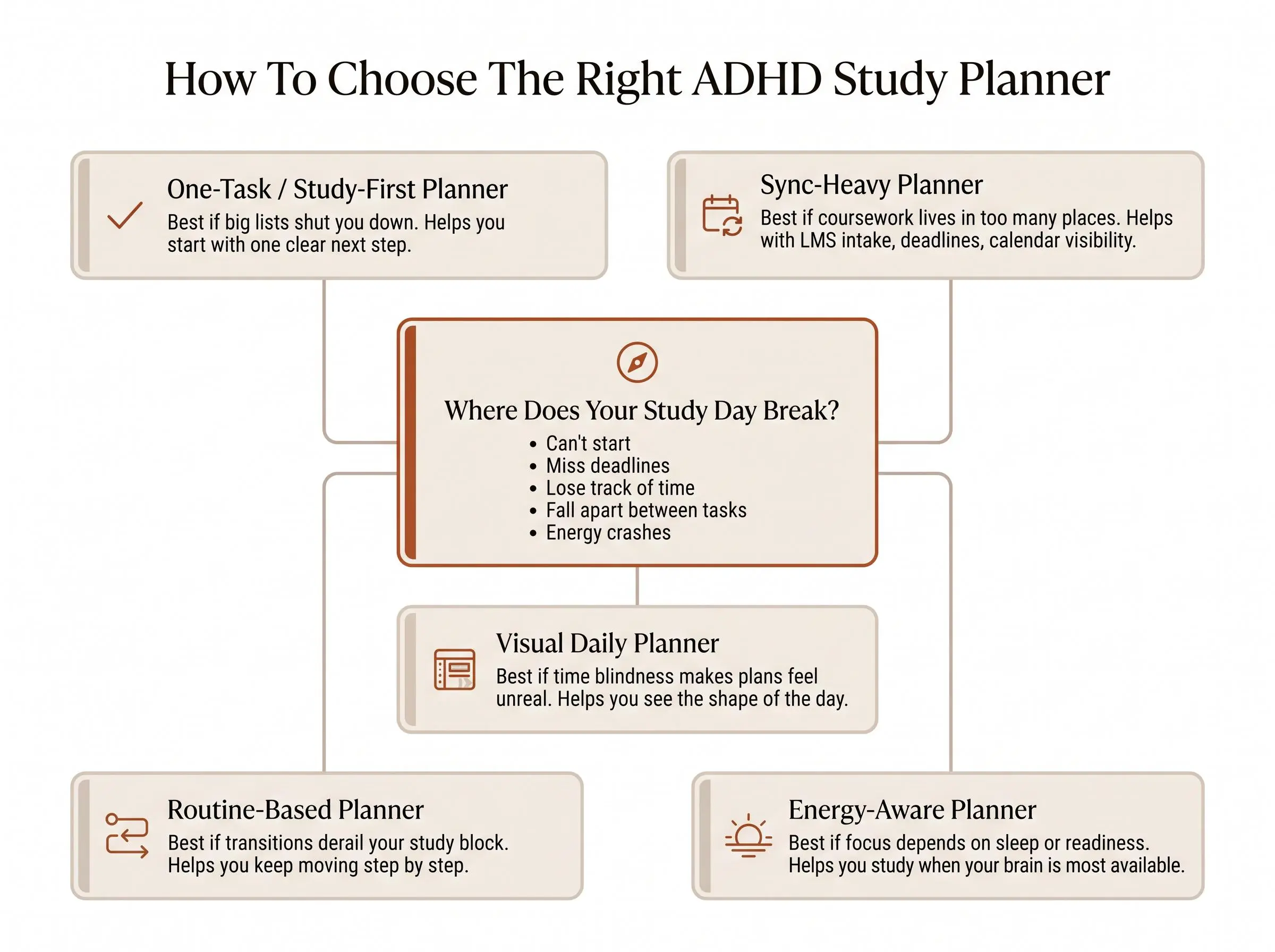
Don't start with features. Start with the place where your day usually breaks.
A planner can look perfect and still miss your real bottleneck. Most students already have enough ways to record tasks. The harder question is where intention stops turning into action.
Try matching the tool to the failure point:
- Can't start? Look for task breakdown and low-pressure activation.
- Miss deadlines? Look for coursework intake and calendar sync.
- Lose track of time? Look for visual schedules, timers, or estimate-versus-actual feedback.
- Energy crashes unpredictably? Look for energy-aware planning.
- Fall apart between tasks? Look for routines and guided transitions.
Then decide whether you need a study app or a broader life-management app. If school is the whole problem, study-first tools are cleaner. If classes are competing with appointments, routines, and personal admin, a broader system may be worth the extra weight.
Structure level matters too. Light structure is better when too many moving parts trigger avoidance. Heavy structure is better when nothing stays organized without automation. Neither is morally superior. One just fits your week better.
What Actually Improves Study Structure for ADHD
A planner only helps if it shortens the distance between deciding and doing. Everything else is theater.
In practice, the best adhd study planner usually solves one of five student pain points: starting work, prioritizing work, timing work realistically, transitioning between tasks, or recovering after a disrupted day. If an app doesn't improve one of those, it's probably just storing anxiety in a nicer layout.
Features students often underrate:
- Start-time reminders instead of due-time reminders
- Time estimates compared with actual time
- Non-punitive design after missed days
- Brain dump capture that doesn't demand perfect organization
- A built-in focus layer so planning turns into work blocks
Features students often overrate:
- Endless customization
- Complicated tag systems
- Beautiful dashboards with weak execution support
- Too many separate views to maintain
The quiet rule is this: if the app is hard to maintain, you won't maintain it during the exact weeks you need it most.
Which Type of Planner Fits Different Students Best
By this point, the categories are clearer than the brand names. That's useful, because most students don't need the "best app." They need the right type.
Choose based on how your brain tends to stall:
- One-task planner if big lists shut you down and you need one clear daily win
- Study-first planner if assignments, exam prep, and procrastination are the real problem
- Sync-heavy planner if classes, LMS platforms, and calendars are scattered everywhere
- Visual daily planner if seeing the day reduces time blindness and helps you trust the plan
- Routine-based planner if you know what to do but can't stay moving through it
- Energy-aware planner if timing determines whether focus shows up at all
A simple planner for ADHD often outperforms a sophisticated one simply because you'll still use it on a bad Wednesday. That's the real test.
Conclusion
The best adhd study planner is the one that removes your specific point of friction, not the one with the longest feature list.
If you need the simplest path to daily clarity, start with a one-priority planner. If your coursework lives across too many systems, lean toward sync and intake. If starting is the hard part, choose something gentler and more supportive. If follow-through is the issue, routines, scheduling, or body doubling will matter more than another pretty dashboard.
Pick one planning style that matches your real bottleneck this week. Then test it on an actual school day, not an imaginary ideal one. Judge it by three things: whether you started sooner, stayed focused longer, and ended the day knowing what got done.
That's enough to know if the tool is helping. And honestly, that's the whole job.
Article Record
ReferencesPrimary sources used for this article
- Aqademiq — AI Study Planner for Students Who Procrastinate | ADHD-Friendly
- Wick | Study Planner
- Tiimo: To-Do List Planner App - App Store
- Doable — AI Daily Planner & Task Manager Built for ADHD
- Smarter Day: To-Do & Calendar App - App Store
- Brili Routines – Habit Tracker
- theGoodspace: ADHD Energy Planner | Plan Your Day Around Focus
- ADHD Planner For Adults & Quiz App - App Store
- Visual Schedules: Tips and Tricks for Supporting a Child with ADHD
- Body Doubling: The ADHD Productivity Strategy That Actually Works (2026)
Update HistoryMeaningful revisions to this article
- Refreshed pricing details across eight ADHD study planner listings to make cost comparisons easier.
- Added current plan information, including free options and starting prices, for Daily Planner, Aqademiq, Wick, Doable, Brili Routines, and Smarter Day.