
A study focus app sounds simple until you try a few and realize most of them are just timers with nicer wallpaper.
The useful ones help you decide what to work on, stay with it, and see where your time actually went. The weak ones make you feel busy for 25 minutes and call it progress.
We've cut the list to five. These are the ones worth your attention.
Show 2 more productsShow fewer products
1. Daily Planner

- Planner-first study workflow
- Clarifies one top priority
- Estimates versus actual improve planning
- Links daily tasks to goals
- Calm browser-based cross-device access
- Less useful without planning habit
- Free tier has some limits
- Neurofeedback add-on feels niche
If your study days feel full but oddly hard to account for, this is usually the missing piece. A good study focus app shouldn't just ask how long you worked. It should help you decide what the work is before the timer starts.
This option is best for students who want a planner for study sessions, not just a stopwatch with better fonts. It's also a strong fit for people who want calm structure without signing up for a full productivity religion.
We built Flocus around that exact problem. Most tools start at minute one. We start a little earlier.
Why it works differently
The core method is simple:
- choose one most-important task
- keep the rest of the list short
- estimate the work in focus blocks
- do the session
- close the day with an honest review
That sounds almost too basic. Good. Study systems usually fail because they add too much, not too little.
The non-obvious part is the link between estimated and actual time. Once you start seeing where your two planned Pomodoros became four, your planning gets less theatrical. Students don't usually need more ambition. They need better calibration.
What matters in real use
Flocus is browser-based, so it works on a laptop or phone without forcing you into a specific device setup. That matters more than it sounds. A lot of study friction comes from tiny handoffs.
Useful parts of the workflow include:
- a most-important-task planning layer
- Pomodoro-based effort estimates tied to actual work blocks
- daily tasks that connect to weekly goals
- an end-of-day Focus Ring that gives closure instead of leaving you with scattered logs
- insights comparing estimated time with actual time
- weekly and monthly recaps built from real days, not wishful thinking
There's also optional Muse headband support for real-time flow-state tracking. For most students, that's a niche bonus. Interesting if you're neurotech-curious, irrelevant if you're not. That's the right place for it.
A timer measures effort. A plan decides where effort goes.
Compared with Forest, this is more complete when the real issue is deciding what to study in the first place. Compared with Freedom or Apple Screen Time, it's much more about shaping the day than policing the device. Compared with Focus Bear, it's lighter and calmer. Less routine scaffolding, more daily direction.
There is one catch, and it's a fair one. This only helps if you'll actually use the planning layer. If you want to press start and outsource the rest, a planner-first tool can feel like homework. The free version is enough to try the method properly, but heavier users will notice session and insight limits.
2. Forest
- Motivating visual reward loop
- Very easy to start using
- Makes sessions feel more tangible
- Friendlier than strict blockers
- Limited planning and review depth
- Best only after choosing tasks
- May feel too simple long-term
Forest is for the student who already knows the task and mostly needs a reason not to wander off. It remains one of the most recognizable choices in this category because it gets one thing right immediately: the session feels tangible.
Growing a tree while you stay focused is simple, maybe even a little obvious. Still works.
Where Forest earns its place is motivation. Not deep planning, not serious review, not a full daily study planner. Motivation. For plenty of students, that's the actual bottleneck by the second afternoon of the week.
Where Forest fits best
It tends to work well for readers who want:
- a focus session they can understand in seconds
- a visual reward loop that makes studying feel less abstract
- something friendlier than a strict lockout tool
Forest is more playful and lightweight than a planner-first option like Daily Planner. That can be a strength. A lot of apps try to impress you before they help you.
It also feels more immediately engaging than Apple Screen Time, which is useful but about as charming as a hallway sign.
The tradeoff is clear enough. Forest is strongest when the task is already chosen. If your real problem is fuzzy priorities, weak planning, or ending the day unsure what moved, it won't solve that. It can keep you in the chair. It won't tell you which book should be open.
For students searching for the best study timer app, Forest often deserves the shortlist. For students who actually need a planner for study sessions, it may feel too thin after the first few days.
3. Freedom

- Blocks distractions across devices
- Strong environmental control for focus
- Works well beyond Apple-only setups
- Great when plans already exist
- Doesn't help choose study priorities
- Limited reflection or session closure
- Often works best with another tool
Some students don't need more motivation. They need fewer escape routes. That's where Freedom makes sense.
Its value is straightforward: cross-platform distraction blocking that follows you across devices. If your studying leaks from laptop to phone to tablet and back again, a single-device timer won't do much. Temptation is fast. It doesn't wait for your system to catch up.
What it's really solving
Freedom is best for students and knowledge workers who already know what they should study but keep drifting into sites, apps, and split-screen nonsense. The core appeal isn't inspiration. It's enforcement.
That makes it a better fit when your failure mode sounds like this:
- you made the plan
- you sat down on time
- you still ended up somewhere stupid online
This happens more than people admit.
Compared with Forest, Freedom is less motivational and more serious about environmental control. Compared with Apple Screen Time, it makes more sense if you're not living entirely inside Apple's ecosystem. Compared with Daily Planner, it's much less planning-centric. Compared with Focus Bear, it's less about routines and behavior structure.
That distinction matters. Freedom protects focus once a plan exists. It does not create the plan for you.
If your attention keeps leaking through the edges, patch the edges first.
Readers who want daily review, time estimates, or visible closure will usually need something alongside it. In practice, Freedom is often strongest as one layer in a setup, not the whole setup. If your priorities are clear and your environment keeps sabotaging them, that's not a small layer. It's the whole fight.
4. Focus Bear


- Supports stronger daily routines
- Helpful for executive function struggles
- Builds consistency beyond single sessions
- Reduces distractions through habits
- May feel heavy for casual users
- Less useful for simple timing
- Narrower fit than general apps
Focus Bear is for a different kind of problem. Not "I got distracted halfway through." More "my study day never really started."
Students dealing with executive function issues, inconsistent routines, or chronic difficulty getting going often don't need another prettier timer. They need scaffolding. Routine support isn't glamorous, but it saves more study days than people think.
Why this appeals to a narrower group
Focus Bear stands out because it ties focus support to broader behavior patterns. That's more substantial than session tracking, and for the right person, more useful.
Its relevance to executive functioning and university student use cases gives it weight here. It's not just another app claiming to make you productive if you try harder. Frankly, most people have already tried harder.
Useful angles include:
- structured routines rather than isolated sessions
- distraction reduction tied to broader habits
- support for starting and maintaining a study rhythm
This makes it more routine-oriented than Forest and more behavior-system focused than Apple Screen Time. It's also closer to structured support than Freedom's pure blocking model.
Compared with Daily Planner, the difference is subtle but important. Daily Planner is better when your biggest issue is choosing a clear priority and tracking honest effort through the day. Focus Bear is better when the deeper issue is consistency itself.
That won't suit everyone. If you only want a lightweight study focus app with a timer and a bit of structure, this may be more than you want. But if your study life keeps falling apart before the first session begins, a heavier routine layer can be the adult answer.
5. Apple Screen Time
- Already built into Apple devices
- Easy app limits and boundaries
- No extra account or setup
- Good baseline for testing habits
- Apple-only for best fit
- Not a full study planner
- Limited help with priorities
Apple Screen Time is the practical starting point for a lot of students because it's already there. No extra tool decision, no setup rabbit hole, no new account to ignore next week.
That built-in quality is its biggest advantage.
For iPhone, iPad, and Mac users who want simple limits first, Screen Time can be a decent baseline. Sometimes you don't need the best focus app for studying yet. You need your phone to stop acting like a slot machine.
A useful baseline, not a full system
Screen Time works best when you want:
- built-in app limits and usage controls
- low-friction boundaries on Apple devices
- a quick test of whether stricter phone rules improve study sessions
It's easier to start with than any dedicated tool because there's no additional app choice. That's not trivial. Setup fatigue is real, especially among students who have already downloaded six "focus" apps and use none of them.
Still, its role is narrower than the others in this list. It's less specialized for study workflows than Daily Planner or Forest. It's less cross-platform than Freedom. It's less tailored to executive-function support than Focus Bear.
So yes, it helps. No, it doesn't become a full daily study planner just because the settings menu is thorough.
For mixed-device students, the Apple-only fit is the obvious limitation. For Apple-first users who want a basic control layer before committing to a dedicated tool, it's a sensible place to begin.
How to Choose the Right Study Focus App
Most people pick the app with the nicest screenshots and then wonder why nothing changed. Start with the bottleneck instead.
The right study focus app depends on where your study process breaks.
Start with the real problem
If you don't know what to work on, choose a planner-first option.
If you know the task but keep abandoning it, choose a blocker or motivator.
If your study days collapse before they begin, routine support should move to the front.
That's the whole decision tree, more or less. It doesn't need a framework diagram.
Criteria that actually matter
When comparing tools, look for these:
- planning depth versus pure timing
- whether the app helps choose priorities or only tracks sessions
- device coverage and ecosystem fit
- how strict the distraction control feels
- whether daily review and estimate-versus-actual feedback matter to you
- whether measured-focus extras like neurofeedback are meaningful to you or just interesting in theory
Some students thrive with firm boundaries. Others bounce off rigid timers and feel worse, not better. That's not lack of discipline. It's a bad fit.
Pick the tool that matches how focus fails in your real life, not how you think a serious student is supposed to work.
What Makes the Best Study Timer App Actually Work
A timer alone often creates a tidy illusion. You counted the minutes. Great. Were they spent on the right thing?
This is why the search for the best study timer app often ends in disappointment. The tool records effort but never helps direct it.
What turns a timer into a useful system
The better tools do more than count down. They usually include some version of:
- clear task selection before the session starts
- visible commitment to one priority
- realistic time estimates
- feedback on estimated versus actual time
- some form of closure so sessions connect into a day, not just a streak
That last part gets overlooked. Closure matters because disconnected sessions are hard to trust. By evening, you remember being busy and nothing else.
A lot of students searching for a timer are really looking for a planner for study sessions. They just don't know it yet. Others searching for the best focus app for studying actually need a blocker because temptation is the real issue. And some looking for a deep work app for students don't want more features at all. They want fewer moving parts and a calmer workflow.
Counting Pomodoros isn't the same as making progress.
A timer works best as one component in a method. On its own, it's a metronome.
Which Type of Tool Fits Your Study Style
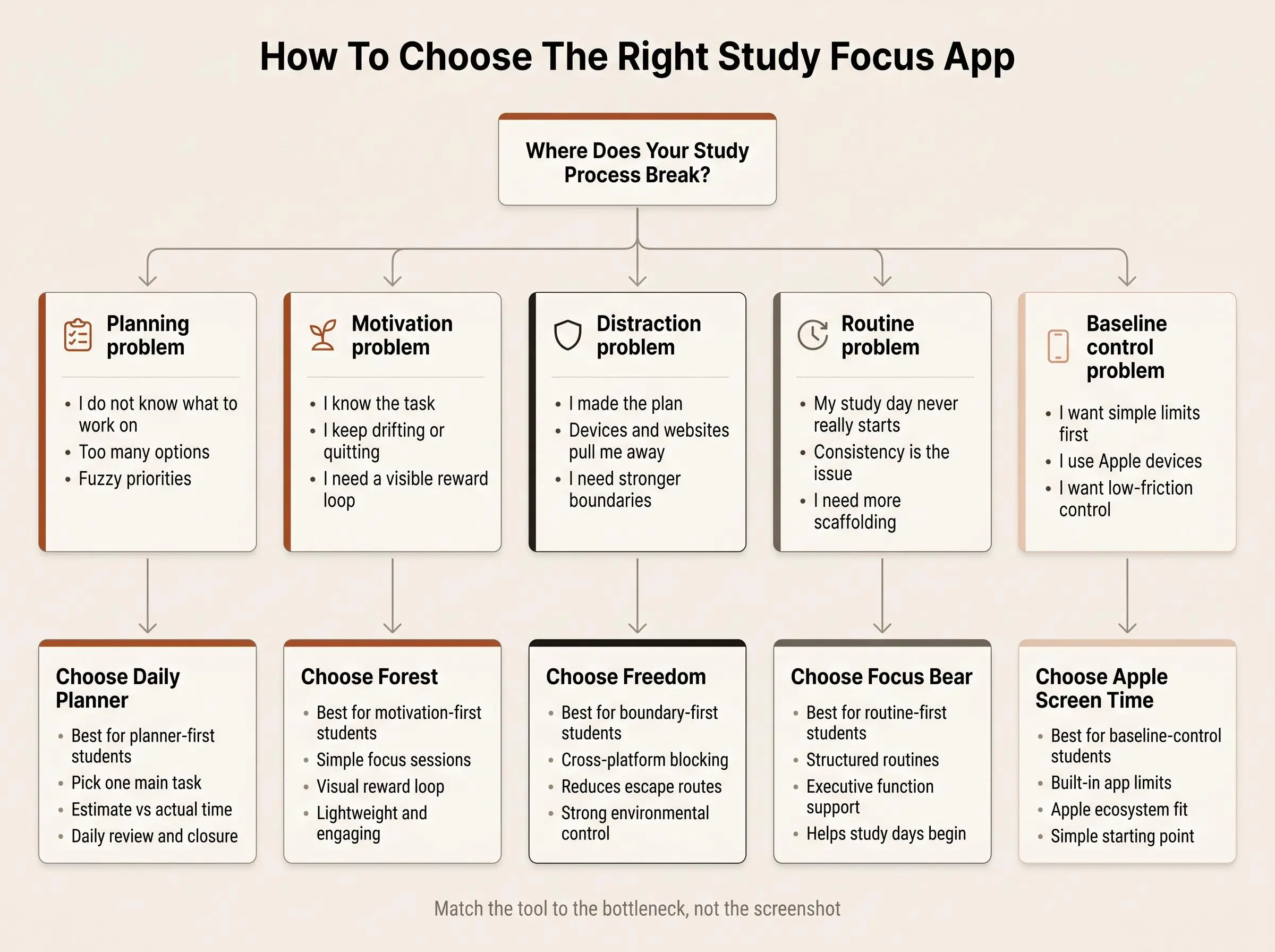
By this point, the categories are probably clearer than the brand names. That's useful. You don't need more apps. You need the right shape of help.
Planner-first students
If procrastination starts with too many options and unclear priorities, go planner-first. This is where Daily Planner stands out. It gives your study day a center of gravity.
Motivation-first students
If starting is easy but staying with the task is not, Forest makes more sense. It's simple, visible, and less severe than a blocker.
Boundary-first students
If the environment keeps winning, especially across devices, Freedom is the stronger call. Some problems are not internal. They are one browser tab away.
Routine-first students
If executive function and consistency are the core challenge, Focus Bear is the better fit. It supports the structure around studying, not just the study session itself.
Baseline-control students
If you want to test simple device limits before adopting a dedicated app, Apple Screen Time is the cleanest starting point.
The combination approach
Sometimes the best answer isn't switching between five timer apps. It's pairing a planner with a blocker.
If your problem starts before the session, use planning.
If it starts during the session, use motivation or blocking.
If it lives at the device level, handle that directly.
The strongest setup is usually boring. That's often a good sign.
How We Evaluated These Tools
We evaluated these tools by comparing the type of study support each one provides, rather than treating every focus app as the same kind of product. The comparison considered:
- Planning support: whether the tool helps students choose priorities, organize sessions, or connect daily work with broader goals.
- Focus-session support: whether it provides a straightforward timer, motivation loop, or other structure for staying with one task.
- Distraction control: how directly it helps limit access to distracting sites, apps, or devices.
- Routine and consistency support: whether it addresses the habits and structure around starting and maintaining study sessions.
- Review and feedback: whether it offers useful reflection, session history, or estimated-versus-actual time feedback.
- Device and ecosystem fit: whether its approach suits browser-based, cross-platform, or Apple-focused study setups.
- Ease-of-fit and tradeoffs: how much setup or structure the tool requires, and which student problems it is less suited to solve.
We then weighed each tool against the main failure modes described in this guide: unclear priorities, abandoning sessions, digital distractions, inconsistent routines, and the need for basic built-in limits. The rankings and scores reflect that comparative fit for students; they are not claims that one tool is best for every study style. Product capabilities were checked against the linked public product and support information, and the descriptions above note meaningful limitations alongside the strengths.
Conclusion
These five tools solve different versions of the same problem. The best study focus app depends on whether you need planning, motivation, blocking, routine support, or built-in device limits.
If your sessions fail because your priorities are fuzzy, a daily study planner is usually the better choice. If your priorities are clear but your environment keeps dragging you elsewhere, a blocker will do more for you than another timer ever will.
Here's the practical next step:
- look back at the last week of studying
- identify the main failure mode
- pick one app that matches that problem
- test it for seven days with one specific study goal
Don't download three tools at once. That feels productive for about ten minutes.
Then you're back where you started.
Article Record
ReferencesPrimary sources used for this article
- Freedom Features | Block Distractions, Build Better Focus
- Forest — The #1 Focus App for Time Well Spent
- Focus Bear | Focus & Productivity App for ADHD Brains
- Flocus | Your Aesthetic Productivity Dashboard
- Set schedules with Screen Time on iPhone - Apple Support (AE)
- Get started with Screen Time on iPhone - Apple Support (CA)
- Focus apps are failing neurodivergent minds, new research finds
- StayFocused: Examining the Effects of Reflective Prompts and Chatbot Support on Compulsive Smartphone Use
Update HistoryMeaningful revisions to this article
- Added a comparison table to help students review the apps at a glance.
- Explained how the tools were evaluated to make choosing the right study app easier.